
chichengjingji
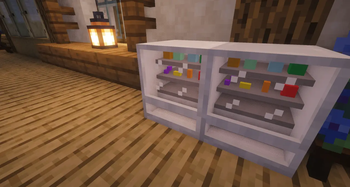
The Akagi Economic Mod provides a complete virtual currency system (Akagi Coins) for Minecraft servers or single-player games and includes fully functional vending machine and cash register blocks. Players can place vending machines and list any items for
Screenshots
About this Mod
ChichengJingJi
https://img.shields.io/badge/NeoForge-21.1.232-blue
https://img.shields.io/badge/Minecraft-1.21.1-green
📖 Introduction
Chicheng Economy is a mod that adds a complete virtual currency system (Chicheng Coins) to Minecraft servers or single-player worlds, along with fully functional vending machines and cash registers.
Players can place vending machines and list any item (supports enchantments, NBT, etc.). Other players can purchase items using Chicheng Coins, and the earnings are automatically distributed to the vending machine owner (real-time transfer if online; offline earnings are stored and paid out upon login).
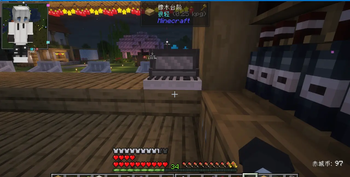
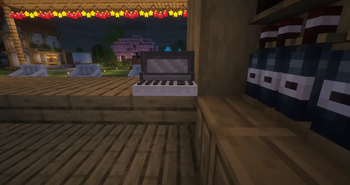
Cash registers allow players to transfer coins directly to the owner, making team or server transactions convenient. The mod also includes a balance HUD, economy commands, and other helper features.
✨ Key Features
🛒 Vending Machine
Place & Bind: The player who places the block is automatically the owner.
List Items: The owner right‑clicks the vending machine while holding the item to set the unit price and stock (supports any item, preserves enchantments and NBT).
Buy Items: Any player right‑clicks the vending machine to open the purchase interface, selects an item, enters the quantity – the mod automatically checks balance and inventory space.
Earnings Distribution:
Owner online → earnings transferred instantly.
Owner offline → earnings stored in the vending machine, paid out automatically when the owner logs in (with a notification).
Data Persistence: Item lists, ownership, earnings, etc., are saved with the world; they survive server restarts.
Protection: Only the owner can break the vending machine; when broken, all listed items drop.
Real‑time Sync: All interfaces refresh automatically in multiplayer.
🧾 Cash Register
Place & Bind: The player who places the block is automatically the owner.
Transfer Functionality: Any other player right‑clicks to open a transfer interface, enters an amount, and confirms – the coins are instantly transferred to the owner (no manual collection needed).
Owner Prompt: The owner right‑clicking only shows a message, not the transfer interface.
Protection: Only the owner can break the block.
💰 Economy System
Chicheng Coin: Virtual currency, managed via commands.
Commands (all with prefix /chicheng):
balance – Check your balance.
give
take
set
transfer
Balance HUD: Shows your current balance in the bottom‑right corner (configurable).
Configuration: Modify config/chichengjingji-common.toml to set the starting balance (default 100).
🎨 Interface & Interaction
Vending Machine Purchase Interface: Item list (icon, unit price, stock) → click an item to go to a detail page (enlarged icon) → enter quantity to buy.
Listing Interface: Intuitive input fields and buttons.
Cash Register Transfer Interface: Simple number input and confirmation button.
All buttons support hover highlighting; interfaces do not pause the game.
📦 Installation
Ensure you have NeoForge 1.21.1 installed.
Put the downloaded chichengjingji-1.0-SNAPSHOT.jar into the .minecraft/mods folder.
Launch the game – the mod will automatically generate its config file.
Multiplayer servers: Place the jar file in the server’s mods folder. All clients must also install the mod (otherwise they cannot see the interfaces).
🕹️ Usage Guide
Vending Machine
Place the vending machine (the placer becomes the owner).
While holding the item you want to sell, right‑click the vending machine → set unit price and quantity → confirm to list it.
Other players (empty hand) right‑click to open the purchase interface → select an item → enter quantity → buy.
The owner can add new listings at any time and check earnings (earnings are automatically paid / stored).
Cash Register
Place the cash register (the placer becomes the owner).
Another player right‑clicks the cash register → enter the transfer amount → confirm – the coins are deducted from their account and added to the owner’s account.
The owner right‑clicking only shows a message, no transfer.
Economy Commands
Type /chicheng help in chat to view sub‑commands (usage as described above).
⚙️ Configuration
Config file path: config/chichengjingji-common.toml
toml
[common]
starting_balance = 100 # New players' starting balance
showBalanceHUD = true # Whether to show the balance HUD
🛠️ Developer Information
Development Environment: NeoForge 1.21.1
Language: Java 21~~~~
📄 License
All Rights Reserved (contact the author for permission).
🧑💻 Author
MCyangguang
🙏 Acknowledgements
~~~~~~
Available Versions
How to Install chichengjingji on Your Server
Order Server
Order a Minecraft Java server with at least 3 GB RAM (4 GB recommended).
Set neoforge Loader
In the panel under "Egg", select the neoforge loader and matching Minecraft version (1.21.11).
Install Mod
Open the mod browser in the dashboard and search for "chichengjingji". Click "Install" – done! Alternatively, upload the .jar via SFTP to the /mods folder.
Compatibility
Mod Loaders
Minecraft Versions
1.21.11, 1.21.10, 1.21.9 (+8 more)
Server-side
✓ RequiredRecommended RAM
4 GB(min. 3 GB)Frequently Asked Questions
chichengjingji server crashes on startup – what to do?
Most common cause: wrong neoforge version or insufficient RAM. Check the server log (latest.log) for "OutOfMemoryError" or "Mixin" errors. With Mado Hosting: ensure at least 3 GB RAM is allocated and the loader matches the mod version (1.21.11). You can switch loaders with one click in the panel.
Is chichengjingji compatible with neoforge?
chichengjingji officially supports neoforge for Minecraft 1.21.11, 1.21.10, 1.21.9. The Mado dashboard automatically detects incompatible loader combinations.
Server lagging with chichengjingji – how to optimize performance?
Recommended RAM: 4 GB (per 8 players). Use /spark profiler to check if chichengjingji consumes the most tick time. Common fixes: reduce server view-distance to 8-10, install "performant" or "starlight" as supplementary mods on Forge. With Mado Hosting, your server runs on NVMe SSDs with dedicated CPU cores for minimal latency.
Similar Mods




![CobbleDollars [Cobblemon Addon]](https://cdn.modrinth.com/data/s7N7AsqL/684040a264fc1d7f9b856ec5d2da39767398c7ad.png)
Rent Modded Server
Install chichengjingji with just one click on your server.