
Chronicles of Kings - Tools
Every kingdom starts with its tools. From crude picks to the royal forge’s finest hammer, this module delivers gear progression that grows with your realm, blending smooth gameplay with the rich style of the Chronicles of Kings.
Screenshots
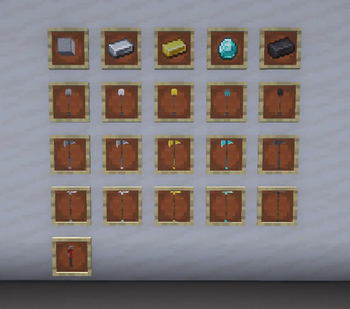
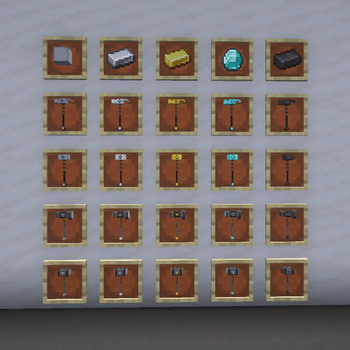
About this Mod
Chronicles of Kings: Tools of the Realm ⚒️
Every kingdom starts with its tools. From the crude implements of early settlers to the masterworks of the royal forge, this module delivers a fully tiered, lore‑rich tool progression that grows with your realm. Built for seamless integration with the Chronicles of Kings ecosystem, it pairs mechanical depth with bold visual storytelling.
Included Tools:
- Royal Preservation Wrench – Repairs equipment automatically with every in‑game tick.
- Timberfall Axe – Fells entire trees with a single, decisive strike.
- Earthform Shovel – Excavates spherical sections of dirt or entire columns of gravel and sand in one motion.
- Lifebloom Hoe – Automatically tills and plants in a wide circular area.
- Groundbreak Hammer (3×3×1) – Reshapes surface layers in broad strokes.
- Deepreach Hammer (3×3×3) – Mines deeply and evenly through stone.
- Dominion Hammer (5×5×1) – Commands vast surface areas with each swing.
- Creation Hammer (5×5×5) – Alters terrain on a grand, kingdom‑defining scale.
If you’d like, I can now condense this into a sharp, two‑paragraph marketing cut for mod menus while keeping those standout abilities front‑and‑center. That way you’d have both a lore version and a punchy “sell” version ready to go.
Available Versions
How to Install Chronicles of Kings - Tools on Your Server
Order Server
Order a Minecraft Java server with at least 3 GB RAM (4 GB recommended).
Set neoforge Loader
In the panel under "Egg", select the neoforge loader and matching Minecraft version (1.21.1).
Install Mod
Open the mod browser in the dashboard and search for "Chronicles of Kings - Tools". Click "Install" – done! Alternatively, upload the .jar via SFTP to the /mods folder.
Compatibility
Mod Loaders
Minecraft Versions
1.21.1
Server-side
✓ RequiredRecommended RAM
4 GB(min. 3 GB)Frequently Asked Questions
Chronicles of Kings - Tools server crashes on startup – what to do?
Most common cause: wrong neoforge version or insufficient RAM. Check the server log (latest.log) for "OutOfMemoryError" or "Mixin" errors. With Mado Hosting: ensure at least 3 GB RAM is allocated and the loader matches the mod version (1.21.1). You can switch loaders with one click in the panel.
Is Chronicles of Kings - Tools compatible with neoforge?
Chronicles of Kings - Tools officially supports neoforge for Minecraft 1.21.1. The Mado dashboard automatically detects incompatible loader combinations.
Server lagging with Chronicles of Kings - Tools – how to optimize performance?
Recommended RAM: 4 GB (per 8 players). Use /spark profiler to check if Chronicles of Kings - Tools consumes the most tick time. Common fixes: reduce server view-distance to 8-10, install "performant" or "starlight" as supplementary mods on Forge. With Mado Hosting, your server runs on NVMe SSDs with dedicated CPU cores for minimal latency.
Similar Mods




![[TaCZ] Timeless and Classics Zero](https://cdn.modrinth.com/data/SzzJttH8/fd27766d2bb8390d284696b1dbd358f87e081439_96.webp)

Rent Modded Server
Install Chronicles of Kings - Tools with just one click on your server.