
Chronos Rewards
🤖 Playtime and daily rewards that you can customize 😇
Screenshots
About this Mod
⏱️ Chronos Rewards
Turn your playtime and daily consistency into epic, game-changing loot! 💎🔥
Chronos Rewards is a high-performance, progression-focused mod built specifically for modern server ecosystems. Whether you are running Fabric, Paper, or Folia, this introduces a balanced, highly satisfying system that rewards players for both daily consistency and long-term playtime grind! 👑
📅 Features At A Glance
- Dual Reward Structures: Track daily login streaks and cumulative total playtime simultaneously! 📆
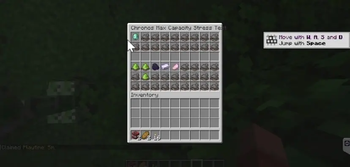
- Sleek GUI Layout: A beautifully organized, clean 6-row chest interface. 📦
- Highly Optimized: Designed to run flawlessly even on heavy server environments under max capacity stress tests with hundreds of concurrent players. ⚡
- Modern Version Support: Ready for the newest updates, fully supporting up to 1.21.11 (Mounts of Mayhem) and beyond! 🛠️
🎁 The Loot Progression
- Tier 1: The Daily Habit 🟢
- Days 1–3: Emerald stacks to get your economy rolling. 🪙
- Days 7–13: Major iron milestones. ⚙️
- Days 14–18: Escalate to a full Gold Block tier-up! 🥇
- Tier 2: Mid-Game Milestones ⚡
- 1h – 4h: Diamonds, TNT, Obsidian, and an Anvil. 💎
- 5h – 10h: Diamond Blocks, Shulker Shells, and Horse Armor. 🐎
- Tier 3: Endgame Legends 🔥
- 12h – 100h: Netherite Scrap, Wither Skulls, Beacons, and Totems! 💀
- 100 Hours: The ultimate crown jewel—a flight-ready Elytra! 🦅
⚙️ Commands & Configuration
- Access the panel instantly with a single command: /rewards 🎮
- Everything from item types, custom lore text, and tick requirements can be fully customized within a single JSON configuration file to seamlessly match your server's specific theme! 💻
🛠️ How to Use the JSON Configuration
- Step 1: Locate your config folder 📂
- Open your Minecraft server or client instance directory.
- Navigate into the config folder, and look for the folder designated for the rewards mod (typically named chronos_rewards or similar).
- Step 2: Open or create the file 📄
- Inside that folder, locate the configuration file (usually named rewards.json or config.json).
- If the file isn't there yet, start the server once to let the mod generate it, or manually create a new file named exactly rewards.json.
- Step 3: Paste the code 📋
- Open the JSON file using a text editor like Notepad++, VS Code, or standard Notepad.
- Select everything inside the file, delete it, and paste the entire JSON code block provided earlier.
- Ensure no trailing commas or brackets are missing so the syntax remains valid.
- Step 4: Save your changes 💾
- Save the file and close your text editor.
- Step 5: Apply it in-game 🔄
- If the server is already running, type the mod's reload command in the console, or simply restart the server to load the new config.
- Players can now type /rewards in the chat to open up the fully customized 6-row reward menu tracking their daily streaks and playtime milestones! 🎮
Available Versions
How to Install Chronos Rewards on Your Server
Order Server
Order a Minecraft Java server with at least 3 GB RAM (4 GB recommended).
Set fabric Loader
In the panel under "Egg", select the fabric loader and matching Minecraft version (26.1.2).
Install Mod
Open the mod browser in the dashboard and search for "Chronos Rewards". Click "Install" – done! Alternatively, upload the .jar via SFTP to the /mods folder.
Compatibility
Mod Loaders
Minecraft Versions
26.1.2, 26.1.1, 26.1
Server-side
✓ RequiredRecommended RAM
4 GB(min. 3 GB)Frequently Asked Questions
Chronos Rewards server crashes on startup – what to do?
Most common cause: wrong fabric version or insufficient RAM. Check the server log (latest.log) for "OutOfMemoryError" or "Mixin" errors. With Mado Hosting: ensure at least 3 GB RAM is allocated and the loader matches the mod version (26.1.2). You can switch loaders with one click in the panel.
Is Chronos Rewards compatible with fabric?
Chronos Rewards officially supports fabric for Minecraft 26.1.2, 26.1.1, 26.1. The Mado dashboard automatically detects incompatible loader combinations.
Server lagging with Chronos Rewards – how to optimize performance?
Recommended RAM: 4 GB (per 8 players). Use /spark profiler to check if Chronos Rewards consumes the most tick time. Common fixes: reduce server view-distance to 8-10, install "performant" or "starlight" as supplementary mods on Forge. With Mado Hosting, your server runs on NVMe SSDs with dedicated CPU cores for minimal latency.
Similar Mods






Rent Modded Server
Install Chronos Rewards with just one click on your server.