
Chunk Loader
Adds a chunk loader to the game that allows you - surprise - to permanently load chunks.
Screenshots
About this Mod
Chunk Loader



With Chunk Loader Datapack the Chunk Loader is added to the game. With it - surprise - you can permanently load chunks.
This means that you can be anywhere in the world, while the chunk in which the Chunk Loader is placed is still loaded.
In order for the Chunk Loader to load the chunk, it needs 3 Redstone Dust per minute. To fill, simply right-click and place it inside. As soon as there is no more Redstone dust inside, the chunk loader stops working and the chunk will be unloaded until new Redstone dust is added.
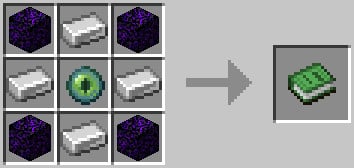
Crafting recipe

Settings
- deactivate fuel consumption:
/scoreboard players set $require_fuel chlo.data 0 - deactivate ambient sound:
/scoreboard players set $sound chlo.data 0 - change fuel consumption speed:
/scoreboard players set $fuel_time chlo.data <time in seconds>
Chunk loading
Because of technical reasons, the Chunk Loader loads the chunks as the following. (every box is a chunk)
| . | . | . | . | . |
|---|---|---|---|---|
| . | TI | TI | TI | . |
| . | TI | ET | TI | . |
| . | TI | TI | TI | . |
| . | . | . | . | . |
.: Not loaded, but mobs count for the mob capTI: Normal except plant growth, mob spawning and mob ticking (movement)ET: Normal except plant growth and mob spawning
Additional info: https://gist.github.com/Drovolon/24bfaae00d57e7a8ca64b792e14fa7c6
Technical Notes
- ONLY the latest version of the datapack for Fabric and Vanilla 1.21.1 is supported
- bug reports and suggestions are ONLY accepted on GitHub
- the Chunk Loader can also be obtained with the command
/loot give @s loot chlo:chunk_loader - there could be problems with other datapacks that forceload many chunks themselves
- to uninstall run the command
/function chlo:core/uninstall - datapack was created with the help of beet
Available Versions
How to Install Chunk Loader on Your Server
Order Server
Order a Minecraft Java server with at least 3 GB RAM (4 GB recommended).
Set datapack Loader
In the panel under "Egg", select the datapack loader and matching Minecraft version (1.21.1).
Install Mod
Open the mod browser in the dashboard and search for "Chunk Loader". Click "Install" – done! Alternatively, upload the .jar via SFTP to the /mods folder.
Compatibility
Mod Loaders
Minecraft Versions
1.21.1, 1.21, 1.20.1 (+5 more)
Server-side
✓ RequiredRecommended RAM
4 GB(min. 3 GB)Frequently Asked Questions
Chunk Loader server crashes on startup – what to do?
Most common cause: wrong datapack version or insufficient RAM. Check the server log (latest.log) for "OutOfMemoryError" or "Mixin" errors. With Mado Hosting: ensure at least 3 GB RAM is allocated and the loader matches the mod version (1.21.1). You can switch loaders with one click in the panel.
Is Chunk Loader compatible with datapack and fabric and forge and neoforge and quilt?
Chunk Loader officially supports datapack, fabric, forge, neoforge, quilt for Minecraft 1.21.1, 1.21, 1.20.1. Note: Forge and Fabric mods are NOT cross-compatible – pick one loader and stick with it. The Mado dashboard automatically detects incompatible loader combinations.
Server lagging with Chunk Loader – how to optimize performance?
Recommended RAM: 4 GB (per 8 players). Use /spark profiler to check if Chunk Loader consumes the most tick time. Common fixes: reduce server view-distance to 8-10, install "performant" or "starlight" as supplementary mods on Forge. With Mado Hosting, your server runs on NVMe SSDs with dedicated CPU cores for minimal latency.
Similar Mods





Rent Modded Server
Install Chunk Loader with just one click on your server.