
ChunkMill
A fast, efficient, and easy-to-manage chunk pregenerator — generate your world on command or on a schedule, without lagging the players who are online.
Screenshots
About this Mod
ChunkMill
A fast, efficient, and easy-to-manage chunk pregenerator — generate your world on command or on a schedule, without lagging the players who are online.
ChunkMill is a lightweight, server-side mod with its own high-throughput generation engine. Define reusable pregeneration tasks, run them whenever you like (or queue several up), and let ChunkMill grind through them at a pace that keeps your server smooth. Big runs even resume automatically after a restart. A map view of what's already been generated is planned for a future update.
Why ChunkMill
- Fast — generates chunks in tightly-batched bursts and keeps multiple chunks in flight at once, so it pushes hard when there's headroom.
- Efficient — generated chunks are released as it goes, so a huge run won't balloon memory; it only does the work that's actually needed.
- Manageable — everything is named, listed, and controllable: define tasks once, run/queue/pause/cancel them, and watch live progress from a clean in-game panel.
- Safe for players — optional auto-pause means pregeneration never competes with people who are actually playing.
Features
- Named tasks — define a job once (
dimension,square/circle, center, radius) and reuse it:task add spawn overworld square 0 0 5000. - Run on demand or queue —
run <task>starts it now, or lines it up behind the current run. - Time scheduler — fire tasks (or
pause/resume/cancel) onHH:mmrules for any days (all,mon-fri,sat,sun, …), timezone-aware. - Smart throttling — pick adaptive (auto-paces to hold a target ms/tick) or fixed (set chunks/tick); both cap how many chunks are generated at once.
- Player-aware — optionally auto-pause the whole run while players are online, and resume when the server empties.
- Restart-safe — an in-progress run saves its progress and continues where it left off after a restart or crash.
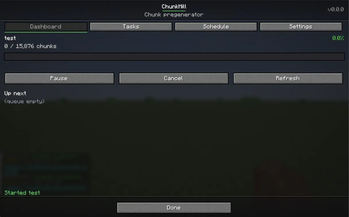
- In-game control panel — just
/chunkmillopens a live, tabbed screen that doesn't pause your world, so you watch generation happen in real time:- Dashboard — progress bar with a live chunks/sec rate and ETA, plus pause/resume/cancel and the upcoming queue.
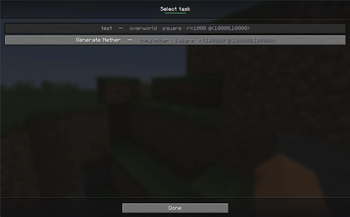
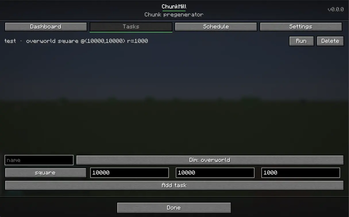
- Tasks — run, delete, or edit any task in a dedicated form (name, dimension, shape, center, radius).
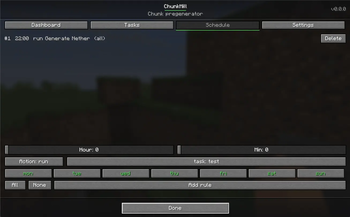
- Schedule — build rules with hour/minute sliders and clickable day toggles (no typing); pick the task from a list that shows each one's details.
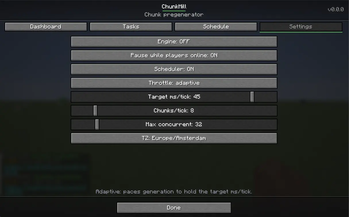
- Settings — engine, throttle, auto-pause, scheduler, and timezone.
- Multi-loader — one mod for Fabric, Forge, and NeoForge.
Quick start
/chunkmill enable
/chunkmill task add spawn overworld square 0 0 5000
/chunkmill run spawn
/chunkmill status
Want it to run itself overnight?
/chunkmill settings scheduler true
/chunkmill schedule add 01:00 run spawn mon-fri
Commands
/chunkmill enable | disable | status/chunkmill task add <name> <dimension> <square|circle> <cx> <cz> <radius>·task remove|list|info/chunkmill run <task> | pause | resume | cancel/chunkmill queue list | clear/chunkmill settings throttle <adaptive|fixed>·mspt·chunkspertick·maxconcurrent·autopause·scheduler·timezone/chunkmill schedule add <HH:mm> <run|pause|resume|cancel> [task] [days]·list|remove|clear|next/chunkmill(no arguments) — open the in-game control panel;/chunkmill helpfor the text list
Requirements
- CodxLib — required companion library (listed under Dependencies; most launchers install it automatically). Make sure it's present, or the mod won't load.
- Works on Fabric, Forge, and NeoForge for Minecraft 26.1.2.
Available Versions
How to Install ChunkMill on Your Server
Order Server
Order a Minecraft Java server with at least 3 GB RAM (4 GB recommended).
Set fabric Loader
In the panel under "Egg", select the fabric loader and matching Minecraft version (26.1.2).
Install Mod
Open the mod browser in the dashboard and search for "ChunkMill". Click "Install" – done! Alternatively, upload the .jar via SFTP to the /mods folder.
Compatibility
Mod Loaders
Minecraft Versions
26.1.2, 26.1.1, 26.1
Server-side
✓ RequiredRecommended RAM
4 GB(min. 3 GB)Frequently Asked Questions
ChunkMill server crashes on startup – what to do?
Most common cause: wrong fabric version or insufficient RAM. Check the server log (latest.log) for "OutOfMemoryError" or "Mixin" errors. With Mado Hosting: ensure at least 3 GB RAM is allocated and the loader matches the mod version (26.1.2). You can switch loaders with one click in the panel.
Is ChunkMill compatible with fabric and forge and neoforge?
ChunkMill officially supports fabric, forge, neoforge for Minecraft 26.1.2, 26.1.1, 26.1. Note: Forge and Fabric mods are NOT cross-compatible – pick one loader and stick with it. The Mado dashboard automatically detects incompatible loader combinations.
Server lagging with ChunkMill – how to optimize performance?
Recommended RAM: 4 GB (per 8 players). Use /spark profiler to check if ChunkMill consumes the most tick time. Common fixes: reduce server view-distance to 8-10, install "performant" or "starlight" as supplementary mods on Forge. With Mado Hosting, your server runs on NVMe SSDs with dedicated CPU cores for minimal latency.
Similar Mods






Rent Modded Server
Install ChunkMill with just one click on your server.
Details
- License
- Creative Commons Attribution Non Commercial No Derivatives 4.0 International
- Server-side
- Required