
Chunky McChunkFace
A mod that adds a chunk loader which can be upgraded like a beacon
Screenshots
About this Mod
Chunky McChunkFace is a versatile chunk loader mod for Minecraft that ensures your desired areas stay loaded even when you're not around. Say goodbye to chunk unloading frustrations!
Features:
- Chunk Loader Block: Activate chunk loading by interacting with the Chunky McChunkFace block.
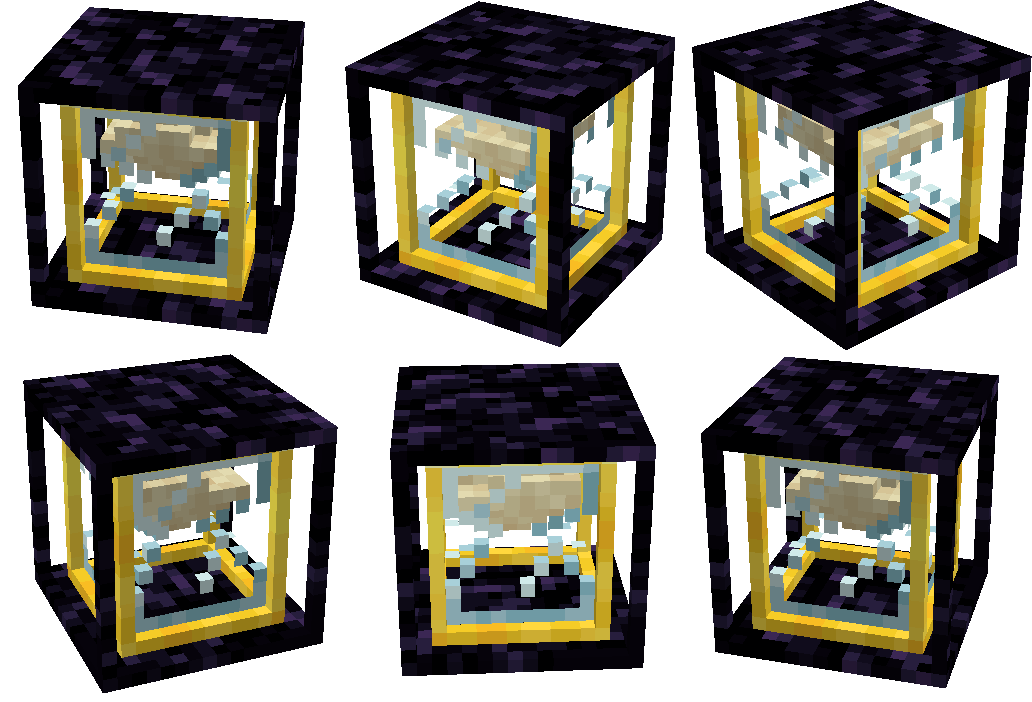
- Visual Indicator: The hourglass-inspired model visually shows the enabled or disabled state of the chunk loader.
- Automatic Disable: If all players who interacted with the chunk loader are offline for a configurable period (default: 7 in-game days (140 minutes)), it automatically turns off.
- Upgradeable Range: Expand the loaded area by building a pyramid of allowed blocks beneath the chunk loader. (Like you would with a beacon)
- Configuration Options: Fine-tune settings such as base range, tier ranges, and offline time.
- Radius Renderer: Toggle the radius renderer with a keybind to visualize the loaded chunks with a translucent box.
- Location: When holding a Chunk Loader item, nearby chunk loaders will display an outline, providing a visual indication of their locations.
Keep your farms, buildings, and important areas continuously loaded with Chunky McChunkFace. Enjoy a seamless Minecraft experience even when you're away.
Moderation
There's also features that were added with server moderation in mind.
Moderation features:
- List Chunk Loaders: Use the
/chunkymcchunkface list <dimension>command to get a list of all chunk loaders in the specified dimension. - Active Chunk Loaders: Use the
/chunkymcchunkface list active <dimension>subcommand to filter the list to show only active chunk loaders in the specified dimension. - Disable Chunk Loader: Use the
/chunkymcchunkface disable <x> <y> <z> <dimension>command to disable a specific chunk loader at the given position in the specified dimension. - Disable All Chunk Loaders: Use the
/chunkymcchunkface disableall <dimension>command to disable all chunk loaders in the specified dimension.
Available Versions
How to Install Chunky McChunkFace on Your Server
Order Server
Order a Minecraft Java server with at least 3 GB RAM (4 GB recommended).
Set forge Loader
In the panel under "Egg", select the forge loader and matching Minecraft version (26.1.1).
Install Mod
Open the mod browser in the dashboard and search for "Chunky McChunkFace". Click "Install" – done! Alternatively, upload the .jar via SFTP to the /mods folder.
Compatibility
Mod Loaders
Minecraft Versions
26.1.1, 1.21.11, 1.21.10 (+14 more)
Server-side
✓ RequiredRecommended RAM
4 GB(min. 3 GB)Frequently Asked Questions
Chunky McChunkFace server crashes on startup – what to do?
Most common cause: wrong forge version or insufficient RAM. Check the server log (latest.log) for "OutOfMemoryError" or "Mixin" errors. With Mado Hosting: ensure at least 3 GB RAM is allocated and the loader matches the mod version (26.1.1). You can switch loaders with one click in the panel.
Is Chunky McChunkFace compatible with forge and neoforge?
Chunky McChunkFace officially supports forge, neoforge for Minecraft 26.1.1, 1.21.11, 1.21.10. The Mado dashboard automatically detects incompatible loader combinations.
Server lagging with Chunky McChunkFace – how to optimize performance?
Recommended RAM: 4 GB (per 8 players). Use /spark profiler to check if Chunky McChunkFace consumes the most tick time. Common fixes: reduce server view-distance to 8-10, install "performant" or "starlight" as supplementary mods on Forge. With Mado Hosting, your server runs on NVMe SSDs with dedicated CPU cores for minimal latency.
Similar Mods





Rent Modded Server
Install Chunky McChunkFace with just one click on your server.