
Classic Beta Biomes
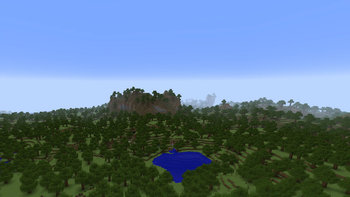
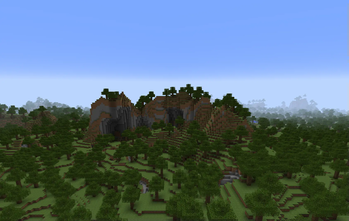
Brings back the nostalgic feel of old Minecraft with a classic Beta-style biome!
Screenshots
About this Mod
Русская версия:
Мод добавляет новый биом, напоминающий старую бета-версию генерации мира Minecraft. Этот биом, названный BetaBiome, воссоздает атмосферу классического мира Minecraft, как он выглядел в версиях до 1.8. В этом биоме можно найти старые текстуры земли и травы, а также характерные особенности генерации, такие как более открытые ландшафты и обрывистые горы.
В BetaBiome растут старые деревья, а сама атмосфера напоминает первые версии Minecraft, возвращая ностальгические ощущения от игры. Здесь нет структур или особого освещения, только простая и чистая природа старых версий игры.
Для наилучшего игрового опыта рекомендуется выбирать в мире только этот биом (BetaBiome), чтобы полностью погрузиться в атмосферу старой версии Minecraft.
Загляните в мой профиль — там вас ждут другие интересные моды! Не забудьте подписаться на обновления, чтобы ничего не пропустить!
English version:
This mod adds a new biome that resembles the old beta generation of Minecraft worlds. This biome, called BetaBiome, recreates the classic Minecraft world atmosphere as it appeared in versions prior to 1.8. In this biome, you’ll find old textures for dirt and grass, as well as typical generation features like more open terrain and steep mountains.
In BetaBiome, old trees grow, and the atmosphere is a throwback to the early versions of Minecraft, evoking nostalgic feelings from the past. There are no structures or special lighting, just the simple, pure nature of the old game versions.
For the best experience, it is recommended to choose only this biome (BetaBiome) in your world to fully immerse yourself in the atmosphere of the old Minecraft version.
Check out my profile for more awesome mods! And don’t forget to subscribe for updates so you don’t miss anything!
Available Versions
How to Install Classic Beta Biomes on Your Server
Order Server
Order a Minecraft Java server with at least 3 GB RAM (4 GB recommended).
Set fabric Loader
In the panel under "Egg", select the fabric loader and matching Minecraft version (1.21.5).
Install Mod
Open the mod browser in the dashboard and search for "Classic Beta Biomes". Click "Install" – done! Alternatively, upload the .jar via SFTP to the /mods folder.
Compatibility
Mod Loaders
Minecraft Versions
1.21.5, 1.21.4, 1.21.3 (+14 more)
Server-side
~ OptionalRecommended RAM
4 GB(min. 3 GB)Frequently Asked Questions
Classic Beta Biomes server crashes on startup – what to do?
Most common cause: wrong fabric version or insufficient RAM. Check the server log (latest.log) for "OutOfMemoryError" or "Mixin" errors. With Mado Hosting: ensure at least 3 GB RAM is allocated and the loader matches the mod version (1.21.5). You can switch loaders with one click in the panel.
Is Classic Beta Biomes compatible with fabric and forge and neoforge?
Classic Beta Biomes officially supports fabric, forge, neoforge for Minecraft 1.21.5, 1.21.4, 1.21.3. Note: Forge and Fabric mods are NOT cross-compatible – pick one loader and stick with it. The Mado dashboard automatically detects incompatible loader combinations.
Server lagging with Classic Beta Biomes – how to optimize performance?
Recommended RAM: 4 GB (per 8 players). Use /spark profiler to check if Classic Beta Biomes consumes the most tick time. Common fixes: reduce server view-distance to 8-10, install "performant" or "starlight" as supplementary mods on Forge. With Mado Hosting, your server runs on NVMe SSDs with dedicated CPU cores for minimal latency.
Similar Mods




Rent Modded Server
Install Classic Beta Biomes with just one click on your server.