Classic Chat
Multiplayer chat features for BTA!
About this Mod

Yet another chat plugin mod aimed to add more chat customization.
All the features below are toggleable, so if you want to have only pings and PMs, you can turn off all the other features in the config.
Features
- Custom Channels which can be customized individually. You can set up message format, chat range, cooldown and fast access prefix for each channel.

- Private messages with custom formatting and /reply command for quick replies.

- @pings in chat with customazible color and sound.

- Roleplay comands for true lovers of immersive interactions.

- Custom color codes so you don't need to search for that '§' symbol to apply colors in chat. Also it adds advanced color codes, read about them below.

- Non-italic /nickname so you can be a true spy.

Advanced color codes
They are currently used for gradients, but maybe i'll add more features to them in future updates.
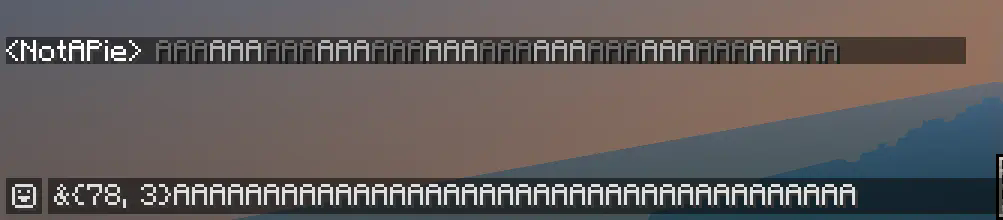
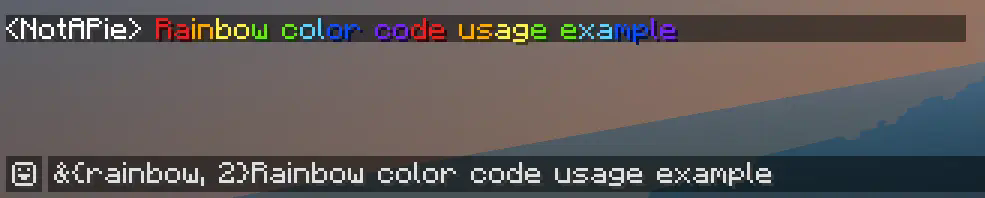
To get gradients, use following syntax: &{colors, period}. Colors represents one or more colors, alternating in the gradient. Period affects how frequently (in letters) color will change. It's 1 letter per color by default, so you can just type &{colors} if you don't want to change period.
Also you can use alias &{rainbow} to get rainbow text. (periods work here too)
Note that "&" is a default custom color code symbol, so changing it in config affects advanced color codes syntax.
Commands
- /channel (/ch) — used to select default writing channel and display info about current channel.
- /message (/msg, /tell, /whisper) — PM other players.
- /reply (/r) — reply to the latest PM.
- /roll — roll a dice with 6 (or you can select how much) sides.
- /try — describe some action and see if it successeed or not.
- /me — just a roleplay action.
How to install
- Make sure you are hosting a b1.7.3 BTA! Babric server.
- Don't forget to install ServerLibe, the only one dependency of this mod.
- Drop the latest mod version to the
/modsfolder. - Customize chat in
config/cchat.cfg. - Restart your server.
- Enjoy!
This mod uses a modified version of Fabric (Babric) and is designed only for Better than Adventure, a heavily modified version of Minecraft b1.7.3!
Available Versions
How to Install Classic Chat on Your Server
Order Server
Order a Minecraft Java server with at least 3 GB RAM (4 GB recommended).
Set bta-babric Loader
In the panel under "Egg", select the bta-babric loader and matching Minecraft version (b1.7.3).
Install Mod
Open the mod browser in the dashboard and search for "Classic Chat". Click "Install" – done! Alternatively, upload the .jar via SFTP to the /mods folder.
Compatibility
Mod Loaders
Minecraft Versions
b1.7.3
Server-side
✓ RequiredRecommended RAM
4 GB(min. 3 GB)Frequently Asked Questions
Classic Chat server crashes on startup – what to do?
Most common cause: wrong bta-babric version or insufficient RAM. Check the server log (latest.log) for "OutOfMemoryError" or "Mixin" errors. With Mado Hosting: ensure at least 3 GB RAM is allocated and the loader matches the mod version (b1.7.3). You can switch loaders with one click in the panel.
Is Classic Chat compatible with bta-babric?
Classic Chat officially supports bta-babric for Minecraft b1.7.3. The Mado dashboard automatically detects incompatible loader combinations.
Server lagging with Classic Chat – how to optimize performance?
Recommended RAM: 4 GB (per 8 players). Use /spark profiler to check if Classic Chat consumes the most tick time. Common fixes: reduce server view-distance to 8-10, install "performant" or "starlight" as supplementary mods on Forge. With Mado Hosting, your server runs on NVMe SSDs with dedicated CPU cores for minimal latency.
Similar Mods






Rent Modded Server
Install Classic Chat with just one click on your server.