
Classic GUIShop
Highly configureable mod for server or client. Ready to use after install. Offers easy to use shop gui. Based on a classic plugin from the Bukkit era.
Screenshots

About this Mod
Classic GUI Shop
A Fabric server shop mod with classic inventory menus, visual admin editing, exact item listings, folders, enchanted books, and economy commands.
About
Classic GUI Shop adds a simple server shop system for Fabric servers or single player worlds.
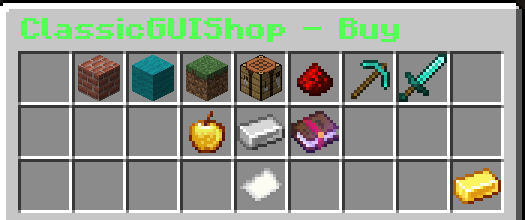
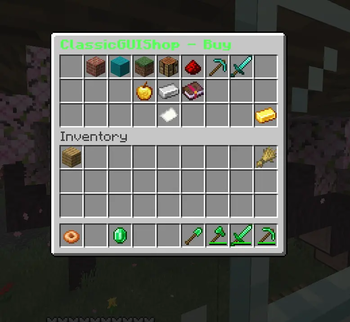
Players can browse shop menus, buy items, sell items, check item worth, sell items from their hand, and use enchanted book shops.
Admins can manage listings through a visual editor using /adminshop, making setup easier without forcing every shop entry to be handled manually.
Back From The Dead But Better
Classic GUIShop is a modern Fabric adaptation, complete rewrite and overhaul of the old classic plugin that was a chest-based shop experience for bukkit back in the day. I set out to make a simple port for my own little community server, but there was no way around a full rewrite to adapt it to modern Minecraft and the Fabric Loader, I wanted to share that with all you.
Features
- Server-side only supported
- Single Player Supported
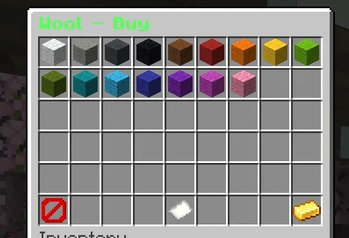
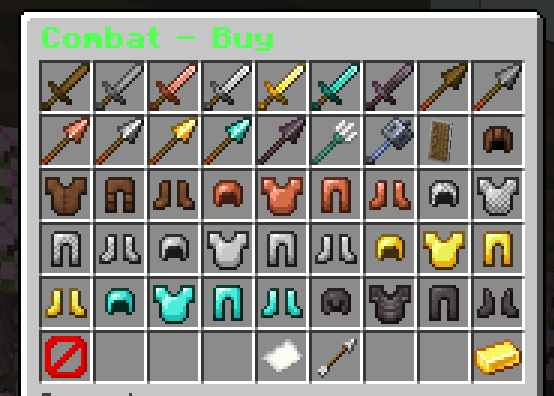
- Classic inventory based shop menus
/shopplayer menu/adminshopvisual admin editor- Buy and sell listings
- All Vanilla Items auto listed/Priced
- Enchanted book buying
- Enchanted book selling
- Exploit alerts via recipie checks
- Datapack and Modded Item importing supported
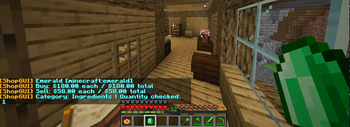
- Item worth checks
- Sell hand commands
- Exact item identification
- Money System built-in
- Compatibility layer for quick porting to newly realeased versions
Player Commands
Common player commands include:
/shop- Opens the shop GUI/shop sellOpens the Shop GUI in sell mode/shop enchantOpens the Shop GUI but stright to the enchantment listings/sellhandSells the stack you are holding/worthTells you the worth of the item you are holding/identAllows you to know the id of the item you are holding
Admin tools are available through /adminshop. For more details on adminshop check out the wiki somewhere on this page.
Why bring it back?
I havent seen something quite like this in a long time so, I brought it back with the help of AI. It is built for servers that want a simple, familiar, and highly configurable economy shop without annoying extra setup just to get started.
The main goal is simple: drop it in, start the server, and have a working shop.
Classic GUIShop generates a usable shop out of the box, includes its own persistent economy, supports permissions, and provides in-game tools for editing and managing shop content. You can Import items into it from Datapacks, and other mods. All the listings are completely configurable by the server admins. You can also run it on a single player world. Although you cannot edit the shop unless you have commands enabled.
If you are running this on a server, you do not need to have this mod installed on the client.
Feel free to use this in any modpack, I also don't care if anyone wants to make edits to the code, you can fork it in the git. If you need help with it, hmu in discord, link should be somewhere on this page. This is my gift back to the modding community. I love you guys <3
Works out of the box
Classic GUIShop is designed to be usable immediately after installation.
On first run, the mod creates its configuration files, builds a starter shop, sets up default pricing, and prepares the economy system automatically. You do not need to manually write a full shop config before players can start using it.
This makes it useful for:
- Survival servers
- Small community servers
- SMPs
- Economy-based servers
- Admins who want a classic GUI shop without heavy setup
Dynamic shop system
Classic GUIShop is not just a static list of items. It includes tools and systems that help the shop adapt to your server or singleplayer game.
Features include:
- Chest-style shop menus
- Buy and sell support
- Dynamic pricing support
- Automatic vanilla item catalog generation
- Version-safe item handling
- Enchanted book buying and selling
- Folder/category-based shop organization
- Configurable shop listings
- In-game admin editing tools
The mod is built to make shop management easier while still allowing server owners to customize prices, categories, and permissions.
Built-in economy
Classic GUIShop includes its own economy system, so it can run independently without requiring another economy mod.
Players can earn, spend, and manage balances through the shop system. Server owners can use the built-in economy tools without needing to install a separate currency provider.
This keeps the setup lightweight and reliable.
Permissions support
Classic GUIShop includes permission-aware command and admin access.
Server owners can control who has access to shop commands, economy commands, import tools, and admin editing features. If a permissions API is not installed, the mod falls back to standard Minecraft permission levels.
This means it can work on a simple server with no extra permission mods, while still supporting more controlled setups.
Admin-friendly tools
Classic GUIShop is built with server management in mind.
Admins can manage shop content through commands and GUI-based tools instead of editing every listing manually. The mod supports importing, editing, pricing, and organizing items into shop categories.
Useful admin features include:
- In-game shop editor
- Shop reload support
- Item identification tools
- Configurable permission defaults
- Console import reminders
- Automatic handling of unavailable version-specific items
Fabric API not required
Classic GUIShop does not require Fabric API.
The mod is built to run as a lightweight Fabric server-side shop mod using Fabric Loader directly. This helps reduce dependency issues and makes the mod easier to run across supported Minecraft versions.
If Fabric API is installed on your server, make sure your Fabric Loader version is compatible with that Fabric API release.
Why Use Classic GUIShop?
Classic GUIShop is made for server owners who want the familiar chest GUI shop style, but with modern Fabric support and less setup hassle.
It focuses on being:
- Easy to install
- Usable immediately
- Server-friendly
- Highly configurable
- Permission-aware
- Dynamic enough for long-term server use
Whether you want a simple survival shop or a more organized server economy, Classic GUIShop gives you a strong starting point without forcing you to build everything from scratch.
Available Versions
How to Install Classic GUIShop on Your Server
Order Server
Order a Minecraft Java server with at least 3 GB RAM (4 GB recommended).
Set fabric Loader
In the panel under "Egg", select the fabric loader and matching Minecraft version (26.2).
Install Mod
Open the mod browser in the dashboard and search for "Classic GUIShop". Click "Install" – done! Alternatively, upload the .jar via SFTP to the /mods folder.
Compatibility
Mod Loaders
Minecraft Versions
26.2, 26.1.2, 26.1.1
Server-side
✓ RequiredRecommended RAM
4 GB(min. 3 GB)Frequently Asked Questions
Classic GUIShop server crashes on startup – what to do?
Most common cause: wrong fabric version or insufficient RAM. Check the server log (latest.log) for "OutOfMemoryError" or "Mixin" errors. With Mado Hosting: ensure at least 3 GB RAM is allocated and the loader matches the mod version (26.2). You can switch loaders with one click in the panel.
Is Classic GUIShop compatible with fabric?
Classic GUIShop officially supports fabric for Minecraft 26.2, 26.1.2, 26.1.1. The Mado dashboard automatically detects incompatible loader combinations.
Server lagging with Classic GUIShop – how to optimize performance?
Recommended RAM: 4 GB (per 8 players). Use /spark profiler to check if Classic GUIShop consumes the most tick time. Common fixes: reduce server view-distance to 8-10, install "performant" or "starlight" as supplementary mods on Forge. With Mado Hosting, your server runs on NVMe SSDs with dedicated CPU cores for minimal latency.
Similar Mods


![CobbleDollars [Cobblemon Addon]](https://cdn.modrinth.com/data/s7N7AsqL/684040a264fc1d7f9b856ec5d2da39767398c7ad.png)

Rent Modded Server
Install Classic GUIShop with just one click on your server.