
Classic Peripherals
Addon for CC: Tweaked that adds a bunch of peripherals and tweaks.
Screenshots
About this Mod
Classic Peripherals is an addon for CC: Tweaked that adds a bunch of peripherals and some tweaks.
Check out the documentation at https://github.com/Ale32bit/ClassicPeripherals/wiki
Features
Tweaks
Ender Modem Nerfing
In vanilla CC: Tweaked, Ender Modems are capable of transmitting and receiving messages from everywhere across all dimensions, with a virtually unlimited range.
This mod changes the behaviour of the peripheral by:
- Limiting the range to 2x normal wireless modem's range (unaffected by weather)
- Limiting the cross-dimensional messaging to work only if the block position is close by 8 blocks (scaling is applied, ie. 1:8 for overworld and nether)
Redstone Relay Enhancement
The network name of the Redstone Relay peripheral is now added to the redstone event.
Radio network
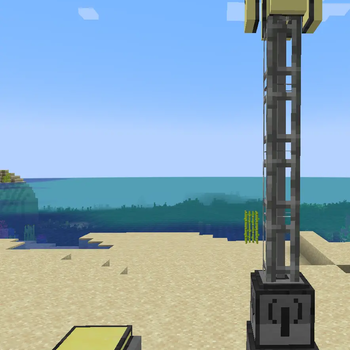
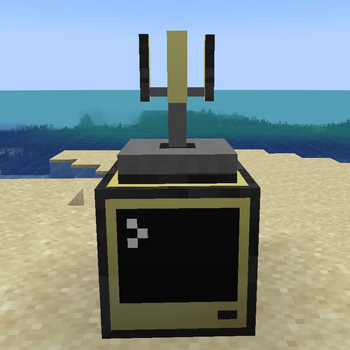
Radio Towers can be built to assist long-range wireless communication.
Craft a Radio Tower Base, at least one Radio Tower Segment, and a Radio Tower Antenna and build the tower like in the image.
NFC and RFID
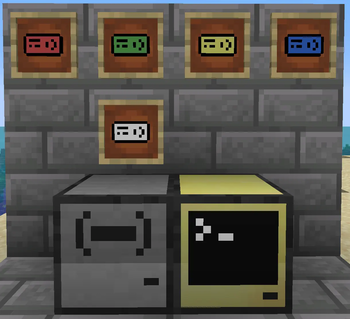
The NFC Reader peripheral is capable of reading and writing data to the NFC Card and RFID Badge (write-only).
The RFID Scanner can read all badges within its range wirelessly without user interaction.
Cryptographic Accelerator
Secure your communications with the Cryptographic Accelerator's implementation of Ed25519 and X25519, encrypt your data with AES or just hash your strings with SHA.
Scanner
The Scanner peripheral can read printed paper. That's it. But it supports reading colors too!
Available Versions
How to Install Classic Peripherals on Your Server
Order Server
Order a Minecraft Java server with at least 3 GB RAM (4 GB recommended).
Set fabric Loader
In the panel under "Egg", select the fabric loader and matching Minecraft version (1.21.1).
Install Mod
Open the mod browser in the dashboard and search for "Classic Peripherals". Click "Install" – done! Alternatively, upload the .jar via SFTP to the /mods folder.
Compatibility
Mod Loaders
Minecraft Versions
1.21.1, 1.20.1
Server-side
✓ RequiredRecommended RAM
4 GB(min. 3 GB)Frequently Asked Questions
Classic Peripherals server crashes on startup – what to do?
Most common cause: wrong fabric version or insufficient RAM. Check the server log (latest.log) for "OutOfMemoryError" or "Mixin" errors. With Mado Hosting: ensure at least 3 GB RAM is allocated and the loader matches the mod version (1.21.1). You can switch loaders with one click in the panel.
Is Classic Peripherals compatible with fabric and forge and neoforge?
Classic Peripherals officially supports fabric, forge, neoforge for Minecraft 1.21.1, 1.20.1. Note: Forge and Fabric mods are NOT cross-compatible – pick one loader and stick with it. The Mado dashboard automatically detects incompatible loader combinations.
Server lagging with Classic Peripherals – how to optimize performance?
Recommended RAM: 4 GB (per 8 players). Use /spark profiler to check if Classic Peripherals consumes the most tick time. Common fixes: reduce server view-distance to 8-10, install "performant" or "starlight" as supplementary mods on Forge. With Mado Hosting, your server runs on NVMe SSDs with dedicated CPU cores for minimal latency.
Similar Mods





Rent Modded Server
Install Classic Peripherals with just one click on your server.