
Clean HUD
Only shows health/hunger/armor when they change, fades out otherwise
Screenshots
About this Mod
CleanHUD
CleanHUD keeps your screen clean without taking useful information away. Core HUD elements can fade out when they are not needed, and optional Info HUD lines can stay visible exactly where you want them.
Built for Fabric, Forge, and NeoForge.
What CleanHUD Can Do
Fade the vanilla HUD
You can configure these HUD elements individually:
healthhungerarmorairexperiencemount_healthhotbarcrosshairheld_itemstatus_effectsboss_bar
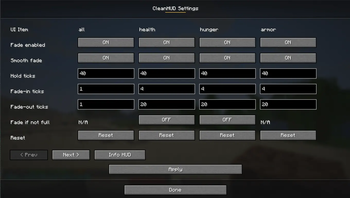
Each supported HUD element can be configured with:
- Fade enabled on/off
- Fade if not full on/off where it makes sense
- Hold ticks
- Fade ticks
- Reset to global/default behavior
Show an optional Info HUD
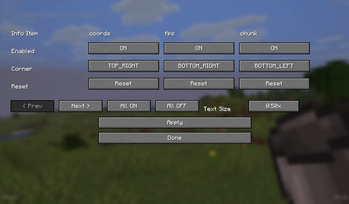
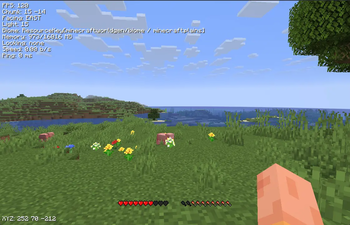
CleanHUD also includes an Info HUD with individually toggleable items:
coords— player coordinatesfps— FPS counterchunk— chunk coordinatesfacing— facing directionlight— light levelbiome— current biomememory— memory usagelooking— what you are looking at, with coordinatesspeed— movement speedping— player ping
Each Info HUD item can be:
- Enabled or disabled individually
- Placed in any corner:
top_lefttop_rightbottom_rightbottom_left
The Info HUD also has a single global text size setting shared by all info items.
Available text sizes currently include:
0.25x0.50x0.75x1.00x1.25x1.50x1.75x2.00x
In-Game Configuration
Open the menu with:
/cleanhud/ch
From the main config screen you can:
- Configure fading behavior for vanilla HUD elements
- Open the dedicated Info HUD screen
- Toggle each info item on/off
- Change each info item corner
- Change Info HUD text size
- Use All ON and All OFF for the Info HUD
Commands
Open the menu
/cleanhud/cleanhud menu/ch/ch menu
HUD fade commands
/cleanhud status [element]
/cleanhud fade <element|all> <true|false>
/cleanhud hold <element|all> <ticks>
/cleanhud fadeTicks <element|all> <ticks>
/cleanhud reset <element|all>
Info HUD commands
/cleanhud info status [item]
/cleanhud info toggle <item|all> <true|false>
/cleanhud info corner <item|all> <top_left|top_right|bottom_right|bottom_left>
/cleanhud info allOn
/cleanhud info allOff
The same commands are also available through /ch.
Why Use CleanHUD?
CleanHUD is made for players who want less clutter without losing useful information. You can keep the screen minimal during normal gameplay, while still showing the exact HUD and player info you care about.
Available Versions
How to Install Clean HUD on Your Server
Order Server
Order a Minecraft Java server with at least 3 GB RAM (4 GB recommended).
Set fabric Loader
In the panel under "Egg", select the fabric loader and matching Minecraft version (26.1.2).
Install Mod
Open the mod browser in the dashboard and search for "Clean HUD". Click "Install" – done! Alternatively, upload the .jar via SFTP to the /mods folder.
Compatibility
Mod Loaders
Minecraft Versions
26.1.2, 26.1.1, 26.1
Server-side
✗ UnsupportedRecommended RAM
4 GB(min. 3 GB)Frequently Asked Questions
Clean HUD server crashes on startup – what to do?
Most common cause: wrong fabric version or insufficient RAM. Check the server log (latest.log) for "OutOfMemoryError" or "Mixin" errors. With Mado Hosting: ensure at least 3 GB RAM is allocated and the loader matches the mod version (26.1.2). You can switch loaders with one click in the panel.
Is Clean HUD compatible with fabric and forge and neoforge?
Clean HUD officially supports fabric, forge, neoforge for Minecraft 26.1.2, 26.1.1, 26.1. Note: Forge and Fabric mods are NOT cross-compatible – pick one loader and stick with it. The Mado dashboard automatically detects incompatible loader combinations.
Server lagging with Clean HUD – how to optimize performance?
Recommended RAM: 4 GB (per 8 players). Use /spark profiler to check if Clean HUD consumes the most tick time. Common fixes: reduce server view-distance to 8-10, install "performant" or "starlight" as supplementary mods on Forge. With Mado Hosting, your server runs on NVMe SSDs with dedicated CPU cores for minimal latency.
Similar Mods






Rent Modded Server
Install Clean HUD with just one click on your server.
Details
- License
- Creative Commons Attribution Non Commercial No Derivatives 4.0 International
- Server-side
- Unsupported