
Clickable Link
Adds the ability to click on a link in the chat
Screenshots
About this Mod
ClickableLinks
EN Description
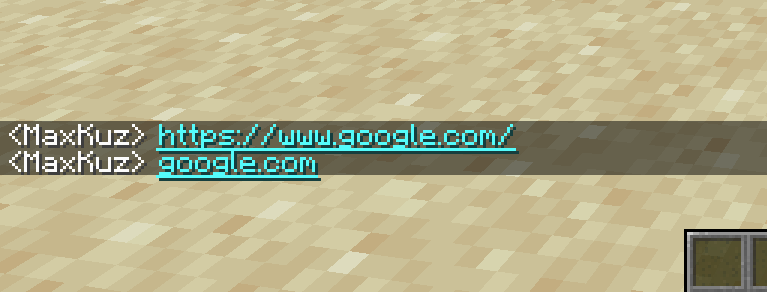
ClickableLinks is a client-side mod that makes links in the in-game chat clickable.
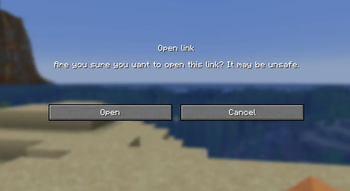
If a chat message contains a link, the player can click it. Before opening the link, a warning window will appear:
Are you sure you want to open this link? It may be unsafe.
The player can choose:
- Open — open the link in the browser
- Cancel — close the window and open nothing
The mod works only on the client side and does not need to be installed on the server.
Features
- Automatically detects links in chat messages
- Makes links clickable
- Shows a warning before opening a link
- Supports English and Russian languages
- Works with different types of chat messages
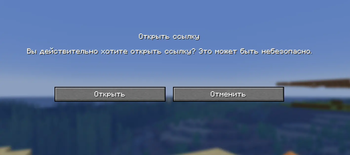
🇷🇺 Описание
ClickableLinks — клиентский мод, который делает ссылки в игровом чате кликабельными.
Если в сообщении чата есть ссылка, игрок может нажать на неё. Перед открытием появится предупреждение:
Вы действительно хотите открыть ссылку? Это может быть небезопасно.
Игрок может выбрать:
- Открыть — открыть ссылку в браузере
- Отменить — закрыть окно и ничего не открывать
Мод работает только на стороне клиента и не требует установки на сервер.
Возможности
- Автоматически находит ссылки в сообщениях чата
- Делает ссылки кликабельными
- Показывает предупреждение перед открытием ссылки
- Поддерживает русский и английский языки
- Работает с разными типами сообщений
Available Versions
How to Install Clickable Link on Your Server
Order Server
Order a Minecraft Java server with at least 3 GB RAM (4 GB recommended).
Set neoforge Loader
In the panel under "Egg", select the neoforge loader and matching Minecraft version (1.21.1).
Install Mod
Open the mod browser in the dashboard and search for "Clickable Link". Click "Install" – done! Alternatively, upload the .jar via SFTP to the /mods folder.
Compatibility
Mod Loaders
Minecraft Versions
1.21.1
Server-side
✗ UnsupportedRecommended RAM
4 GB(min. 3 GB)Frequently Asked Questions
Clickable Link server crashes on startup – what to do?
Most common cause: wrong neoforge version or insufficient RAM. Check the server log (latest.log) for "OutOfMemoryError" or "Mixin" errors. With Mado Hosting: ensure at least 3 GB RAM is allocated and the loader matches the mod version (1.21.1). You can switch loaders with one click in the panel.
Is Clickable Link compatible with neoforge?
Clickable Link officially supports neoforge for Minecraft 1.21.1. The Mado dashboard automatically detects incompatible loader combinations.
Server lagging with Clickable Link – how to optimize performance?
Recommended RAM: 4 GB (per 8 players). Use /spark profiler to check if Clickable Link consumes the most tick time. Common fixes: reduce server view-distance to 8-10, install "performant" or "starlight" as supplementary mods on Forge. With Mado Hosting, your server runs on NVMe SSDs with dedicated CPU cores for minimal latency.
Similar Mods






Rent Modded Server
Install Clickable Link with just one click on your server.