
Clockpass
Clockpass adds more uses to items such as the compass, clock, and spyglass, turning otherwise useless items into life-saving equipment!
Screenshots
About this Mod

Ever coincidentally lost your f3 button or are just too much of a lazy sloth to press it? or are you just too braindead to use your eyes and senses? well, i got you covered!
Clockpass is a vanilla friendly mod which aims to add more uses to items such as the compass, clock, and spyglass, turning otherwise useless items into life-saving equipment!
What's new:
-Compasses now display your current coordinates above your hotbar when held. Additionally, holding the compass while sneaking shows which direction you're looking at, a handy tool for your journeys!
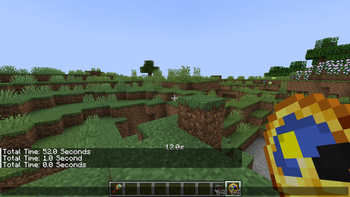
-Clocks now display the current time of the day as "Day" or "Night". This may sound useless at first glace, but using this, you can tell when you can and cannot sleep, or when mobs can and cannot spawn. Additionally, you can hold the clock while sneaking to see the current light level at your feet, or you can right-click with a clock to use it's new Stopwatch ability!
-The Stopwatch: Right-clicking with a clock in your main-hand starts a timer, which goes up every second. to stop the timer, simply right-click again with the clock in your main-hand while the timer is active. doing so will also announce the total time in the chat, letting you check it later. (Note: the timer will still run while the clock is anywhere in your inventory. you only need to hold the clock in your main-hand or your off-hand to see the timer.)
-The Spyglass will now show you the current weather when used, useful for knowing if it's thundering or raining. Make sure you have a clear view to the sky, tho! You need to make sure there's no blocks above your head to check the weather. Additionally, using the spyglass while sneaking shows you the name of the block you're looking at, helping you learn and remember them.
-The mod also comes with a streamer mode. As should be pretty self explanatory, streamer mode disables the new compass functions, for you, and only you, so you don't accidentally leak your coordinates or position on live streaming! Streamer mode can be toggled by pressing f6 (Customizable in keybind controls) and is indicated in-game as a red dot in the bottom right of your screen.
For server owners:
-The mod can be disabled in-game using a gamerule, in case you don't want it in specific worlds, or want to deactivate it mid-game. Use /gamerule clockpassMode false/true, or change it via the world creation menu!
-You can make it so whenever any player stops their stopwatch, it announces the total time in chat for every single player online, by using /gamerule publicStopwatch false/true, or changing it via the world creation menu! This could be useful for events, races, games, etc. to prevent cheating.
Final notes:
-The mod will have backports to 1.19.4, but the backport will not be maintained as new clockpass updates for the latest minecraft releases roll out.
-There COULD be a bedrock edition port in the future. No promises tho!
-Make sure to check out the discord server to report bugs or suggest features! we have a good time there
Please note that this mod is a remake/remaster of the mod of the same name "clockpass" on PMC (planet minecraft). i am the same creator, coming back with a new name since i've lost access to my pmc account. Have fun playing!
Available Versions
How to Install Clockpass on Your Server
Order Server
Order a Minecraft Java server with at least 3 GB RAM (4 GB recommended).
Set forge Loader
In the panel under "Egg", select the forge loader and matching Minecraft version (1.20.1).
Install Mod
Open the mod browser in the dashboard and search for "Clockpass". Click "Install" – done! Alternatively, upload the .jar via SFTP to the /mods folder.
Compatibility
Mod Loaders
Minecraft Versions
1.20.1, 1.19.4
Server-side
✓ RequiredRecommended RAM
4 GB(min. 3 GB)Frequently Asked Questions
Clockpass server crashes on startup – what to do?
Most common cause: wrong forge version or insufficient RAM. Check the server log (latest.log) for "OutOfMemoryError" or "Mixin" errors. With Mado Hosting: ensure at least 3 GB RAM is allocated and the loader matches the mod version (1.20.1). You can switch loaders with one click in the panel.
Is Clockpass compatible with forge?
Clockpass officially supports forge for Minecraft 1.20.1, 1.19.4. The Mado dashboard automatically detects incompatible loader combinations.
Server lagging with Clockpass – how to optimize performance?
Recommended RAM: 4 GB (per 8 players). Use /spark profiler to check if Clockpass consumes the most tick time. Common fixes: reduce server view-distance to 8-10, install "performant" or "starlight" as supplementary mods on Forge. With Mado Hosting, your server runs on NVMe SSDs with dedicated CPU cores for minimal latency.
Similar Mods




![[TaCZ] Timeless and Classics Zero](https://cdn.modrinth.com/data/SzzJttH8/fd27766d2bb8390d284696b1dbd358f87e081439_96.webp)

Rent Modded Server
Install Clockpass with just one click on your server.