
CloudTweak
Adds a clean in-game PC overlay for Cobblemon with bulk selection, sorting, filtering, and priority-based Pokémon management.
Screenshots
About this Mod
CloudTweak
CloudTweak is a Cobblemon quality-of-life add-on that helps make large PC boxes easier to manage.
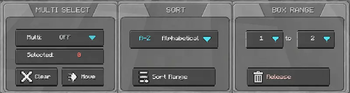
It adds a clean overlay inside the Cobblemon PC with tools for searching, selecting, moving, sorting, releasing, highlighting, and setting up Pasture breeding pairs.
Features
PC Management
- Search through your PC boxes
- Select multiple Pokémon at once
- Shift-click to select a range
- Move selected Pokémon to another box
- Release selected Pokémon with a confirmation popup
- Helps protect special Pokémon from bulk release:
- Shiny Pokémon
- Legendary Pokémon
- Mythical Pokémon
- Ultra Beasts
- Highlight important Pokémon:
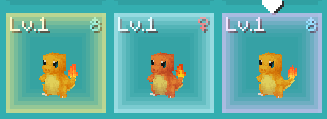
- Shiny Pokémon
- 100% IV Pokémon
- Shiny + 100% IV Pokémon
- Saves your settings after restarting the game
Sorting
- Sort Pokémon inside a custom box range
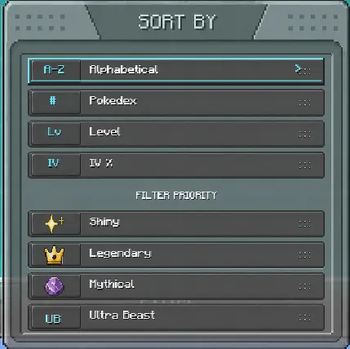
- Sort by:
- Name
- Pokédex number
- Level
- IV percentage
- Put important Pokémon first with priority filters:
- Shiny Pokémon
- Legendary Pokémon
- Mythical Pokémon
- Ultra Beasts
Pasture Mode
- Switch between PC Sort Mode and Pasture Mode
- Create breeding pairs directly from the PC
- Paired Pokémon show a P# label
- Pair Assist helps find matching partners
- Supports:
- Same species pairs
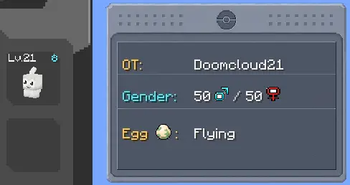
- Shared egg group pairs
- Ditto pairs
- Optional 100% IV Pair Filter
- Shows a red ! when a Pokémon cannot be paired
- Auto Pasture can help send queued pairs
- If a pair returns to your PC after relogging or pasture changes, CloudTweak can help bring that pair back into the queue
- Clean Cobblemon-style Pasture UI
How To Use
Sorting Pokémon
- Open the Cobblemon PC.
- Use PC Sort Mode.
- Select the Pokémon or box range you want to organize.
- Choose a sort option.
- Press Sort Range.
Moving Pokémon
- Select the Pokémon you want to move.
- Press Move.
- Go to the target box.
- Press Place.
Releasing Pokémon
- Select the Pokémon you want to release.
- Press Release.
- Confirm the release popup.
Special Pokémon such as Shiny, Legendary, Mythical, and Ultra Beast Pokémon are skipped for safer bulk release.
Creating Pasture Pairs
- Open the Cobblemon PC.
- Switch to Pasture Mode.
- Click two compatible Pokémon to create a pair.
- The pair will show a P# label.
- Use Auto Pasture if you want queued pairs to be sent more easily.
Pair Assist
- Turn Pair Assist ON.
- Click the Pokémon you want to pair.
- CloudTweak will show matching partners in a temporary PC view.
- Click the partner you want to use.
100% IV Pair Filter
- Open Pair Option.
- Turn 100% IV ON.
- Pair Assist will only show 100% IV partners from the available matches.
Purpose
CloudTweak is made for players with large Cobblemon PC collections who want an easier way to organize, sort, manage, and breed Pokémon without going box by box manually.
Available Versions
How to Install CloudTweak on Your Server
Order Server
Order a Minecraft Java server with at least 3 GB RAM (4 GB recommended).
Set fabric Loader
In the panel under "Egg", select the fabric loader and matching Minecraft version (1.21.1).
Install Mod
Open the mod browser in the dashboard and search for "CloudTweak". Click "Install" – done! Alternatively, upload the .jar via SFTP to the /mods folder.
Compatibility
Mod Loaders
Minecraft Versions
1.21.1
Server-side
✗ UnsupportedRecommended RAM
4 GB(min. 3 GB)Frequently Asked Questions
CloudTweak server crashes on startup – what to do?
Most common cause: wrong fabric version or insufficient RAM. Check the server log (latest.log) for "OutOfMemoryError" or "Mixin" errors. With Mado Hosting: ensure at least 3 GB RAM is allocated and the loader matches the mod version (1.21.1). You can switch loaders with one click in the panel.
Is CloudTweak compatible with fabric?
CloudTweak officially supports fabric for Minecraft 1.21.1. The Mado dashboard automatically detects incompatible loader combinations.
Server lagging with CloudTweak – how to optimize performance?
Recommended RAM: 4 GB (per 8 players). Use /spark profiler to check if CloudTweak consumes the most tick time. Common fixes: reduce server view-distance to 8-10, install "performant" or "starlight" as supplementary mods on Forge. With Mado Hosting, your server runs on NVMe SSDs with dedicated CPU cores for minimal latency.
Similar Mods






Rent Modded Server
Install CloudTweak with just one click on your server.