Cobalt Caverns
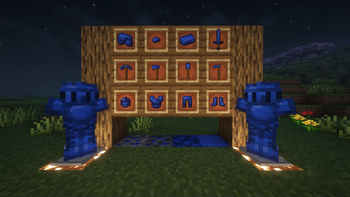
Adds Cobalt to the Deep Dark and its equivalent tools and armor!
Screenshots
About this Mod
What does Cobalt Caverns Add?
Cobalt Caverns adds cobalt ore to the deep dark; it's a rather rare ore for which you will have to work hard to get enough for the tools or armor. This mod is a work in progress with much more to be added, so please give any suggestions to the discord! I have large plans for this mod moving forward and hope to see you guys join me through the process!
What is planned for the future?
Much, much more! Namely a Dimension for the Deep Dark, and some more ores added to the nether, and the end, used to upgrade tools and armor, or simply as decoration! Some will also have their own special effects!
FAQ
How do I craft a Cobalt Ingot?
One cobalt ingot is made from 8 cobalt nuggets and one Netherite ingot. You get cobalt nuggets from smelting raw cobalt in a furnace or blast furnace.
How much better is Cobalt than Netherite?
The jump from Netherite to Cobalt is a small one, but it is there, it also improves your knockback resistance! The main jump will be seen in the future once this mod gets implemented with my next one!
Where can I report a bug I found?
You can report bugs in the discord!
Can I support you?
If you want to support me, you can either go to Ko-Fi and support me there, or you can also support me by getting a Server from ZapHosting using my affiliate link. Either way, I appreciate your support and I hope you enjoy my mods!
Available Versions
How to Install Cobalt Caverns on Your Server
Order Server
Order a Minecraft Java server with at least 4 GB RAM (6 GB recommended).
Set fabric Loader
In the panel under "Egg", select the fabric loader and matching Minecraft version (1.21.4).
Install Mod
Open the mod browser in the dashboard and search for "Cobalt Caverns". Click "Install" – done! Alternatively, upload the .jar via SFTP to the /mods folder.
Compatibility
Mod Loaders
Minecraft Versions
1.21.4
Server-side
✓ RequiredRecommended RAM
6 GB(min. 4 GB)Frequently Asked Questions
Cobalt Caverns server crashes on startup – what to do?
Most common cause: wrong fabric version or insufficient RAM. Check the server log (latest.log) for "OutOfMemoryError" or "Mixin" errors. With Mado Hosting: ensure at least 4 GB RAM is allocated and the loader matches the mod version (1.21.4). You can switch loaders with one click in the panel.
Is Cobalt Caverns compatible with fabric?
Cobalt Caverns officially supports fabric for Minecraft 1.21.4. The Mado dashboard automatically detects incompatible loader combinations.
Server lagging with Cobalt Caverns – how to optimize performance?
Recommended RAM: 6 GB (per 5 players). Use /spark profiler to check if Cobalt Caverns consumes the most tick time. Common fixes: reduce server view-distance to 8-10, install "performant" or "starlight" as supplementary mods on Forge. With Mado Hosting, your server runs on NVMe SSDs with dedicated CPU cores for minimal latency.
Similar Mods



![[TaCZ] Timeless and Classics Zero](https://cdn.modrinth.com/data/SzzJttH8/fd27766d2bb8390d284696b1dbd358f87e081439_96.webp)


Rent Modded Server
Install Cobalt Caverns with just one click on your server.