
CobblePass
A battle pass side-mod for Cobblemon 1.6+
Screenshots
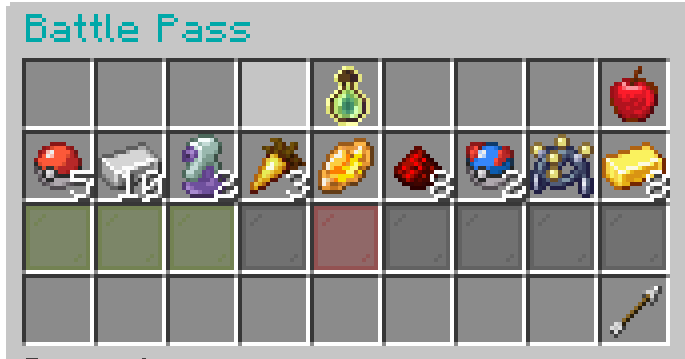
About this Mod
CobblePass - The Ultimate Battle Pass for Cobblemon
Welcome to the completely revamped CobblePass! This mod provides a deeply integrated and highly customizable battle pass system for your Cobblemon server. Engage your players with a rewarding progression system, complete with free and premium tracks, seasonal content, and a wide array of configurable rewards.

Features
- Seasons: Create unique battle pass seasons with configurable durations and rewards.
- Dual Reward Tracks: Implement both
freeandpremiumreward tiers. - Dynamic GUI: A clean, intuitive, and paginated GUI (
/bp) for players to view progress and claim rewards. - XP Progression:
- Gain XP from various in-game actions: catching, defeating, evolving, hatching, and trading Pokémon.
- Two XP progression models:
FORMULA: XP required per level increases based on a configurable multiplier.MANUAL: Manually define the exact XP required for each level.
- Diverse Reward Types:
ITEM: Grant any item from Minecraft or other mods, with full NBT support.POKEMON: Reward players with specific Pokémon, including level, shininess, and other attributes.COMMAND: Execute any server command as a reward, with placeholders for player name and UUID.
- Admin Management:
- A full suite of commands for managing seasons, players, and configurations.
- Create, start, stop, and delete seasons.
- Modify player XP, levels, and premium status on the fly.
- Reload configurations without a server restart.
- Economy Integration: Charge for the premium pass using any Impactor-compatible economy plugin.
- Highly Configurable: Tweak everything from XP values to reward templates and season settings through intuitive JSON files.
- Data Integrity: Player data is saved reliably and includes safeguards against corruption.
Dependencies
CobblePass requires the following mods to be installed on your server:
- Fabric API
- Cobblemon (v1.6+)
- Impactor (For economy features)
- GooeyLibs
Installation
- Ensure you have a Fabric server running Minecraft 1.21.1 or later.
- Download the latest versions of CobblePass and all required dependencies.
- Place the
.jarfiles into your server'smodsfolder. - Start your server. CobblePass will generate its default configuration files in the
config/cobblepass/directory.
Getting Started: Your First Season
Setting up a new Battle Pass is easy with the in-game creation tool.
Step 1: Create the Battle Pass
- As an operator, run the command:
/battlepass create - This will open a GUI where you can set:
- Duration: The length of the season in days.
- Max Level: The highest level players can achieve.
- Premium Toggle: Whether this season will have a premium track.
- Click "Create Battle Pass". This generates
config.jsonandtiers.jsonfiles and resets all player progress for a fresh start.
Step 2: Configure Your Rewards
- Open
config/cobblepass/tiers.json. - By default, it's filled with placeholder rewards (Apples). Customize each level's
freeRewardandpremiumReward. See the detailed tiers.json Configuration section below for examples of Item, Pokémon, and Command rewards. - This is where you can also define reusable reward
templates!
Step 3: Configure Settings
- Open
config/cobblepass/config.json. - Adjust XP gain values (
catchXP,defeatXP, etc.), the cost of the premium pass (premiumCost), and the XP progression model (xpProgression). See the config.json Configuration section for more details.
Step 4: Reload the Configuration
- Once you've saved your changes to the JSON files, run the command:
/battlepass reload - This will load all your new settings and rewards into the server without needing a restart.
Step 5: Start the Season!
- When you're ready for the season to begin, run:
/battlepass season start - The timer will start, and players can now begin earning XP!
Commands
The base command is /battlepass with aliases /bp and /pass.
Player Commands
| Command | Description |
|---|---|
/bp |
Opens the main Battle Pass GUI to view progress and claim rewards. |
/bp premium |
Shows information about the premium pass, including cost and status. |
/bp premium buy |
Purchases the premium pass if premiumMode is enabled and the player has enough funds. |
/bp claim <level> [premium] |
A command-based way to claim a reward for a specific level. The GUI is the primary method. |
Admin Commands (Permission Level 4)
| Command | Description |
|---|---|
/bp create |
Opens a GUI to create a new Battle Pass season from scratch. |
/bp delete confirm |
Deletes all Battle Pass files (config.json, tiers.json, and all player data). This is irreversible. |
/bp season start |
Starts the currently configured season. |
/bp season stop |
Stops the active season, pausing the timer. |
/bp reload |
Reloads config.json and tiers.json from the disk. Player data is unaffected. |
/bp addxp <player> <amount> |
Adds a specified amount of XP to a player's pass. |
/bp addlevels <player> <amount> |
Adds a specified number of levels to a player's pass. |
/bp premiumanage add <player> |
Grants a player premium status for free. |
/bp premiumanage remove <player> |
Revokes a player's premium status. |
Configuration Files
All configuration is located in the config/cobblepass/ directory.
config.json
This file controls the core mechanics of the Battle Pass.
{
  "catchXP": 50,
  "defeatXP": 25,
  "evolveXP": 100,
  "hatchXP": 75,
  "tradeXP": 50,
  "premiumCost": 1000,
  "seasonDurationDays": 30,
  "currentSeason": 1,
  "seasonStartTime": 1729898400000,
  "seasonEndTime": 1732490400000,
  "enablePermissionNodes": true,
  "premiumMode": true,
  "xpProgression": {
    "mode": "FORMULA",
    "xpPerLevel": 1000,
    "xpMultiplier": 1.05,
    "manualXpValues": {}
  }
}
XP Values (catchXP, defeatXP, etc.): The amount of Battle Pass XP granted for each action.
premiumCost: The price for the premium pass, using your server's economy.
seasonDurationDays: The length of a season in days, set via /bp create.
currentSeason, seasonStartTime, seasonEndTime: These are managed automatically by the /bp season and /bp create commands. Do not edit manually.
enablePermissionNodes: Set to true to use a permissions plugin for command access.
premiumMode: Set to true to enable the premium track for the current season.
xpProgression:
- mode: Either
"FORMULA"or"MANUAL". - If
FORMULA: usesxpPerLevelas the base andxpMultiplierto increase the requirement each level. (e.g., Level 2 needs 1000 XP, Level 3 needs 1000*1.05=1050 XP, etc.) - If
MANUAL: uses themanualXpValuesmap to define XP for each level specifically."manualXpValues": { "2": 500, "3": 550, "4": 600 }
tiers.json
The heart of your Battle Pass, where all rewards are defined.
{
  "templates": {
    "rare_candy_stack": {
      "type": "ITEM",
      "data": { "id": "cobblemon:rare_candy", "Count": 5 }
    },
    "greeting_command": {
      "type": "COMMAND",
      "command": "tellraw %player% {\"text\":\"Thanks for supporting the server!\",\"color\":\"gold\"}",
      "data": { "id": "minecraft:paper", "display_name": "§6Server Thank You" }
    }
  },
  "tiers": [
    {
      "level": 1,
      "freeReward": {
        "type": "ITEM",
        "data": { "id": "cobblemon:poke_ball", "Count": 10 }
      }
    },
    {
      "level": 5,
      "freeReward": {
        "$template": "rare_candy_stack"
      },
      "premiumReward": {
        "type": "POKEMON",
        "data": {
          "species": "eevee",
          "level": 5,
          "shiny": true
        }
      }
    },
    {
        "level": 10,
        "premiumReward": {
            "$template": "greeting_command"
        }
    }
  ]
}
- templates: (Optional) Define reusable rewards here. Give a template a name (e.g., "rare_candy_stack") and then reference it in a tier using
"$template": "rare_candy_stack". This is great for recurring rewards. - tiers: A list of tier objects. Each object must have a
level. - Reward Objects: Can be
freeRewardorpremiumReward.- type:
ITEM,POKEMON, orCOMMAND. - data-blocked:
- For
ITEM: Theidof the item and itsCount. You can add any other NBT data here too. - For
POKEMON: Thespeciesis required. You can also specifylevel,shiny,ability, and more. The display item in the GUI will be a sprite of that Pokémon. - For
COMMAND: Theidspecifies which item to display in the GUI. You can also add a customdisplay_name.
- For
- command: (Only for
COMMANDtype) The command string to execute. Use%player%for the player's name and%uuid%for their UUID.
- type:
Player Data
Player progress is stored individually in config/cobblepass/players/<uuid>.json. It's recommended not to edit these files manually, but they can be useful for diagnostics or manual corrections if needed.
{
  "version": "1.0",
  "level": 5,
  "xp": 250,
  "isPremium": true,
  "claimedFreeRewards": [
    1,
    2,
    3,
    4,
    5
  ],
  "claimedPremiumRewards": [
    5
  ]
}
Available Versions
How to Install CobblePass on Your Server
Order Server
Order a Minecraft Java server with at least 3 GB RAM (4 GB recommended).
Set fabric Loader
In the panel under "Egg", select the fabric loader and matching Minecraft version (1.21.1).
Install Mod
Open the mod browser in the dashboard and search for "CobblePass". Click "Install" – done! Alternatively, upload the .jar via SFTP to the /mods folder.
Compatibility
Mod Loaders
Minecraft Versions
1.21.1
Server-side
✓ RequiredRecommended RAM
4 GB(min. 3 GB)Frequently Asked Questions
CobblePass server crashes on startup – what to do?
Most common cause: wrong fabric version or insufficient RAM. Check the server log (latest.log) for "OutOfMemoryError" or "Mixin" errors. With Mado Hosting: ensure at least 3 GB RAM is allocated and the loader matches the mod version (1.21.1). You can switch loaders with one click in the panel.
Is CobblePass compatible with fabric?
CobblePass officially supports fabric for Minecraft 1.21.1. The Mado dashboard automatically detects incompatible loader combinations.
Server lagging with CobblePass – how to optimize performance?
Recommended RAM: 4 GB (per 8 players). Use /spark profiler to check if CobblePass consumes the most tick time. Common fixes: reduce server view-distance to 8-10, install "performant" or "starlight" as supplementary mods on Forge. With Mado Hosting, your server runs on NVMe SSDs with dedicated CPU cores for minimal latency.
Rent Modded Server
Install CobblePass with just one click on your server.