
CobbleDollars Notes
Cobbledollars Notes is an addon for the CobbleDollars mod, designed to expand the in-game economy in your Cobblemon world.
About this Mod
CobbleDollar Notes
Based on CobbleDollars Ticket - the original mod on Modrinth.
Overview / 概要
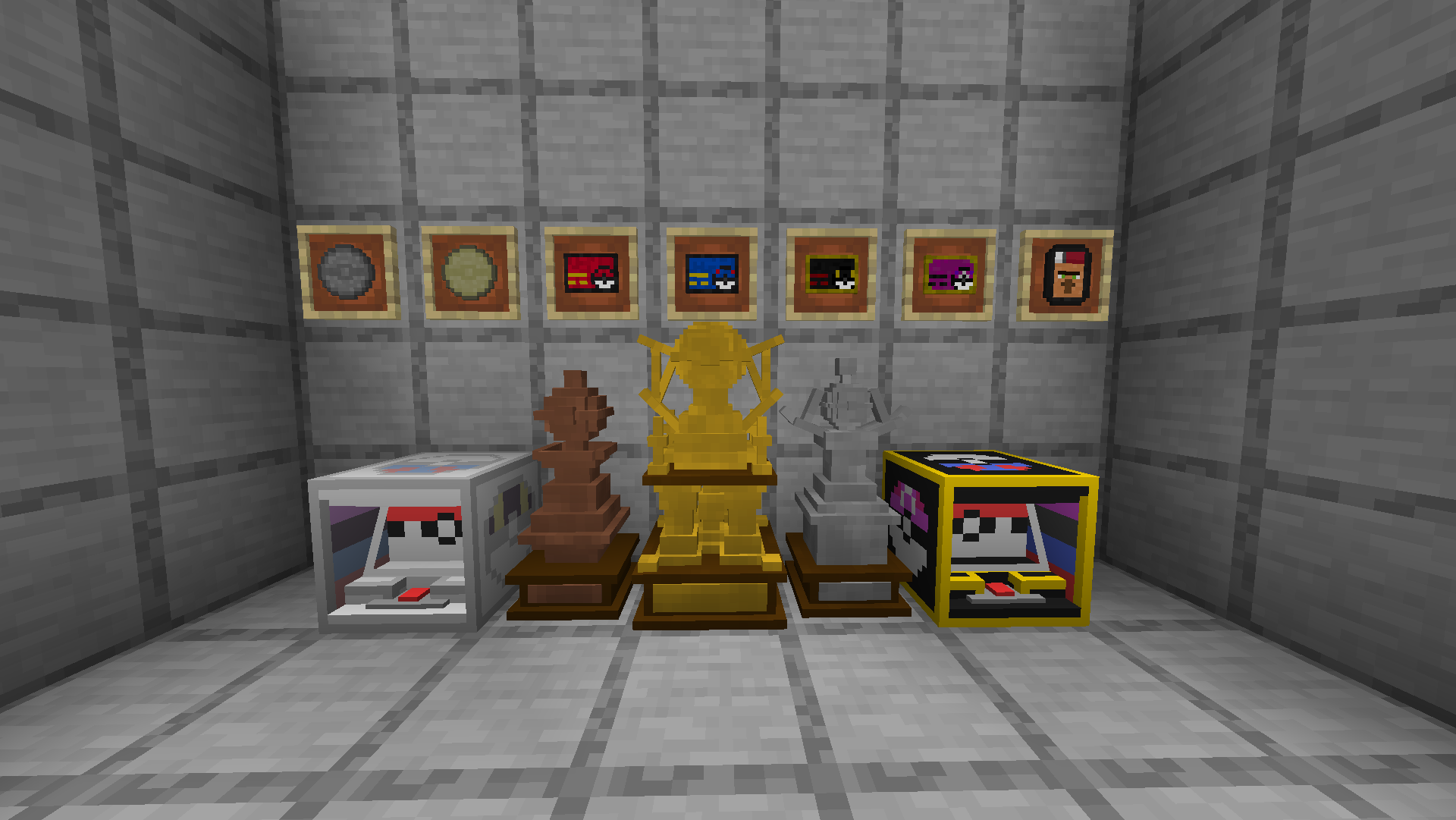
CobbleDollar Notes adds physical currency to CobbleDollars: coins (€10, €100) and notes (€1,000, €10,000, €100,000, €1,000,000) you can trade or use at slot machines. With CobbleDollars installed you can exchange balance at the CobbleDollar Shop Villager once configured and pay for spins with notes or balance. Buy Golden, Silver, and Bronze Wealth Trophies to show off. Slot odds are configurable via JSON.
Features / 主な機能
Pokézon 🛒 - Right-click to open the CobbleDollar Shop from anywhere (once configured).
Physical currency 💵 - Coins: €10, €100. Notes: €1,000, €10,000, €100,000, €1,000,000. Right-click to add to balance; Sneak + Right-click to redeem a full stack. To get notes/coins from your balance, configure the CobbleDollar Shop (see below).
Slot machines 🎰 - Normal: €1,000/play, jackpot €120,000. Premium: €10,000/play, jackpot €1,500,000. Pay with notes or balance. Level system and configurable odds in config/CobbleDollarNotes/config.json.
Wealth trophies 🏆 - Gold €100,000,000, Silver €10,000,000, Bronze €1,000,000. Shop purchase needs CobbleDollars + Shop config.
Advancements - For slots, trophies, jackpot, and Pokézon.
How to use / 使い方
- Pokézon - Hold it, Right-click to open the CobbleDollar Shop.
- Notes/coins - Right-click to add one to your balance; Sneak + Right-click to redeem the whole stack.
- Slots - Use a machine, put €1,000 or €10,000 notes in inventory (or have enough balance), and press SPIN REELS!.
- Trophies - Buy from the Shop (if configured) or obtain in-game; place the block to display.
Dependencies / 依存MOD
Required: CobbleDollars (balance, redemption, shop). With CobbleDollars, slots accept notes or balance; redemption and getting notes/coins from the shop need CobbleDollars + shop config.
Configuration Guide / 設定ガイド
Slot odds - config/CobbleDollarNotes/config.json. Auto-created on first run. Two arrays: normalProbabilities and premiumProbabilities, each 4 levels × 4 outcomes (Jackpot, Big Win, Small Win, Cherry Match; order [0]-[3], values 0-1, remainder = Miss).
CobbleDollar Shop - Players get notes/coins from their balance via the CobbleDollar Shop (villager). In config/cobbledollars/default_shop.json, add sections for Tickets, Coins, and Trophies so the shop sells them. Merge with existing JSON as needed.
Example default_shop.json sections (Tickets, Coins, Trophies):
{ "Tickets": [
  { "item": "cobbledollars_ticket:1000cobbledollar", "price": 1000 },
  { "item": "cobbledollars_ticket:10000cobbledollar", "price": 10000 },
  { "item": "cobbledollars_ticket:100000cobbledollar", "price": 100000 },
  { "item": "cobbledollars_ticket:1000000cobbledollar", "price": 1000000 }
]},
{ "Coins": [
  { "item": "cobbledollars_ticket:10cobbledollar", "price": 10 },
  { "item": "cobbledollars_ticket:100cobbledollar", "price": 100 }
]},
{ "Trophies": [
  { "item": "cobbledollars_ticket:gold_trophy", "price": 100000000 },
  { "item": "cobbledollars_ticket:silver_trophy", "price": 10000000 },
  { "item": "cobbledollars_ticket:bronze_trophy", "price": 1000000 }
]}
Available Versions
How to Install CobbleDollars Notes on Your Server
Order Server
Order a Minecraft Java server with at least 3 GB RAM (4 GB recommended).
Set fabric Loader
In the panel under "Egg", select the fabric loader and matching Minecraft version (1.21.1).
Install Mod
Open the mod browser in the dashboard and search for "CobbleDollars Notes". Click "Install" – done! Alternatively, upload the .jar via SFTP to the /mods folder.
Compatibility
Mod Loaders
Minecraft Versions
1.21.1
Server-side
✓ RequiredRecommended RAM
4 GB(min. 3 GB)Frequently Asked Questions
CobbleDollars Notes server crashes on startup – what to do?
Most common cause: wrong fabric version or insufficient RAM. Check the server log (latest.log) for "OutOfMemoryError" or "Mixin" errors. With Mado Hosting: ensure at least 3 GB RAM is allocated and the loader matches the mod version (1.21.1). You can switch loaders with one click in the panel.
Is CobbleDollars Notes compatible with fabric?
CobbleDollars Notes officially supports fabric for Minecraft 1.21.1. The Mado dashboard automatically detects incompatible loader combinations.
Server lagging with CobbleDollars Notes – how to optimize performance?
Recommended RAM: 4 GB (per 8 players). Use /spark profiler to check if CobbleDollars Notes consumes the most tick time. Common fixes: reduce server view-distance to 8-10, install "performant" or "starlight" as supplementary mods on Forge. With Mado Hosting, your server runs on NVMe SSDs with dedicated CPU cores for minimal latency.
Similar Mods




![CobbleDollars [Cobblemon Addon]](https://cdn.modrinth.com/data/s7N7AsqL/684040a264fc1d7f9b856ec5d2da39767398c7ad.png)
Rent Modded Server
Install CobbleDollars Notes with just one click on your server.