CobbleDollars Ticket
Cobbledollars Ticket is an addon for the CobbleDollars mod, designed to expand the in-game economy in your Cobblemon world.
About this Mod
A new author's version has been released on Modrinth, so please be sure to check it out.
https://modrinth.com/mod/cobbledollars-notes
Overview / 概要
Cobbledollars Ticket is an addon for the CobbleDollars mod, designed to expand the in-game economy in your Cobblemon world.
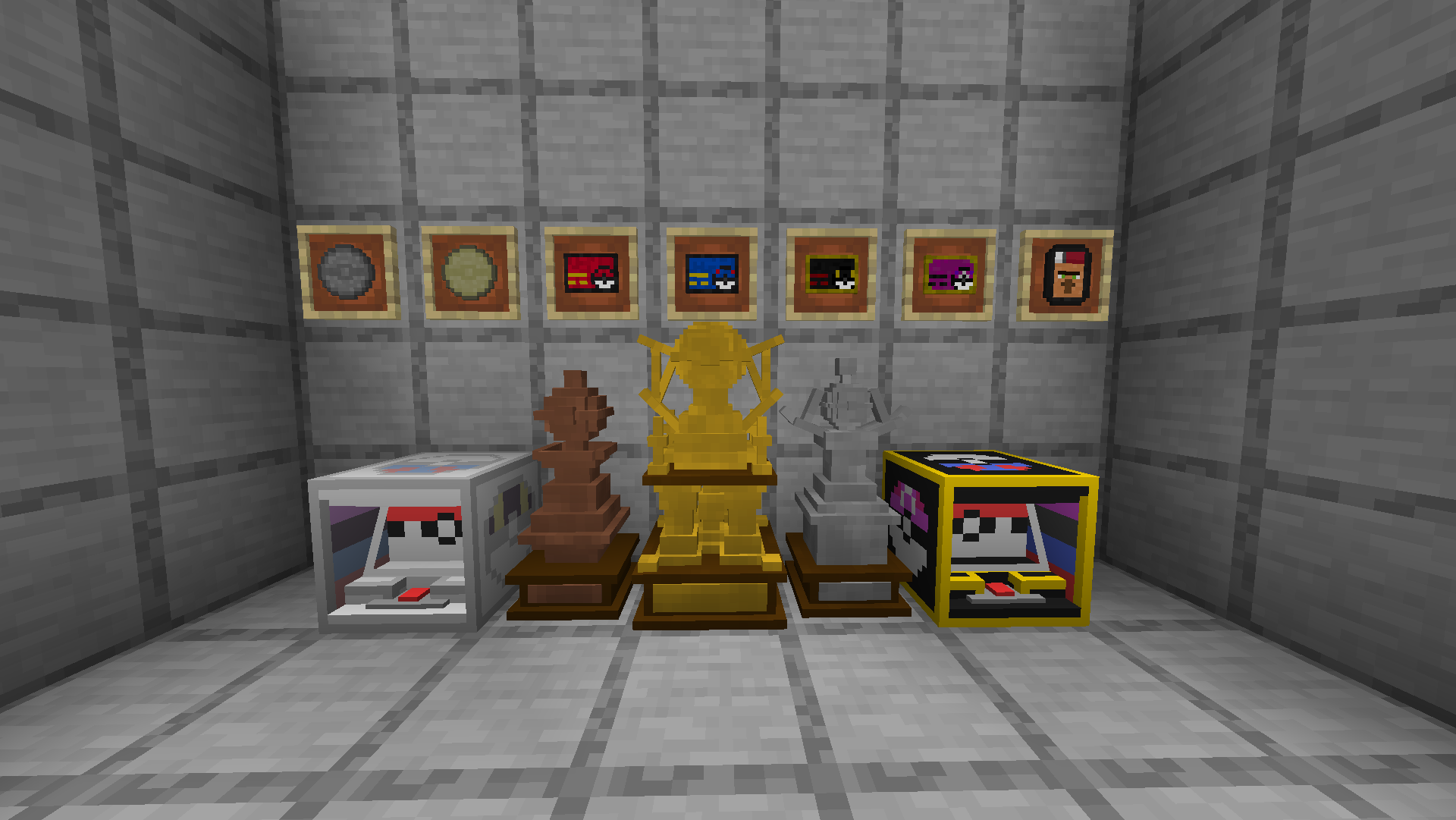
This mod introduces the concept of physical currency to the CobbleDollars' digital money system. You can exchange your digital balance for tickets and coins, which you can hold, trade directly with other players, or use to try your luck at the high-stakes slot machines for a chance to win big!
As an ultimate goal for your earnings, you can also purchase and display magnificent trophies of gold, silver, and bronze to show off your wealth!
Cobbledollars Ticketは、CobbleDollarsのアドオンMODで、Cobblemonの世界の経済を拡張するために作られました。
このMODは、CobbleDollarsの電子マネーシステムに「物理的な通貨」の概念を導入します。電子マネーを様々な額面のチケットやコインに両替し、直接取引したり、スリル満点のスロットマシンで一攫千金を狙ったりすることができます。
稼いだお金の使い道として、富の象徴となる豪華な金・銀・銅のトロフィーを購入し、拠点に飾りましょう!
Features / 主な機能
Pokézon:
A handy item that gives you remote access to the economy!
Right-click to open the Shop from anywhere.
Sneak + Right-click to open the Bank from anywhere.
Physical Currency:
Exchange your digital money for tickets and coins, from $10 to $1,000,000. Sneak + Right-click to redeem a whole stack at once!
Slot Machines:
Normal Slot: Play with a $1,000 ticket for a chance to win up to $120,000!
Premium Slot: Play with a $10,000 ticket for a massive jackpot of $1,500,000!
Includes a dynamic leveling system and immersive sound effects.
Luxury Trophies:
Purchase Gold (100M), Silver (10M), and Bronze (1M) trophies as the ultimate status symbols in your world.
Pokézon:
経済機能にどこからでもアクセスできる便利なアイテム!
右クリックで、どこからでもショップを開きます。
スニークしながら右クリックで、どこからでも銀行を開きます。
物理通貨:
電子マネーを10ドルから100万ドルまでのチケットやコインに交換できます。スニーク右クリックでスタックをまとめて換金!
スロットマシン:
通常台: 1,000ドルチケットでプレイ。最大賞金12万ドル!
プレミアム台: 10,000ドルチケットで挑戦。ジャックポットは150万ドル!
変動するレベルシステムや臨場感あふれる効果音を搭載。
豪華なトロフィー:
あなたの世界で成功の証として、金(1億ドル)、銀(1000万ドル)、銅(100万ドル)のトロフィーを購入できます。
Dependencies / 依存MOD
The following mods are REQUIRED:
⚠️ Configuration Guide / 設定ガイド ⚠️
To enable the currency exchange and shop features, you'll need to manually edit the Cobbledollars config files. This step is necessary for both single-player and multi-player.
The files are located in the config/ directory of your Minecraft instance or server folder.
チケットやトロフィーの交換・売買機能を有効にするには、手動でCobbledollarsのコンフィグファイルを編集する必要があります。 この設定は、シングルプレイ・マルチプレイのどちらで遊ぶ場合でも必要です。
ファイルは、あなたのMinecraftのconfig/フォルダ内にあります。
1. Bank Configuration (config/cobbledollars/bank.json)
This allows you to exchange digital money for physical tickets/coins using the Bank feature. Add the following entries to your bank.json file.
これにより、銀行機能を使って、電子マネーとチケット/コインを交換できるようになります。bank.jsonに以下の内容を追記してください。
{ "item": "cobbledollars_ticket:10cobbledollar", "price": 10 },
{ "item": "cobbledollars_ticket:100cobbledollar", "price": 100 },
{ "item": "cobbledollars_ticket:1000cobbledollar", "price": 1000 },
{ "item": "cobbledollars_ticket:10000cobbledollar", "price": 10000 },
{ "item": "cobbledollars_ticket:100000cobbledollar", "price": 100000 },
{ "item": "cobbledollars_ticket:1000000cobbledollar", "price": 1000000 }
2. Shop Configuration (config/cobbledollars/default_shop.json)
This allows you to buy and sell tickets and trophies using the Shop feature. Add the following entries to your default_shop.json file.
これにより、ショップ機能を使って、チケットやトロフィーを売買できるようになります。default_shop.jsonに以下のセクションを追加してください。
{
    "Tickets": [
      { "item": "cobbledollars_ticket:1000cobbledollar", "price": 1000 },
      { "item": "cobbledollars_ticket:10000cobbledollar", "price": 10000 },
      { "item": "cobbledollars_ticket:100000cobbledollar", "price": 100000 },
      { "item": "cobbledollars_ticket:1000000cobbledollar", "price": 1000000 }
    ]
},
{
    "Coins": [
      { "item": "cobbledollars_ticket:10cobbledollar", "price": 10 },
      { "item": "cobbledollars_ticket:100cobbledollar", "price": 100 }
    ]
},
{
    "Trophies": [
      { "item": "cobbledollars_ticket:gold_trophy", "price": 100000000 },
      { "item": "cobbledollars_ticket:silver_trophy", "price": 10000000 },
      { "item": "cobbledollars_ticket:bronze_trophy", "price": 1000000 }
    ]
}
Note: Depending on your existing configuration, you may need to merge these entries carefully.
注意: 既存の設定によっては、各項目を慎重にマージする必要があるかもしれません。
Available Versions
How to Install CobbleDollars Ticket on Your Server
Order Server
Order a Minecraft Java server with at least 3 GB RAM (4 GB recommended).
Set fabric Loader
In the panel under "Egg", select the fabric loader and matching Minecraft version (1.21.1).
Install Mod
Open the mod browser in the dashboard and search for "CobbleDollars Ticket". Click "Install" – done! Alternatively, upload the .jar via SFTP to the /mods folder.
Compatibility
Mod Loaders
Minecraft Versions
1.21.1
Server-side
✓ RequiredRecommended RAM
4 GB(min. 3 GB)Frequently Asked Questions
CobbleDollars Ticket server crashes on startup – what to do?
Most common cause: wrong fabric version or insufficient RAM. Check the server log (latest.log) for "OutOfMemoryError" or "Mixin" errors. With Mado Hosting: ensure at least 3 GB RAM is allocated and the loader matches the mod version (1.21.1). You can switch loaders with one click in the panel.
Is CobbleDollars Ticket compatible with fabric?
CobbleDollars Ticket officially supports fabric for Minecraft 1.21.1. The Mado dashboard automatically detects incompatible loader combinations.
Server lagging with CobbleDollars Ticket – how to optimize performance?
Recommended RAM: 4 GB (per 8 players). Use /spark profiler to check if CobbleDollars Ticket consumes the most tick time. Common fixes: reduce server view-distance to 8-10, install "performant" or "starlight" as supplementary mods on Forge. With Mado Hosting, your server runs on NVMe SSDs with dedicated CPU cores for minimal latency.
Similar Mods




![CobbleDollars [Cobblemon Addon]](https://cdn.modrinth.com/data/s7N7AsqL/684040a264fc1d7f9b856ec5d2da39767398c7ad.png)
Rent Modded Server
Install CobbleDollars Ticket with just one click on your server.