
CobbleLemon Systems
A collective mod for all exclusive CobbleLemon server features.
Screenshots
About this Mod
CobbleLemon is a Fabric mod for Cobblemon servers that combines several server-focused gameplay and management systems into one mod.
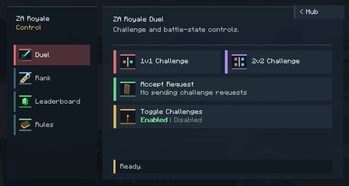
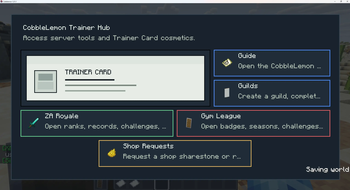
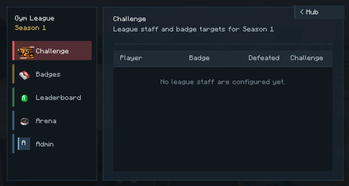
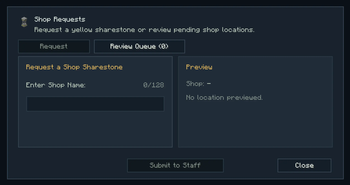
It adds a trainer hub, an in-game guide, gym league menus, ZA Royale battle tools, shop request handling with Waystones support, guilds, command token items, and breeding control features. These systems are designed to give Cobblemon servers more structured progression, player navigation, community features, and admin-managed rewards without needing several separate CobbleLemon addon jars.
Players can use commands such as /hub, /guide, /gym, /za, /requestshop, and /guild to open the mod's main menus and interact with server features. Server staff can configure the included systems through the generated config files and use command tokens or module-specific commands to manage rewards, leagues, events, guilds, and shop requests.
Download this if you run a Cobblemon Fabric server and want a unified set of tools for player hubs, guides, leagues, guilds, requests, event battles, and controlled breeding behavior.
Important information before downloading:
- Requires Minecraft 1.21.1, Fabric Loader, Fabric API, Fabric Language Kotlin, Cobblemon, Waystones, and Cobblemon Raid Dens.
- Install the mod on the server and on players' clients so the menus, packets, items, and screens work correctly.
- This unified mod replaces the older separate CobbleLemon jars. Do not run it together with the old commandtokens, cobblelemon_hub, cobblelemon_guide, cobblelemon_gym_league, zaroyale, shoprequestwaystones, cobblelemon_guilds, or disablebreeding jars.
- LuckPerms is recommended for permission-based server setups.
- Optional integrations include Open Parties and Claims, Cobbledollars, Styled Chat, Placeholder API, Styled Nicknames, Cobbreeding, Unchained, Exposure, and CasinoRocket.
Available Versions
How to Install CobbleLemon Systems on Your Server
Order Server
Order a Minecraft Java server with at least 3 GB RAM (4 GB recommended).
Set fabric Loader
In the panel under "Egg", select the fabric loader and matching Minecraft version (1.21.1).
Install Mod
Open the mod browser in the dashboard and search for "CobbleLemon Systems". Click "Install" – done! Alternatively, upload the .jar via SFTP to the /mods folder.
Compatibility
Mod Loaders
Minecraft Versions
1.21.1
Server-side
✓ RequiredRecommended RAM
4 GB(min. 3 GB)Frequently Asked Questions
CobbleLemon Systems server crashes on startup – what to do?
Most common cause: wrong fabric version or insufficient RAM. Check the server log (latest.log) for "OutOfMemoryError" or "Mixin" errors. With Mado Hosting: ensure at least 3 GB RAM is allocated and the loader matches the mod version (1.21.1). You can switch loaders with one click in the panel.
Is CobbleLemon Systems compatible with fabric?
CobbleLemon Systems officially supports fabric for Minecraft 1.21.1. The Mado dashboard automatically detects incompatible loader combinations.
Server lagging with CobbleLemon Systems – how to optimize performance?
Recommended RAM: 4 GB (per 8 players). Use /spark profiler to check if CobbleLemon Systems consumes the most tick time. Common fixes: reduce server view-distance to 8-10, install "performant" or "starlight" as supplementary mods on Forge. With Mado Hosting, your server runs on NVMe SSDs with dedicated CPU cores for minimal latency.
Rent Modded Server
Install CobbleLemon Systems with just one click on your server.