Cobblemon - Advanced Move inspector
Cobblemon – Move Inspector is a lightweight addon for Cobblemon that enhances the battle interface by showing detailed information about each move directly in combat.
About this Mod
Cobblemon - Advanced Move inspector
Modloader: Fabric
Overview
Move Info Overlay is a quality-of-life mod for Cobblemon that adds a detailed tooltip interface when selecting moves during battle. It provides crucial information like type, category, accuracy, and effectiveness in a clean, accessible way.
This mod is perfect for competitive players and casual fans alike who want to make better decisions in battle without leaving the game screen.
Features
🧠 Contextual Move Information
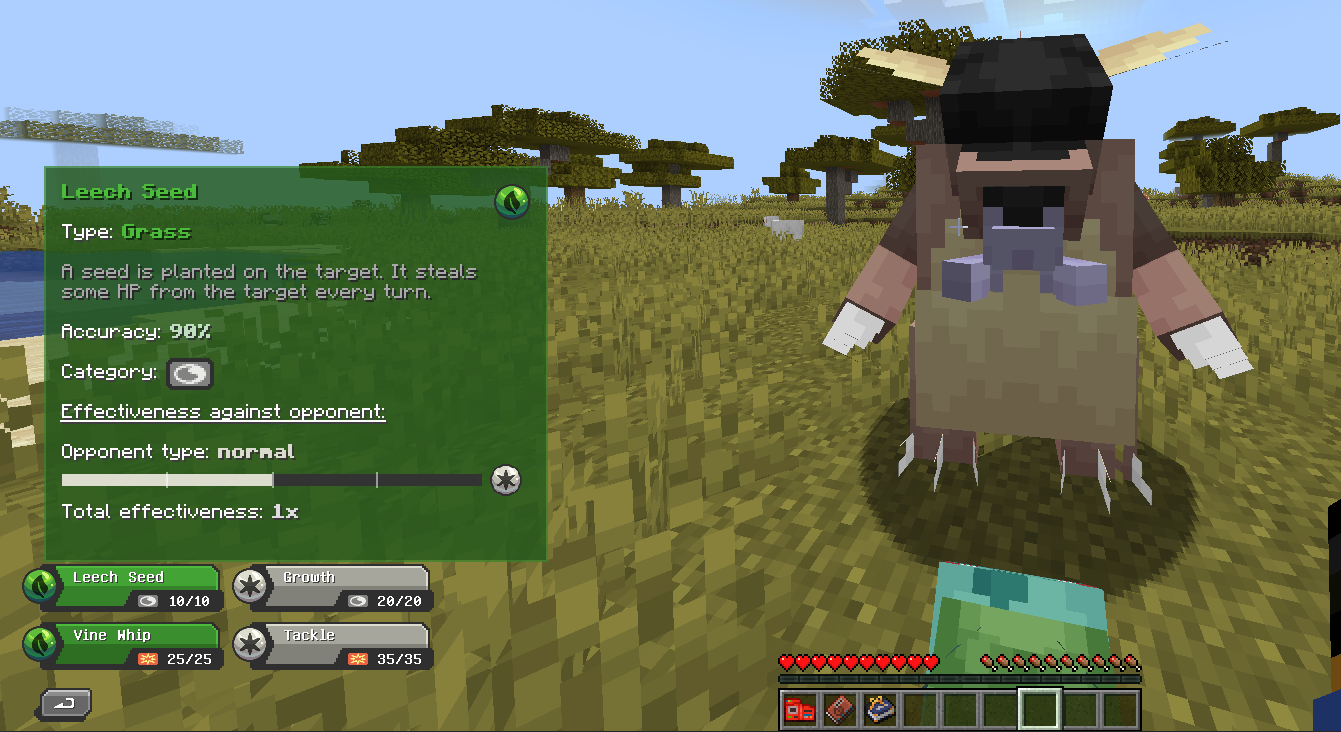
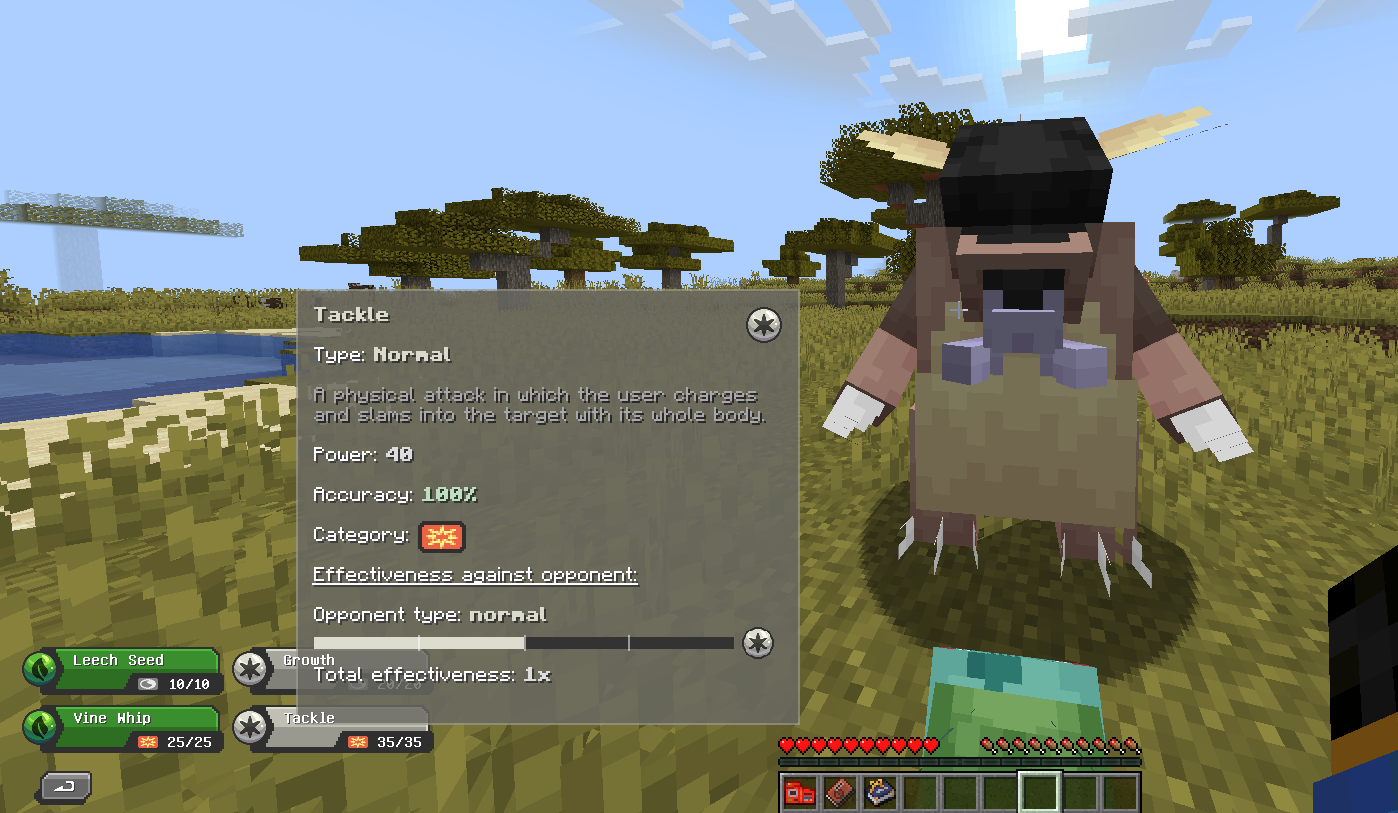
When you're in a battle and hovering over a move, a tooltip appears displaying:
- Move Name
- Type (e.g., Grass, Fire, Psychic)
- Category (Physical, Special, or Status)
- Accuracy
- Effect (e.g., heals user, inflicts status, etc.)
- Effectiveness against the current target
🎯 Effectiveness Insights
The tooltip dynamically calculates type effectiveness based on the opponent's type(s), showing:
- Effectiveness multiplier (e.g., 0.5x, 1x, 2x)
- Opponent's type for reference
This helps players decide whether the move is worth using or if another one would be more effective.
Installation
- Install Fabric Loader for Minecraft 1.20.1.
- Install Fabric API.
- Download and install Cobblemon.
- Drop the
CobblemonMoveInspectormod.jarfile into your/modsfolder.
⚠️ Requires Cobblemon to function. This is an addon, not a standalone mod.
Compatibility
- ✅ Fabric 1.20.1
- ❌ Not compatible with Forge
- ❌ Not compatible with versions of Minecraft below 1.20.1
Roadmap
- Base tooltip with move info
- Effectiveness logic
- Configurable themes or tooltip styles
License
This mod is open-source under the MIT License. Contributions and pull requests are welcome!
Available Versions
How to Install Cobblemon - Advanced Move inspector on Your Server
Order Server
Order a Minecraft Java server with at least 3 GB RAM (4 GB recommended).
Set fabric Loader
In the panel under "Egg", select the fabric loader and matching Minecraft version (1.20.1).
Install Mod
Open the mod browser in the dashboard and search for "Cobblemon - Advanced Move inspector". Click "Install" – done! Alternatively, upload the .jar via SFTP to the /mods folder.
Compatibility
Mod Loaders
Minecraft Versions
1.20.1
Server-side
✗ UnsupportedRecommended RAM
4 GB(min. 3 GB)Frequently Asked Questions
Cobblemon - Advanced Move inspector server crashes on startup – what to do?
Most common cause: wrong fabric version or insufficient RAM. Check the server log (latest.log) for "OutOfMemoryError" or "Mixin" errors. With Mado Hosting: ensure at least 3 GB RAM is allocated and the loader matches the mod version (1.20.1). You can switch loaders with one click in the panel.
Is Cobblemon - Advanced Move inspector compatible with fabric?
Cobblemon - Advanced Move inspector officially supports fabric for Minecraft 1.20.1. The Mado dashboard automatically detects incompatible loader combinations.
Server lagging with Cobblemon - Advanced Move inspector – how to optimize performance?
Recommended RAM: 4 GB (per 8 players). Use /spark profiler to check if Cobblemon - Advanced Move inspector consumes the most tick time. Common fixes: reduce server view-distance to 8-10, install "performant" or "starlight" as supplementary mods on Forge. With Mado Hosting, your server runs on NVMe SSDs with dedicated CPU cores for minimal latency.
Similar Mods




Rent Modded Server
Install Cobblemon - Advanced Move inspector with just one click on your server.