Cobblemon Arena
Cobblemon Arena PvP Adds structured competitive PvP to your Cobblemon server with ranked matchmaking, tournaments, and full Discord integration.
Screenshots
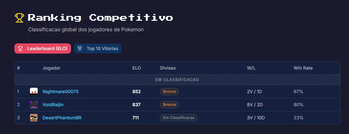
About this Mod
Cobblemon Arena PvP
Competitive PvP system for Cobblemon servers. Battle in arenas with ranked matchmaking, climb the leaderboard, and compete in automated tournaments — all integrated with Discord.
Getting Started — Free License
This mod requires a license key to activate. The license is completely free and valid for unlimited use — no payments, no expiration.
We use the license system solely to track bugs and monitor how the mod behaves across different servers during this testing phase.
How to get your license:
- Join our Discord server
- Go to the #request-help-license channel
- Request your free license key
- Add the key to your config file under
license_key
That's it — you're ready to go!
How It Works
Players challenge each other or join a matchmaking queue. The mod teleports both players to a random arena, starts a Cobblemon battle, and tracks the result. After the match, players return to their original position and rankings update automatically.
Ranked System
- ELO-based matchmaking with divisions: Bronze, Silver, Gold, Platinum, Diamond, Master
- Placement matches before your first rank
- Promotion and demotion between divisions
- Separate Normal and Ranked queues
- Boss bar showing queue status
Tournaments
- Weekly tournament polls via Discord (day, time, banned Pokemon)
- Sign-up through Discord button — no need to be in-game
- Dynamic slots: starts at 10, expands up to 20
- Auto-generated single-elimination brackets with ELO seeding
- 1-5 simultaneous battles with automatic W.O. for no-shows
- Live Discord embeds updated each round
- Automatic prizes and champion trophies on the website
Discord Integration
- Embedded Discord bot — no external setup needed
- Leaderboard and player stats commands
- Rich embeds for every match result
- Tournament sign-ups, bracket reveals, and live updates
- Auto role assignment on account link
- Slash command
/linkarto link Minecraft and Discord accounts
Boss Raids
- Manual boss raids via admin command or automatic spawning on a timer
- Optional RaidDens mod integration (zero hard dependencies)
- Damage-based XP rewards with ranking
- Discord notifications for spawn, defeat, and expiration
Website Integration
- Replay capture in Pokemon Showdown format
- Leaderboard, match history, and replay sync via HTTP API
- Champion trophies sent to website after tournaments
Player Commands
| Command | Description |
|---|---|
/challenge <player> |
Challenge a player to a duel |
/challenge accept |
Accept a pending challenge |
/challenge decline |
Decline a pending challenge |
/normal |
Join the Normal (casual) queue |
/ranked |
Join the Ranked queue (requires 10 Pokemon) |
/leave |
Leave any queue |
/matchaccept |
Accept a ranked match |
/matchdecline |
Decline a ranked match |
/arena spec [arena] |
Spectate an active duel |
/bossraid join |
Join an active boss raid |
/carena banlist |
View tournament banned Pokemon |
/carena link |
Generate code to link Discord account |
/carena link status |
Check Discord link status |
/carena unlink |
Unlink Discord account |
Admin Commands
All admin commands require the carena.admin permission.
| Command | Description |
|---|---|
/carena admin arenaset <name> |
Create arena at current location |
/carena admin arenasetspec <arena> |
Set spectator point for arena |
/carena admin arenalist |
List all arenas with status |
/carena admin arenadelete <name> |
Delete an arena |
/carena admin bossraid start <pokemon> <level> |
Spawn a boss raid |
/carena admin bossraid stop |
Stop active boss raid |
/carena admin bossraid status |
Show boss raid details |
/carena admin sync |
Force sync ranking data to web API |
/carena admin banlist add <pokemon> |
Add Pokemon to tournament ban list |
/carena admin banlist remove <pokemon> |
Remove Pokemon from tournament ban list |
/carena admin prize set |
Capture admin inventory as tournament prizes |
/carena admin tournament status |
Show tournament state |
/carena admin tournament cancel |
Cancel active tournament |
/carena admin tournament force |
Force poll posting (testing) |
Discord Bot Commands
| Command | Description |
|---|---|
/linkar <code> |
Link Minecraft account using 6-digit code |
!rank |
Show paginated leaderboard |
!rank <player> |
Show specific player stats |
!banlist |
Show tournament banned Pokemon |
!torneio |
Show next tournament info |
!tournament history |
Show last 10 tournaments |
Permissions
Admin (default: OP level 2):
| Permission | Description |
|---|---|
carena.admin |
Access all admin commands |
carena.admin.arena |
Manage arenas |
carena.admin.bossraid |
Manage boss raids |
carena.admin.sync |
Force sync to web API |
carena.bypass.boundary |
Bypass arena boundary ejection |
Player (default: everyone):
| Permission | Description |
|---|---|
carena.play.normal |
Join normal queue |
carena.play.ranked |
Join ranked queue |
carena.play.challenge |
Challenge other players |
carena.play.spectate |
Spectate matches |
carena.play.bossraid |
Join boss raids |
Configuration
The config file is located at carena/carena-server.toml in the server world directory.
General
| Option | Default | Description |
|---|---|---|
language |
pt_br |
Language (pt_br or en_us) |
Battle
| Option | Default | Description |
|---|---|---|
enable_battle_logging |
true |
Enable detailed battle logging |
battle_timeout |
10 |
Battle timeout in minutes (1-60) |
challenge_timeout |
30 |
Challenge accept timeout in seconds (10-120) |
Arena
| Option | Default | Description |
|---|---|---|
default_radius |
20 |
Default arena radius in blocks (5-100) |
Boss Raid
| Option | Default | Description |
|---|---|---|
spawn_radius |
500 |
Max spawn distance from world spawn (50-5000) |
auto_enabled |
false |
Enable automatic boss raid spawning |
auto_interval_hours |
4 |
Hours between automatic spawns (1-24) |
duration_minutes |
120 |
Minutes before boss disappears (10-480) |
boss_pool |
mewtwo:100,... |
Comma-separated pokemon:level list |
base_xp_reward |
5000 |
Base XP per Pokemon, scaled by damage % (100-100000) |
raiddens_enabled |
false |
Enable RaidDens mod integration |
Web API
| Option | Default | Description |
|---|---|---|
web_enabled |
false |
Enable web API sync |
web_api_url |
"" |
Web API base URL |
web_api_key |
"" |
Secret API key for authentication |
Discord
| Option | Default | Description |
|---|---|---|
webhook_enabled |
false |
Enable Discord webhooks |
webhook_url |
"" |
Discord webhook URL for match results |
status_webhook_url |
"" |
Separate webhook for server status messages |
notify_duel_result |
true |
Send duel result embeds |
notify_promotion |
true |
Send division promotion embeds |
notify_boss_spawn |
true |
Send boss spawn notifications |
notify_boss_defeated |
true |
Send boss defeat notifications |
notify_boss_expired |
true |
Send boss expiration notifications |
notify_server_start |
true |
Send server start notification |
notify_server_stop |
true |
Send server stop notification |
notify_match_found |
false |
Send match found notifications |
notify_arena_change |
false |
Send arena change notifications |
notify_queue_activity |
false |
Send queue activity notifications |
bot_enabled |
false |
Enable embedded Discord bot |
bot_token |
"" |
Discord bot token |
bot_channel_id |
"" |
Channel ID for bot responses |
cargo_id_link |
"" |
Role ID to assign on account link |
Tournament
| Option | Default | Description |
|---|---|---|
tournament_enabled |
false |
Enable weekly tournaments |
poll_hour |
10 |
Hour for Saturday polls (0-23) |
tournament_channel_ids |
[] |
Channel IDs for tournament announcements |
admin_channel_id |
"" |
Channel for admin tournament results |
enrollment_initial_slots |
10 |
Initial player slots (4-20) |
enrollment_max_slots |
20 |
Maximum player slots (4-20) |
enrollment_slot_increment |
2 |
Slots added when filled (2-4) |
bracket_announce_hours |
24 |
Hours before tournament for bracket reveal (1-72) |
max_concurrent_battles |
3 |
Max simultaneous tournament battles (1-5) |
Requirements
- Minecraft 1.21.1
- NeoForge
- Cobblemon 1.7.3+
- Java 21
- Server-side only
Optional Integrations
- RaidDens — Enable
raiddens_enabledfor automatic raid integration - Website — Enable
web_enabledand configure API URL for leaderboard, replays, and trophies - Discord Webhooks — Enable
webhook_enabledfor match result embeds - Discord Bot — Enable
bot_enabledfor interactive leaderboard and tournament system
Languages
- English (en_us)
- Brazilian Portuguese (pt_br)
Available Versions
How to Install Cobblemon Arena on Your Server
Order Server
Order a Minecraft Java server with at least 3 GB RAM (4 GB recommended).
Set neoforge Loader
In the panel under "Egg", select the neoforge loader and matching Minecraft version (1.21.9).
Install Mod
Open the mod browser in the dashboard and search for "Cobblemon Arena". Click "Install" – done! Alternatively, upload the .jar via SFTP to the /mods folder.
Compatibility
Mod Loaders
Minecraft Versions
1.21.9, 1.21.8, 1.21.7 (+6 more)
Server-side
✓ RequiredRecommended RAM
4 GB(min. 3 GB)Frequently Asked Questions
Cobblemon Arena server crashes on startup – what to do?
Most common cause: wrong neoforge version or insufficient RAM. Check the server log (latest.log) for "OutOfMemoryError" or "Mixin" errors. With Mado Hosting: ensure at least 3 GB RAM is allocated and the loader matches the mod version (1.21.9). You can switch loaders with one click in the panel.
Is Cobblemon Arena compatible with neoforge?
Cobblemon Arena officially supports neoforge for Minecraft 1.21.9, 1.21.8, 1.21.7. The Mado dashboard automatically detects incompatible loader combinations.
Server lagging with Cobblemon Arena – how to optimize performance?
Recommended RAM: 4 GB (per 8 players). Use /spark profiler to check if Cobblemon Arena consumes the most tick time. Common fixes: reduce server view-distance to 8-10, install "performant" or "starlight" as supplementary mods on Forge. With Mado Hosting, your server runs on NVMe SSDs with dedicated CPU cores for minimal latency.
Similar Mods




Rent Modded Server
Install Cobblemon Arena with just one click on your server.