
Cobblemon Broadcaster
Notifies the global chat when a Shiny, Legendary, Ultra Beast, or custom-aspect Pokémon spawns near a player.
Screenshots
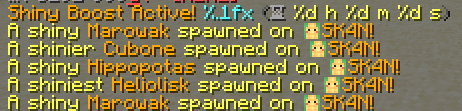
About this Mod
📣 Cobblemon Broadcaster: Real-Time Spawn Announcements! ✨
Cobblemon Broadcaster is a powerful tool for real-time announcements on Pokémon spawns, captures, and defeats, supporting Shiny, Legendary, Mythical, and Ultra Beast Pokémon!
🔧 Key Features
- Custom Messages: Adjust spawn, capture, and faint messages to fit your style.
- Control Broadcasts: Toggle announcements for specific Pokémon tiers.
- Dynamic Placeholders: Use
{pokemon}and{player}for personalized messages. - Custom Aspects Support: Add and configure new Pokémon aspects with custom messages.
- World Blacklist: Prevent broadcasts in specific worlds.
📄 Example Configuration
# DON'T TOUCH Config-Version OR THINGS WILL BREAK
Config-Version: 1.0.0

shiny:
  enabled: true
  SpawnMessage: "<yellow>A shiny <gold>{pokemon} <yellow>spawned near <gold>{player}!"
  FaintMessage: "<red>A shiny <dark_red>{pokemon}<red> has fainted."
  CaptureMessage: "<yellow>A shiny <gold>{pokemon} <yellow>has been captured by <gold>{player}!"

legendary:
  enabled: true
  SpawnMessage: "<green>A Legendary <dark_green>{pokemon} <green>has spawned near <dark_green>{player}!"
  FaintMessage: "<red>A Legendary <dark_red>{pokemon}<red> has fainted."
  CaptureMessage: "<green>A Legendary <dark_green>{pokemon} <green>has been captured by <dark_green>{player}!"

mythical:
  enabled: true
  SpawnMessage: "<light_purple>A Mythical <dark_purple>{pokemon} <light_purple>has spawned near <dark_purple>{player}!"
  FaintMessage: "<red>A Mythical <dark_red>{pokemon}<red> has fainted."
  CaptureMessage: "<light_purple>A Mythical <dark_purple>{pokemon} <light_purple>has been captured by <dark_purple>{player}!"

ultrabeast:
  enabled: true
  SpawnMessage: "<aqua>An Ultra Beast <dark_aqua>{pokemon} <aqua>has spawned near <dark_aqua>{player}!"
  FaintMessage: "<red>An Ultra Beast <dark_red>{pokemon}<red> has fainted."
  CaptureMessage: "<aqua>An Ultra Beast <dark_aqua>{pokemon} <aqua>has been captured by <dark_aqua>{player}!"
🔧 Cobblemon Broadcaster - Custom Aspects Support
This feature allows you to define new aspects with custom messages.
⚙️ Example Config:
shinier:
  enabled: true
  SpawnMessage: "A shinier {pokemon} has spawned!"
  FaintMessage: "A shinier {pokemon} fainted."
  CaptureMessage: "A shinier {pokemon} was captured!"
This configuration demonstrates how to add a Shinier Pokémon aspect. You can create as many custom aspects as you like and tailor the messages to your needs!
🚫 World Blacklist Support
Cobblemon Broadcaster can also be configured to disable broadcasts in specific worlds.
📄 Example world-blacklist.yml:
# DON'T TOUCH Config-Version OR THINGS WILL BREAK
Config-Version: 1.1.0

# Worlds that should not have any broadcasts
Blacklisted-Worlds:
  - "minecraft:test_world"
Use this feature to prevent spam in specific worlds or tailor your announcement settings per environment.
Available Versions
How to Install Cobblemon Broadcaster on Your Server
Order Server
Order a Minecraft Java server with at least 3 GB RAM (4 GB recommended).
Set fabric Loader
In the panel under "Egg", select the fabric loader and matching Minecraft version (1.21.10).
Install Mod
Open the mod browser in the dashboard and search for "Cobblemon Broadcaster". Click "Install" – done! Alternatively, upload the .jar via SFTP to the /mods folder.
Compatibility
Mod Loaders
Minecraft Versions
1.21.10, 1.21.9, 1.21.8 (+8 more)
Server-side
✓ RequiredRecommended RAM
4 GB(min. 3 GB)Frequently Asked Questions
Cobblemon Broadcaster server crashes on startup – what to do?
Most common cause: wrong fabric version or insufficient RAM. Check the server log (latest.log) for "OutOfMemoryError" or "Mixin" errors. With Mado Hosting: ensure at least 3 GB RAM is allocated and the loader matches the mod version (1.21.10). You can switch loaders with one click in the panel.
Is Cobblemon Broadcaster compatible with fabric?
Cobblemon Broadcaster officially supports fabric for Minecraft 1.21.10, 1.21.9, 1.21.8. The Mado dashboard automatically detects incompatible loader combinations.
Server lagging with Cobblemon Broadcaster – how to optimize performance?
Recommended RAM: 4 GB (per 8 players). Use /spark profiler to check if Cobblemon Broadcaster consumes the most tick time. Common fixes: reduce server view-distance to 8-10, install "performant" or "starlight" as supplementary mods on Forge. With Mado Hosting, your server runs on NVMe SSDs with dedicated CPU cores for minimal latency.
Similar Mods




Rent Modded Server
Install Cobblemon Broadcaster with just one click on your server.