
Cobblemon Dailies
Daily quests for the Cobblemon mod! Comes with configuration options including quest rewards, daily reset toggle and time, and HUD toggling!
Screenshots
About this Mod
Cobblemon Dailies
Add engaging daily quests to your Cobblemon server!
Cobblemon Dailies adds on top of the popular Cobblemon minecraft mod to add a daily activity for players on multiplayer servers.
Features
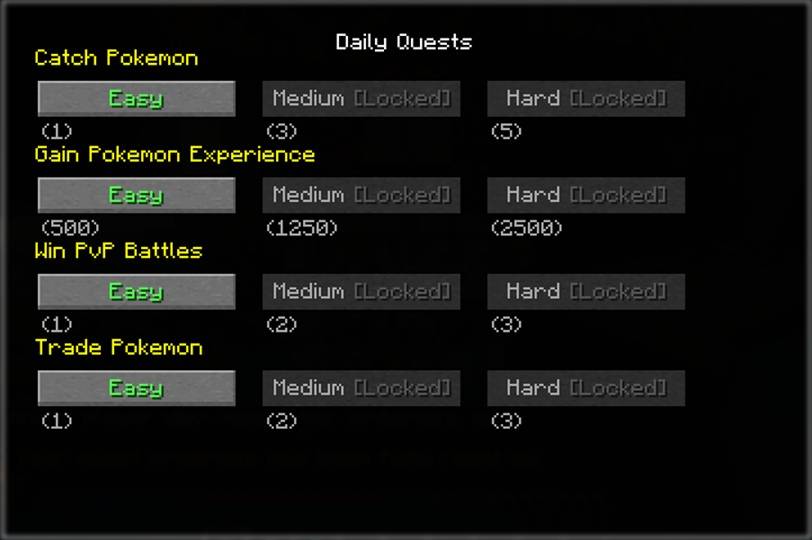
Four Quest Types: Catch Pokémon, gain experience, win PvP battles, and trade with players Daily Reset System: Timezone-aware daily quest resets keep players coming back

Quest Giver NPCs: Transform any NPC into a quest giver with simple commands
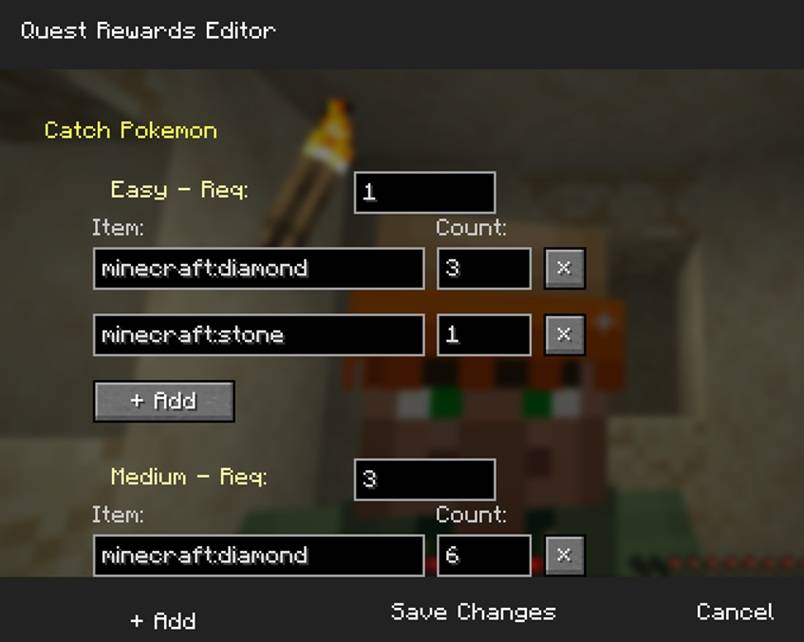
Configurable Rewards: in game reward system editor for server admins to set appropriate rewards for all quest tiers.

How It Works
- Server admins designate NPCs as quest givers using
/cmquestnpc designate. - Players right-click quest NPCs to open the quest selection interface
- Choose daily quests from catch, experience, PvP, or trading challenges
- Complete objectives with real-time progress tracking
- Claim rewards when quests are finished, unlocking the next difficulty!
Configuration
Easily customize:
- Daily reset times and timezones
- Reward items and amounts for each quest type
- Enable/disable daily limitations
- Quest parameters and difficulty
Admin Commands
New & changed with V2.0.0+
/cmquest edit_rewards- Opens the reward editor/cmquest reset_player <player_name>- resets the player's daily cooldown (primarily for testing)/cmquest full_reset_player <player_name>- resets the player's quest data
The following commands continue to exist, but versions earlier than 2.0.0 may have a slightly different function.
/cmquestnpc designate- Make NPCs into quest givers - interacting with an already designated NPC removes them as a quest giver/cmquestnpc remove- Removes selected NPC as a designated quest NPC/cmquestnpc list- View all quest NPCs with coordinates/cmquestnpc clear- Removes all designated quest NPCs/cmquest debug_*- Debug commands for testing/cmquest reset_player <player_name>- resets the player's quest data
Player Experience
- J key toggles quest progress HUD
- Automatic synchronization across server restarts
- Visual feedback for quest availability and progress
Available Versions
How to Install Cobblemon Dailies on Your Server
Order Server
Order a Minecraft Java server with at least 3 GB RAM (4 GB recommended).
Set fabric Loader
In the panel under "Egg", select the fabric loader and matching Minecraft version (1.21.1).
Install Mod
Open the mod browser in the dashboard and search for "Cobblemon Dailies". Click "Install" – done! Alternatively, upload the .jar via SFTP to the /mods folder.
Compatibility
Mod Loaders
Minecraft Versions
1.21.1
Server-side
✓ RequiredRecommended RAM
4 GB(min. 3 GB)Frequently Asked Questions
Cobblemon Dailies server crashes on startup – what to do?
Most common cause: wrong fabric version or insufficient RAM. Check the server log (latest.log) for "OutOfMemoryError" or "Mixin" errors. With Mado Hosting: ensure at least 3 GB RAM is allocated and the loader matches the mod version (1.21.1). You can switch loaders with one click in the panel.
Is Cobblemon Dailies compatible with fabric and neoforge?
Cobblemon Dailies officially supports fabric, neoforge for Minecraft 1.21.1. The Mado dashboard automatically detects incompatible loader combinations.
Server lagging with Cobblemon Dailies – how to optimize performance?
Recommended RAM: 4 GB (per 8 players). Use /spark profiler to check if Cobblemon Dailies consumes the most tick time. Common fixes: reduce server view-distance to 8-10, install "performant" or "starlight" as supplementary mods on Forge. With Mado Hosting, your server runs on NVMe SSDs with dedicated CPU cores for minimal latency.
Similar Mods




Rent Modded Server
Install Cobblemon Dailies with just one click on your server.