
Cobblemon Fossil Deposits
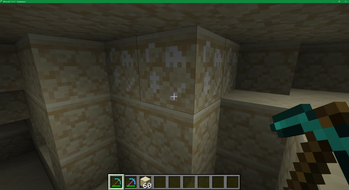
Adds fossil deposits in sandstone, red sandstone, and deeplate that serve as an alternative means to find Cobblemon fossil items.
Screenshots
About this Mod
Cobblemon Fossil Deposits
Adds fossil deposits to sandstone, red sandstone, and deepslate. These basically behave like ore blocks (but without necessarily forming classical veins), including support for Silk Touch and Fortune enchantments (note that the latter is currently broken in vanilla because of 🪲 this bug, so this mod includes a bugfix for that to make it work).
The generation of those blocks should be relatively rare, while still making fossils more accessible than by purely relying on archaeology drops.
Fossil beds in deepslate will be rarer and smaller than those in either kind of sandstone.
API
Included is a new event (FossilExcavationEvents.FOSSIL_EXCAVATED) that fires when a fossil deposit drops a fossil, so other mods can react to that as they wish. The drop is not cancellable, but it is possible to modify the dropped item stack.
Available Versions
How to Install Cobblemon Fossil Deposits on Your Server
Order Server
Order a Minecraft Java server with at least 3 GB RAM (4 GB recommended).
Set fabric Loader
In the panel under "Egg", select the fabric loader and matching Minecraft version (1.21.11).
Install Mod
Open the mod browser in the dashboard and search for "Cobblemon Fossil Deposits". Click "Install" – done! Alternatively, upload the .jar via SFTP to the /mods folder.
Compatibility
Mod Loaders
Minecraft Versions
1.21.11, 1.21.10, 1.21.9 (+8 more)
Server-side
✓ RequiredRecommended RAM
4 GB(min. 3 GB)Frequently Asked Questions
Cobblemon Fossil Deposits server crashes on startup – what to do?
Most common cause: wrong fabric version or insufficient RAM. Check the server log (latest.log) for "OutOfMemoryError" or "Mixin" errors. With Mado Hosting: ensure at least 3 GB RAM is allocated and the loader matches the mod version (1.21.11). You can switch loaders with one click in the panel.
Is Cobblemon Fossil Deposits compatible with fabric?
Cobblemon Fossil Deposits officially supports fabric for Minecraft 1.21.11, 1.21.10, 1.21.9. The Mado dashboard automatically detects incompatible loader combinations.
Server lagging with Cobblemon Fossil Deposits – how to optimize performance?
Recommended RAM: 4 GB (per 8 players). Use /spark profiler to check if Cobblemon Fossil Deposits consumes the most tick time. Common fixes: reduce server view-distance to 8-10, install "performant" or "starlight" as supplementary mods on Forge. With Mado Hosting, your server runs on NVMe SSDs with dedicated CPU cores for minimal latency.
Rent Modded Server
Install Cobblemon Fossil Deposits with just one click on your server.