
Cobblemon: Nests & Dens
A Cobblemon side mod, adding in poke nests and dens . Allowing you to find random pokemon eggs.
Screenshots
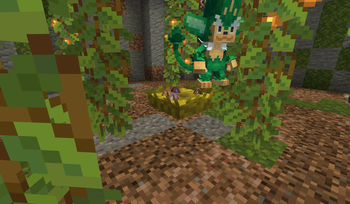
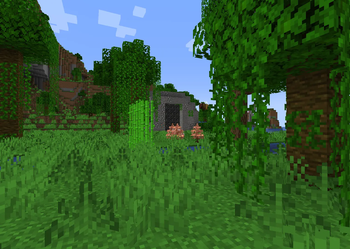
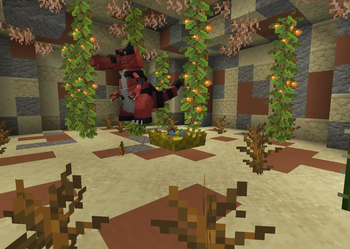
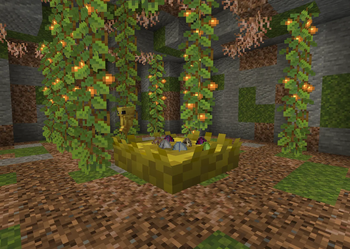
About this Mod
This addon expands the Cobblemon experience by introducing Nests and Dens, bringing a new layer of exploration and reward to your world.
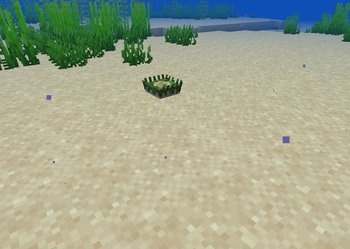
Nests can be found scattered throughout the Minecraft world.
Interacting with a nest rewards the player with a random Pokémon egg, encouraging exploration and discovery.
Treats can be created and used with nests to increase the chance of that Pokémon type egg will spawn.
They can be created in the Cooking Pot.
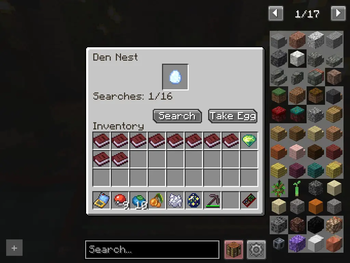
Dens offer a more advanced experience, inspired by Monster Hunter Stories. Players can enter these dens and search throughmedium or large nests for increasingly valuable rewards. Medium nests allow for 1 egg to be taken while the Large nests allow 2 eggs.
Dens come in four rarities:
- Common
- Rare
- Epic
- Legendary
Higher rarity dens provide eggs with improved IVs and EVs.
Legendary dens offer a unique bonus:
- eggs obtained from them have a high chance to hatch into shiny Pokémon.
- a chance to spawn a crystal nest instead of a normal Den nest. This special nest will allow you to potentially get a legendary egg.
However, these rewards come with danger. Each den is guarded by a powerful, high-level hostile Pokémon that cannot be caught. After 4–6 searches, the guardian will awaken and attack. Defeating this guardian increases the rarity of the final egg obtained.
All eggs obtained through nests and dens hatch based on player movement (steps).
Having a Pokémon with Flame Body in your party will reduce the amount of steps needed to have them.
When an egg hatches, it checks whether you have any type of Poké Ball in your inventory.
- If you do, it consumes one ball and automatically catches the hatched Pokémon.
- If you don’t, the Pokémon will simply spawn at your feet.
Future Plans
Spoiler
- Additional den variations- Add scent item to directly affect the rarity of the next den
F.A.Q
Spoiler
Q. How do I enter a den portal? A. To enter a den you need to right-click the portal block. The idea behind this was to control how you entered & exited the portal, prevent the den guardian from leaving and hopefully reduce issues with lag teleporting.Q. Why does my hatched pokemon spawn at my feet?
A. When hatching an egg, it checks whether you have any type of Poké Ball in your inventory
- If you do, it consumes one ball and automatically catches the hatched Pokémon.
- If you don’t, the Pokémon will simply spawn at your feet.
This can be toggled in the common config file
Q. Dens & Nests spawn too (in)frequent. Can this be adjusted?
A. Yes, check the config file to adjust the spawns
Available Versions
How to Install Cobblemon: Nests & Dens on Your Server
Order Server
Order a Minecraft Java server with at least 4 GB RAM (6 GB recommended).
Set fabric Loader
In the panel under "Egg", select the fabric loader and matching Minecraft version (1.21.1).
Install Mod
Open the mod browser in the dashboard and search for "Cobblemon: Nests & Dens". Click "Install" – done! Alternatively, upload the .jar via SFTP to the /mods folder.
Compatibility
Mod Loaders
Minecraft Versions
1.21.1
Server-side
✓ RequiredRecommended RAM
6 GB(min. 4 GB)Frequently Asked Questions
Cobblemon: Nests & Dens server crashes on startup – what to do?
Most common cause: wrong fabric version or insufficient RAM. Check the server log (latest.log) for "OutOfMemoryError" or "Mixin" errors. With Mado Hosting: ensure at least 4 GB RAM is allocated and the loader matches the mod version (1.21.1). You can switch loaders with one click in the panel.
Is Cobblemon: Nests & Dens compatible with fabric and neoforge?
Cobblemon: Nests & Dens officially supports fabric, neoforge for Minecraft 1.21.1. The Mado dashboard automatically detects incompatible loader combinations.
Server lagging with Cobblemon: Nests & Dens – how to optimize performance?
Recommended RAM: 6 GB (per 5 players). Use /spark profiler to check if Cobblemon: Nests & Dens consumes the most tick time. Common fixes: reduce server view-distance to 8-10, install "performant" or "starlight" as supplementary mods on Forge. With Mado Hosting, your server runs on NVMe SSDs with dedicated CPU cores for minimal latency.
Similar Mods




Rent Modded Server
Install Cobblemon: Nests & Dens with just one click on your server.