
Cobblemon Occupied Pokeballs
Eject any party Pokémon as its physical Poké Ball item, hand it to a friend, stash it in a chest, place it on a shelf, or send it straight out into the world.
Screenshots
About this Mod
Cobblemon Occupied Pokéballs
A Cobblemon mod for Minecraft 1.21.1 (Fabric).
Eject any party Pokémon as its physical Poké Ball item, hand it to a friend, stash it in a chest, place it on a shelf, or send it straight out into the world.
Features
- Eject — press T to eject your currently selected party Pokémon as its caught ball
- Reclaim — hold the ball and press T to add it back to your party (or PC if full)
- Send out from hand — hold the ball and press Shift+T to add it to your party and immediately send it out with the full throw animation (only works if your party has space)
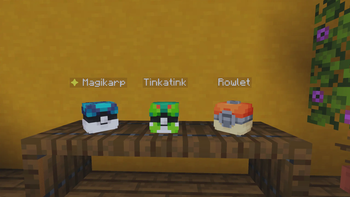
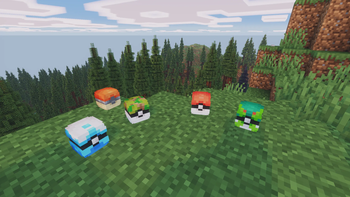
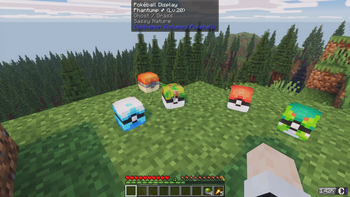
- Pokéball Display — right-click the top face of any solid block while holding an occupied ball to place it as a 3D display; reclaim by breaking it
- Floating name label — placed displays show the Pokémon's name (and ✦ if shiny) as a floating label; toggleable in config
- Jade tooltip — when looking at a placed ball, Jade shows the Pokémon's name, level, type(s), nature, and shiny status
- Ball throwing blocked — occupied balls cannot be thrown; they work only as carriers
- Item tooltip — the ball shows the Pokémon's name, level, gender, type(s), nature, and a ✦ Shiny marker when applicable
- Original ball preserved — a Pokémon caught in a Master Ball drops as a Master Ball, etc.
- Full data preserved — IVs, EVs, moves, ability, nature, held item, nickname, marks — everything round-trips perfectly
- Drop on death (optional, off by default) — configure via ModMenu to drop party balls as items on death; respects the
keepInventorygamerule
All keybinds are rebindable under Options → Controls → Cobblemon Occupied Pokéballs.
Requirements
| Dependency | Version |
|---|---|
| Minecraft | 1.21.1 |
| Fabric Loader | ≥ 0.16.5 |
| Fabric API | ≥ 0.102.0+1.21.1 |
| Fabric Language Kotlin | ≥ 1.13.10+kotlin.2.3.20 |
| Cobblemon (Fabric) | ≥ 1.7.3+1.21.1 |
Optional:
- ModMenu + Cloth Config — in-game config GUI
- Jade — tooltip when looking at a placed Pokéball Display
Without ModMenu/Cloth Config the mod works fully — edit config/cobblemon_occupied_pokeballs.json by hand instead.
Installation
- Install Fabric Loader for 1.21.1
- Drop these into your
mods/folder:cobblemon-occupied-pokeballs-<version>.jar- Fabric API
- Fabric Language Kotlin
- Cobblemon
- Launch with the Fabric profile
For servers: the mod must be installed on both the server and every client.
Configuration
The config file is created automatically at config/cobblemon_occupied_pokeballs.json on first launch:
{
  "showFloatingName": true,
  "dropPartyOnDeath": false
}
| Option | Default | Description |
|---|---|---|
showFloatingName |
true |
Show the Pokémon's name (and ✦ if shiny) as a floating label above placed Pokéball Displays. |
dropPartyOnDeath |
false |
Drop all party Pokémon as ball items on death. Skipped if keepInventory is on. |
If ModMenu and Cloth Config are installed, a Config button appears on the mod's entry in the Mods screen.
Available Versions
How to Install Cobblemon Occupied Pokeballs on Your Server
Order Server
Order a Minecraft Java server with at least 3 GB RAM (4 GB recommended).
Set fabric Loader
In the panel under "Egg", select the fabric loader and matching Minecraft version (1.21.1).
Install Mod
Open the mod browser in the dashboard and search for "Cobblemon Occupied Pokeballs". Click "Install" – done! Alternatively, upload the .jar via SFTP to the /mods folder.
Compatibility
Mod Loaders
Minecraft Versions
1.21.1
Server-side
✓ RequiredRecommended RAM
4 GB(min. 3 GB)Frequently Asked Questions
Cobblemon Occupied Pokeballs server crashes on startup – what to do?
Most common cause: wrong fabric version or insufficient RAM. Check the server log (latest.log) for "OutOfMemoryError" or "Mixin" errors. With Mado Hosting: ensure at least 3 GB RAM is allocated and the loader matches the mod version (1.21.1). You can switch loaders with one click in the panel.
Is Cobblemon Occupied Pokeballs compatible with fabric?
Cobblemon Occupied Pokeballs officially supports fabric for Minecraft 1.21.1. The Mado dashboard automatically detects incompatible loader combinations.
Server lagging with Cobblemon Occupied Pokeballs – how to optimize performance?
Recommended RAM: 4 GB (per 8 players). Use /spark profiler to check if Cobblemon Occupied Pokeballs consumes the most tick time. Common fixes: reduce server view-distance to 8-10, install "performant" or "starlight" as supplementary mods on Forge. With Mado Hosting, your server runs on NVMe SSDs with dedicated CPU cores for minimal latency.
Rent Modded Server
Install Cobblemon Occupied Pokeballs with just one click on your server.