Cobblemon Spawn Notification Discord Integration
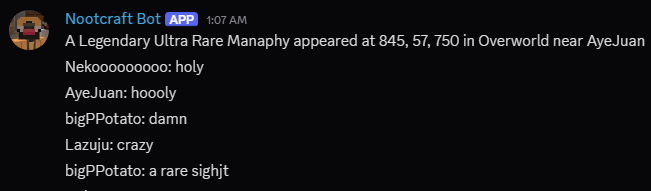
A simple addon/extension mod that bridges tmetcalfe89's Cobblemon Spawn Notification Mod and various Discord Integration Mods
Screenshots
About this Mod
Cobblemon Spawn Notification Discord Integration
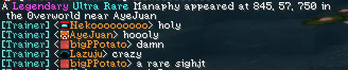
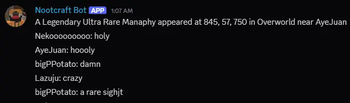
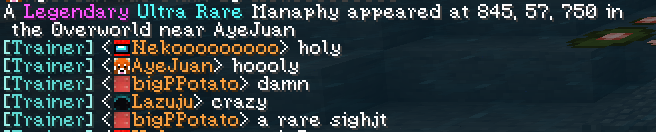
Cobblemon Spawn Notification Discord Integration is an addon/extension for the original Cobblemon Spawn Notification Mod by tmetcalfe89, adding Discord integration to various Discord Integration Mods.
Currently Supported Discord Integration Mods
- Discord Integration by ErdbeerbaerLP
- MC2Discord by DenisD3D
- Discord-MC-Chat by Xujiayao
- Fabricord* by RiriFa
*1.21.1 only
How to Enable
For versions 0.3 and above
No need to change anything in spawn_notification.json now. It should work by default but if you want to it to respect announceCrossDimensions setting from spawn_notification.json, refer to the config section.
For versions 0.2 and below
Currently, the mod only works when announceCrossDimensions is set to true in spawn_notification.json as I thought that would make the most sense.
To enable it:
- Open
spawn_notification.jsoninside theconfig/folder. - Set
"announceCrossDimensions"totrue.
For all versions and using MC2Discord
- Open
mc2discord.tomlinside theconfig/folder. - Add
"cobblemon_spawn_notification_discord"to thesubscriptions = [...]section.
For example:
[Channels]
 [[Channels.Channel]]
  id = 0
  subscriptions = ["info", "chat", "command", "cobblemon_spawn_notification_discord"]
  mode = "WEBHOOK"
Config
The config file for this mod can be found at:config/csn-discord-integration.json
bypassCrossDimension
If set totrue, this will ignore theannounceCrossDimensionsetting fromspawn_notification.jsonwill always broadcast announcements to discord.
If set tofalse, it will follow whatever is set inannounceCrossDimension.
Note: Setting this tofalsewill effectively disable the mod unlessannounceCrossDimensionis also set totrue.
Default:true
⚠ Currently doesn't do anything in version 0.4botName
Sets the display name of the webhook.
Default:"Cobblemon Spawn Notification"botAvatarUrl
Sets the avatar image URL of the webhook.
Commands
/csn-discord reload: Reloads the config
Dependencies
One of the various supported Discord Integration Mods
Credits
This mod is based on the Cobblemon Spawn Notification mod by tmetcalfe89. Full credit to them for the base implementation. Additionally, this mod utilizes various Discord Integration APIs and functions, not limited to; ErdbeerbaerLP, DenisD3D, Xujiayao, RiriFa. Thanks to the developers for their work in making this functionality possible.
Special thanks to tmetcalfe89 for their valuable input towards the mod and allowing me to use their original mod's name for this mod.
Available Versions
How to Install Cobblemon Spawn Notification Discord Integration on Your Server
Order Server
Order a Minecraft Java server with at least 3 GB RAM (4 GB recommended).
Set fabric Loader
In the panel under "Egg", select the fabric loader and matching Minecraft version (1.21.1).
Install Mod
Open the mod browser in the dashboard and search for "Cobblemon Spawn Notification Discord Integration". Click "Install" – done! Alternatively, upload the .jar via SFTP to the /mods folder.
Compatibility
Mod Loaders
Minecraft Versions
1.21.1, 1.20.1
Server-side
✓ RequiredRecommended RAM
4 GB(min. 3 GB)Frequently Asked Questions
Cobblemon Spawn Notification Discord Integration server crashes on startup – what to do?
Most common cause: wrong fabric version or insufficient RAM. Check the server log (latest.log) for "OutOfMemoryError" or "Mixin" errors. With Mado Hosting: ensure at least 3 GB RAM is allocated and the loader matches the mod version (1.21.1). You can switch loaders with one click in the panel.
Is Cobblemon Spawn Notification Discord Integration compatible with fabric and neoforge?
Cobblemon Spawn Notification Discord Integration officially supports fabric, neoforge for Minecraft 1.21.1, 1.20.1. The Mado dashboard automatically detects incompatible loader combinations.
Server lagging with Cobblemon Spawn Notification Discord Integration – how to optimize performance?
Recommended RAM: 4 GB (per 8 players). Use /spark profiler to check if Cobblemon Spawn Notification Discord Integration consumes the most tick time. Common fixes: reduce server view-distance to 8-10, install "performant" or "starlight" as supplementary mods on Forge. With Mado Hosting, your server runs on NVMe SSDs with dedicated CPU cores for minimal latency.
Similar Mods






Rent Modded Server
Install Cobblemon Spawn Notification Discord Integration with just one click on your server.