
CobblemonNPCs
CobblemonNPC's is an open source side mod enabling NPC management for server owners inside a config file. This mod was built using https://player.games/create
Screenshots
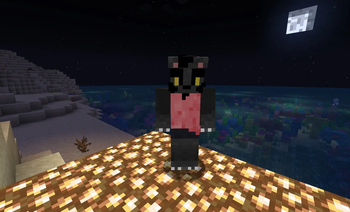
About this Mod
Cobblemon NPCs
Publishd on behalf of one of our users.
Built using https://player.games/create
Features
- Configurable Trainers: Define trainers via YAML configuration with custom names, dialogue, Pokémon teams, and rewards
- Trainer Spawning: Spawn trainer NPCs in-game using commands
- Battle System: Interact with trainers to initiate Pokémon battles using Cobblemon's battle system
- Rewards System: Configure item rewards and command execution upon defeating trainers
- Cooldown System: Set per-trainer cooldowns to prevent repeated battles
- Custom Skins: Apply custom player skins to trainer NPCs
- NPC Protection: Trainers are invulnerable, persistent, and protected from damage/death
Requirements
- Minecraft 1.21.1
- Fabric Loader 0.16.10+
- Fabric API 0.116.5+
- Cobblemon 1.7.0+
- Java 21+
Installation
- Download the latest release JAR file
- Place it in your server's
modsdirectory - Restart your server
- The configuration file will be generated at
config/cobblemonnpcs/trainers.yml
Configuration
The mod generates a default configuration file at config/cobblemonnpcs/trainers.yml. Edit this file to define your trainers:
trainers:
  - trainer_id: "electric_master"
    trainer_name: "Sora"
    battle_dialogue: "Think you can withstand pure voltage?"
    defeat_dialogue: "You really overpowered me!"
    cooldown_hours: 12
    skin: "Sora"
    pokemon_team:
      - species: "cobblemon:raichu"
        level: 55
      - species: "cobblemon:jolteon"
        level: 54
    rewards:
      items:
        - item: "minecraft:diamond"
          count: 2
      commands:
        - "say {player} conquered {trainer}"
Configuration Fields
- trainer_id: Unique identifier for the trainer (lowercase, no spaces)
- trainer_name: Display name shown above the NPC
- battle_dialogue: Dialogue shown when interacting with the trainer
- defeat_dialogue: Message sent to player upon defeating the trainer
- cooldown_hours: Hours before a player can battle this trainer again (default: 12)
- skin: Optional Minecraft username to use as the NPC's skin
- pokemon_team: List of Pokémon species and levels
- species: Pokémon species ID (e.g.,
cobblemon:pikachuorpikachu) - level: Pokémon level (default: 5)
- species: Pokémon species ID (e.g.,
- rewards: Rewards given upon victory
- items: List of items to give
- item: Item ID (e.g.,
minecraft:diamond) - count: Number of items (default: 1)
- item: Item ID (e.g.,
- commands: List of commands to execute (supports
{player}and{trainer}placeholders)
- items: List of items to give
Commands
All commands require OP level 2 (or equivalent permission).
/spawntrainer <trainer_id>
Spawns a trainer NPC at your location.
Example:
/spawntrainer electric_master
/trainerskin <trainer_id> <skin_name>
Updates the skin for all existing instances of a trainer. Use default, clear, off, or none to remove the custom skin.
Examples:
/trainerskin electric_master Notch
/trainerskin electric_master clear
/trainerconfig reload
Reloads the trainer configuration from trainers.yml without restarting the server.
Usage
- Configure Trainers: Edit
config/cobblemonnpcs/trainers.ymlto define your trainers - Reload Config: Run
/trainerconfig reloadto load your changes - Spawn Trainers: Use
/spawntrainer <trainer_id>to spawn trainers in-game - Interact: Right-click on a trainer NPC to open the battle dialogue
- Battle: Select "Battle!" to start a Pokémon battle
- Rewards: Upon victory, players receive configured rewards and must wait for the cooldown before battling again
Building
To build from source:
./gradlew build
The compiled JAR will be in build/libs/.
Technical Details
- Mod ID:
cobblemonnpcs - Environment: Server-side only
- Dependencies: Fabric Loader, Fabric API, Cobblemon
- Configuration: YAML-based via SnakeYAML
- NPC Tracking: Maintains UUID-based tracking of spawned trainer NPCs
- Cooldown Storage: Per-player, per-trainer cooldown tracking
License
All Rights Reserved - PlayerGames LLC
Available Versions
How to Install CobblemonNPCs on Your Server
Order Server
Order a Minecraft Java server with at least 3 GB RAM (4 GB recommended).
Set fabric Loader
In the panel under "Egg", select the fabric loader and matching Minecraft version (1.21.10).
Install Mod
Open the mod browser in the dashboard and search for "CobblemonNPCs". Click "Install" – done! Alternatively, upload the .jar via SFTP to the /mods folder.
Compatibility
Mod Loaders
Minecraft Versions
1.21.10, 1.21.9, 1.21.8 (+7 more)
Server-side
✓ RequiredRecommended RAM
4 GB(min. 3 GB)Frequently Asked Questions
CobblemonNPCs server crashes on startup – what to do?
Most common cause: wrong fabric version or insufficient RAM. Check the server log (latest.log) for "OutOfMemoryError" or "Mixin" errors. With Mado Hosting: ensure at least 3 GB RAM is allocated and the loader matches the mod version (1.21.10). You can switch loaders with one click in the panel.
Is CobblemonNPCs compatible with fabric?
CobblemonNPCs officially supports fabric for Minecraft 1.21.10, 1.21.9, 1.21.8. The Mado dashboard automatically detects incompatible loader combinations.
Server lagging with CobblemonNPCs – how to optimize performance?
Recommended RAM: 4 GB (per 8 players). Use /spark profiler to check if CobblemonNPCs consumes the most tick time. Common fixes: reduce server view-distance to 8-10, install "performant" or "starlight" as supplementary mods on Forge. With Mado Hosting, your server runs on NVMe SSDs with dedicated CPU cores for minimal latency.
Rent Modded Server
Install CobblemonNPCs with just one click on your server.