
Cobblemonteamstudio
Create and add Cobblemon Pokémon directly to your party with a simple in-game admin GUI.
Screenshots
About this Mod
Cobblemon Team Studio
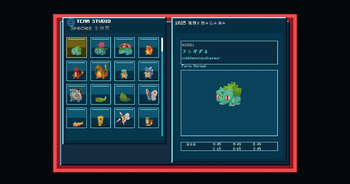
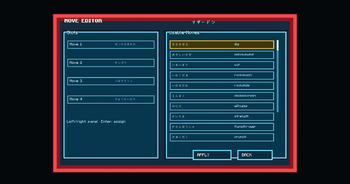
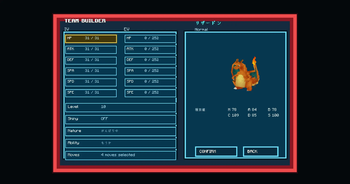
Cobblemon Team Studio provides an in-game GUI that allows you to create Cobblemon Pokémon and add them directly to a player's party.
This mod is intended for situations where preparing Pokémon efficiently is useful, such as server administration, staff work, map creation, and testing environments.
Features
- In-game Team Studio GUI
- Browse and search Cobblemon species
- Configure Pokémon stats from the GUI
- Add created Pokémon directly to your party
Requirements
- Minecraft 1.21.1
- Fabric
- Cobblemon
Cobblemon Team Studio
Cobblemon Team Studio は、ゲーム内GUIからCobblemonのポケモンを作成し、プレイヤーの手持ちに直接追加できる機能を提供します。
サーバー管理者、スタッフ、マップ制作者、テスト環境など、ポケモンの準備を効率化したい場面での使用を想定しています。
主な機能
- ゲーム内のTeam Studio GUI
- Cobblemonのポケモン種族の閲覧・検索
- GUIからポケモンのステータスを指定
- 作成したポケモンを手持ちに直接追加
必要環境
- Minecraft 1.21.1
- Fabric
- Cobblemon
Available Versions
How to Install Cobblemonteamstudio on Your Server
Order Server
Order a Minecraft Java server with at least 3 GB RAM (4 GB recommended).
Set fabric Loader
In the panel under "Egg", select the fabric loader and matching Minecraft version (1.21.1).
Install Mod
Open the mod browser in the dashboard and search for "Cobblemonteamstudio". Click "Install" – done! Alternatively, upload the .jar via SFTP to the /mods folder.
Compatibility
Mod Loaders
Minecraft Versions
1.21.1
Server-side
✓ RequiredRecommended RAM
4 GB(min. 3 GB)Frequently Asked Questions
Cobblemonteamstudio server crashes on startup – what to do?
Most common cause: wrong fabric version or insufficient RAM. Check the server log (latest.log) for "OutOfMemoryError" or "Mixin" errors. With Mado Hosting: ensure at least 3 GB RAM is allocated and the loader matches the mod version (1.21.1). You can switch loaders with one click in the panel.
Is Cobblemonteamstudio compatible with fabric?
Cobblemonteamstudio officially supports fabric for Minecraft 1.21.1. The Mado dashboard automatically detects incompatible loader combinations.
Server lagging with Cobblemonteamstudio – how to optimize performance?
Recommended RAM: 4 GB (per 8 players). Use /spark profiler to check if Cobblemonteamstudio consumes the most tick time. Common fixes: reduce server view-distance to 8-10, install "performant" or "starlight" as supplementary mods on Forge. With Mado Hosting, your server runs on NVMe SSDs with dedicated CPU cores for minimal latency.
Similar Mods






Rent Modded Server
Install Cobblemonteamstudio with just one click on your server.