
Coffee+
Coffee+ adds coffee to Minecraft, the way coffee should be done.
Screenshots

About this Mod

Coffee+ adds coffee to Minecraft, the way coffee should be done.
Plants
Coffee Tree
Right-clicking the ground while holding raw coffee beans will plant a coffee tree. Over time it will grow, and right-clicking a fully-grown tree will give you between 1-3 raw coffee beans.
Coffee trees can spawn in any mountain or mutated extreme hill biome - but remember that you can only gather coffee by right-clicking a grown plant, destroying it won't drop anything.
Blocks
Coffee Machine
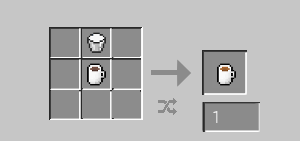
Coffee can be brewed by placing ground coffee within the top slot of a Coffee Machine, an empty mug within the bottom one, and pressing the "Brew" button. This will create a 'Full coffee mug', which can be crafted to create different coffee varieties, as listed below.
Coffee Grinder
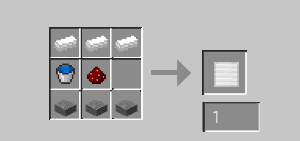
One of the ways that coffee beans can be ground is with a coffee grinder. The coffee grinder must be placed down and does not use up durability over time. To use the coffee grinder, place roasted coffee beans into the grinder and click 'Grind'.
Items
Coffee varieties:
After drinking any variety of coffee, an empty mug will be returned to you. Drinking coffee also applies some potion effects for a short amount of time. The potions and amounts of time vary depending on which coffee variant is drunk. These effects slowly wear off over time, e.g., giving you speed two before slowing it to speed one as the caffeine wears off. The insomnia effect is also applied, which will prevent sleeping after drinking coffee.
Full coffee mug
The Full coffee mug is obtained after using the coffee machine, details of how to do so are listed above.
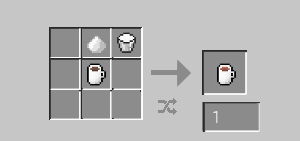
Sugary Coffee
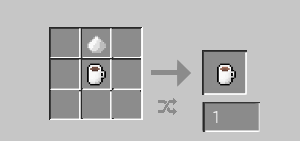
Milky coffee
Sugary milky coffee
Coffee beans:
Raw coffee beans
These are the raw coffee beans that you harvest from a coffee tree. Details of how to collect them are listed above, under the 'Coffee Tree' plant.
Roasted coffee beans
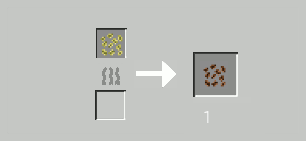
Raw coffee beans can be roasted in a furnace or a smoker, to obtain Roasted coffee beans. These can then be ground down using any variety of coffee grinders, for use in a Coffee machine.
Ground coffee
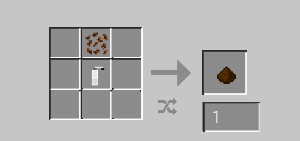
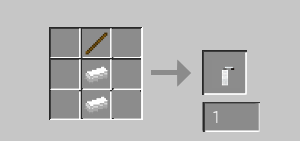
This can be crafted within a crafting grid using the hand grinder (as shown below), or by utilising the coffee grinder block (as shown above)
Mugs:
Clay mug
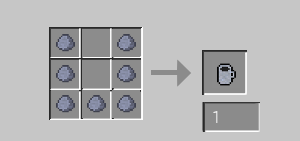
The coffee mug is obtained by gathering 7 clay and crafting a clay mug.
Empty coffee mug
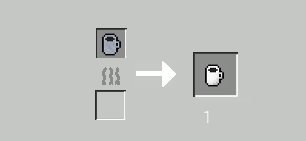
The clay mug must be smelted in a furnace to 'harden' the clay, creating a coffee mug - the item used to hold coffee.
Other:
Hand grinder
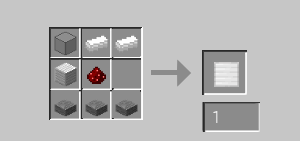
Coffee beans can also be ground with a hand grinder. The hand grinder can be kept in your inventory and loses durability as you use it. To use the hand grinder, place the hand grinder and roasted coffee beans into any shape in a crafting grid. This will use up 1 durability, with a total of 16 uses.
Available Versions
How to Install Coffee+ on Your Server
Order Server
Order a Minecraft Java server with at least 3 GB RAM (4 GB recommended).
Set forge Loader
In the panel under "Egg", select the forge loader and matching Minecraft version (1.18.2).
Install Mod
Open the mod browser in the dashboard and search for "Coffee+". Click "Install" – done! Alternatively, upload the .jar via SFTP to the /mods folder.
Compatibility
Mod Loaders
Minecraft Versions
1.18.2, 1.16.5
Server-side
✓ RequiredRecommended RAM
4 GB(min. 3 GB)Frequently Asked Questions
Coffee+ server crashes on startup – what to do?
Most common cause: wrong forge version or insufficient RAM. Check the server log (latest.log) for "OutOfMemoryError" or "Mixin" errors. With Mado Hosting: ensure at least 3 GB RAM is allocated and the loader matches the mod version (1.18.2). You can switch loaders with one click in the panel.
Is Coffee+ compatible with forge?
Coffee+ officially supports forge for Minecraft 1.18.2, 1.16.5. The Mado dashboard automatically detects incompatible loader combinations.
Server lagging with Coffee+ – how to optimize performance?
Recommended RAM: 4 GB (per 8 players). Use /spark profiler to check if Coffee+ consumes the most tick time. Common fixes: reduce server view-distance to 8-10, install "performant" or "starlight" as supplementary mods on Forge. With Mado Hosting, your server runs on NVMe SSDs with dedicated CPU cores for minimal latency.
Similar Mods



Rent Modded Server
Install Coffee+ with just one click on your server.