
Coin System
A lightweight and optimized shop system with a clean UI, multiple commands, and safe inventory handling.
Screenshots
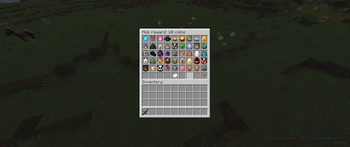
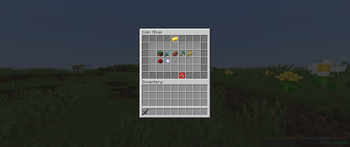
About this Mod
CoinSystem is a lightweight but feature‑rich economy mod for Minecraft servers. Even at only ~67 KB, it includes a complete UI system, a flexible shop, shop management tools, mob rewards, duels, death‑coin penalties, and more than 15 commands for full server‑side control.
The shop is fully customizable, and the UI automatically displays all items that the server owner adds. No manual UI editing is required.
Features:
Clean and fast UI system
15+ commands for economy, shop, and duel control
Lightweight and optimized (~67 KB)
Fully customizable shop
Duel system
Mob reward system
Death coin penalty system
Works on any world or server setup
Player Commands:
/coins – Check your balance
/bal – Show online player balances
/pay
/duel
/duel accept – Accept a duel
/duel decline – Decline a duel
/shop – Show shop prices
/buy
/buy 64
/buy
/mobrewards – Show mob rewards
/coinhelp – Show all commands
Advanced Shop System:
The shop allows players to buy items in multiple ways. The UI automatically updates based on the items added by the server owner. No UI configuration is required.
The shop includes a smart inventory check:
If the player has enough space, all items are given
If the player has limited space, only the available space is filled
The player is only charged for the items actually received
This ensures a fair and safe buying experience.
Admin Commands:
/addcoins
/setcoins
/addshopitem
/removeshopitem
/setbuyprice
/setsellprice
/setmobrewards
/setdeadcoins
Why use this mod:
Extremely lightweight (~64 KB)
Fast, optimized, and clean code
Perfect for SMPs, PvP servers, minigames, and custom gamemodes
Fully customizable shop
UI updates automatically
No external libraries required
Easy to configure
Planned Features:
More UI elements
Custom coin sources (mining, quests)
CoinSystem is designed to be simple, fast, and easy to configure. Ideal for server owners who want a clean and flexible economy system without unnecessary complexity.
Available Versions
How to Install Coin System on Your Server
Order Server
Order a Minecraft Java server with at least 3 GB RAM (4 GB recommended).
Set fabric Loader
In the panel under "Egg", select the fabric loader and matching Minecraft version (1.21.11).
Install Mod
Open the mod browser in the dashboard and search for "Coin System". Click "Install" – done! Alternatively, upload the .jar via SFTP to the /mods folder.
Compatibility
Mod Loaders
Minecraft Versions
1.21.11
Server-side
✓ RequiredRecommended RAM
4 GB(min. 3 GB)Frequently Asked Questions
Coin System server crashes on startup – what to do?
Most common cause: wrong fabric version or insufficient RAM. Check the server log (latest.log) for "OutOfMemoryError" or "Mixin" errors. With Mado Hosting: ensure at least 3 GB RAM is allocated and the loader matches the mod version (1.21.11). You can switch loaders with one click in the panel.
Is Coin System compatible with fabric?
Coin System officially supports fabric for Minecraft 1.21.11. The Mado dashboard automatically detects incompatible loader combinations.
Server lagging with Coin System – how to optimize performance?
Recommended RAM: 4 GB (per 8 players). Use /spark profiler to check if Coin System consumes the most tick time. Common fixes: reduce server view-distance to 8-10, install "performant" or "starlight" as supplementary mods on Forge. With Mado Hosting, your server runs on NVMe SSDs with dedicated CPU cores for minimal latency.
Similar Mods




![CobbleDollars [Cobblemon Addon]](https://cdn.modrinth.com/data/s7N7AsqL/684040a264fc1d7f9b856ec5d2da39767398c7ad.png)
Rent Modded Server
Install Coin System with just one click on your server.