
Coin to shop消费了!
消费了(Cointoshop)是一个轻量的商店/消费系统模组,提供直观的商店 UI、分类标签、排序与渐进式同步,支持服务端/整合包定制。Cointoshop is a lightweight shop system mod that provides an intuitive shop UI, category tabs, sorting, and progressive synchronization, supporting server/modpack customization.
Screenshots
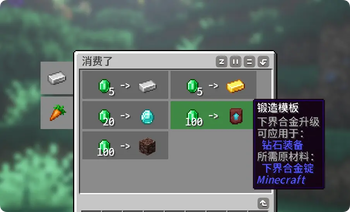
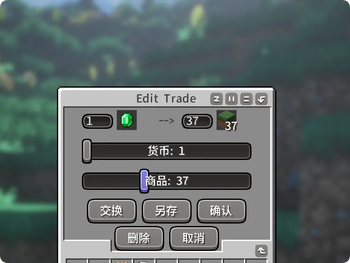
About this Mod
📦 消费了 (Coin To Shop)
消费了 (Cointoshop) 是一个轻量的商店系统模组,提供直观的商店UI、分类标签,并支持管理员在游戏中直观调整交易内容与排序。
本模组最初是为 下单了 (Order To Cook) 提供商店支持而制作,也可独立使用。
✨ 主要功能
| 操作 | 说明 |
|---|---|
| 打开商店 | 默认按 O 键 |
| 浏览分类 | 鼠标移至左侧标签,点击切换 |
| 购买商品 | 鼠标移至内容区网格,显示高亮与详细Tooltip |
| 编辑模式 | OP输入指令 /cts editmode true 进入 |
| 增删排序 | 编辑模式中自由删减商品、拖拽排序 |
| 快速更换 | 编辑模式中打开商品菜单,左右键快速更换交易内容 |
🔧 兼容性说明
- 平台:本模组基于Fabric 1.21.1 模板文件制作
- NeoForge 1.21.1:采用 信雅互联 (Sinytra Connector) 证实可用,但未经多模组环境充分测试
English Version
📦 Coin To Shop
Coin To Shop is a lightweight shop system mod that provides an intuitive shop UI, category tabs, and allows administrators to intuitively adjust trade content and sorting in-game.
This mod was originally created to provide shop support for Order To Cook , but can also be used independently.
✨ Main Features
| Action | Description |
|---|---|
| Open Shop | Press the O key by default |
| Browse Categories | Hover over left-side tabs, click to switch |
| Purchase Items | Hover over content grid to see highlight and detailed tooltip |
| Edit Mode | OP use command /cts editmode true to enter |
| Manage Items | Freely add/delete items and drag to sort in edit mode |
| Quick Swap | Open item menu in edit mode, use left/right clicks to quickly swap trade items |
🔧 Compatibility Notes
- Platform: This mod is built on the Fabric 1.21.1 template
- NeoForge 1.21.1: Confirmed working with Sinytra Connector, but not fully tested in multi-mod environments
Available Versions
How to Install Coin to shop消费了! on Your Server
Order Server
Order a Minecraft Java server with at least 3 GB RAM (4 GB recommended).
Set fabric Loader
In the panel under "Egg", select the fabric loader and matching Minecraft version (1.21.1).
Install Mod
Open the mod browser in the dashboard and search for "Coin to shop消费了!". Click "Install" – done! Alternatively, upload the .jar via SFTP to the /mods folder.
Compatibility
Mod Loaders
Minecraft Versions
1.21.1, 1.20.1
Server-side
✓ RequiredRecommended RAM
4 GB(min. 3 GB)Frequently Asked Questions
Coin to shop消费了! server crashes on startup – what to do?
Most common cause: wrong fabric version or insufficient RAM. Check the server log (latest.log) for "OutOfMemoryError" or "Mixin" errors. With Mado Hosting: ensure at least 3 GB RAM is allocated and the loader matches the mod version (1.21.1). You can switch loaders with one click in the panel.
Is Coin to shop消费了! compatible with fabric?
Coin to shop消费了! officially supports fabric for Minecraft 1.21.1, 1.20.1. The Mado dashboard automatically detects incompatible loader combinations.
Server lagging with Coin to shop消费了! – how to optimize performance?
Recommended RAM: 4 GB (per 8 players). Use /spark profiler to check if Coin to shop消费了! consumes the most tick time. Common fixes: reduce server view-distance to 8-10, install "performant" or "starlight" as supplementary mods on Forge. With Mado Hosting, your server runs on NVMe SSDs with dedicated CPU cores for minimal latency.
Similar Mods






Rent Modded Server
Install Coin to shop消费了! with just one click on your server.