
Colorful Armor
A simple cosmetic mod that adds more armor color customization options.
Screenshots
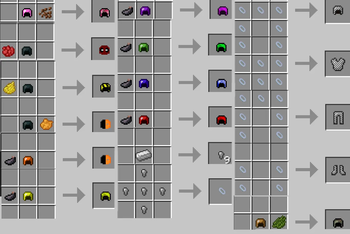
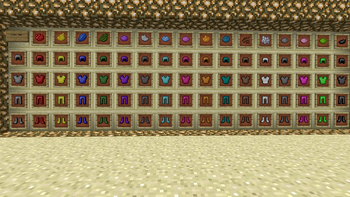
About this Mod
Colorful Armor
Colorful Armor is a simple armor customization mod that allows more armor types to be dyed, giving players extra visual customization options.
The mod is mainly focused on changing the appearance of armor. It does not add a large progression system, custom mobs, structures, quests, or major gameplay mechanics.
Current Features
- Dyeable armor support for more armor types
- Works with multiple dye colors
- Lets players create more personalized armor sets
- Useful for survival, creative, roleplay, and cosmetic-focused modpacks
How It Works
Colorful Armor lets certain armor pieces be colored using dyes.
Depending on the Minecraft version, the exact crafting method or supported armor types may be different. Please check the supported version/files you are using for the correct behavior.
Intended Use
This mod is intended for players and modpacks that want more cosmetic armor variety without changing the game too much.
It can fit well in:
- survival modpacks
- roleplay servers
- cosmetic-focused packs
- creative building worlds
- vanilla-style modpacks
Modpack Use
You are free to include this mod in your modpack.
Development Status
This mod is simple and mainly focused on armor coloring. Some features may vary between Minecraft versions, and support or updates may be limited.
Notes
Colorful Armor is best used as a small cosmetic addon for players who want more armor color options.
Available Versions
How to Install Colorful Armor on Your Server
Order Server
Order a Minecraft Java server with at least 3 GB RAM (4 GB recommended).
Set forge Loader
In the panel under "Egg", select the forge loader and matching Minecraft version (1.20.1).
Install Mod
Open the mod browser in the dashboard and search for "Colorful Armor". Click "Install" – done! Alternatively, upload the .jar via SFTP to the /mods folder.
Compatibility
Mod Loaders
Minecraft Versions
1.20.1, 1.19.2
Server-side
✓ RequiredRecommended RAM
4 GB(min. 3 GB)Frequently Asked Questions
Colorful Armor server crashes on startup – what to do?
Most common cause: wrong forge version or insufficient RAM. Check the server log (latest.log) for "OutOfMemoryError" or "Mixin" errors. With Mado Hosting: ensure at least 3 GB RAM is allocated and the loader matches the mod version (1.20.1). You can switch loaders with one click in the panel.
Is Colorful Armor compatible with forge?
Colorful Armor officially supports forge for Minecraft 1.20.1, 1.19.2. The Mado dashboard automatically detects incompatible loader combinations.
Server lagging with Colorful Armor – how to optimize performance?
Recommended RAM: 4 GB (per 8 players). Use /spark profiler to check if Colorful Armor consumes the most tick time. Common fixes: reduce server view-distance to 8-10, install "performant" or "starlight" as supplementary mods on Forge. With Mado Hosting, your server runs on NVMe SSDs with dedicated CPU cores for minimal latency.
Rent Modded Server
Install Colorful Armor with just one click on your server.