
Colorful Logger Lib
This library is designed to simplify a specific aspect of Minecraft Modding workflows by making it easy to add ANSI color to your Logger calls.
Screenshots
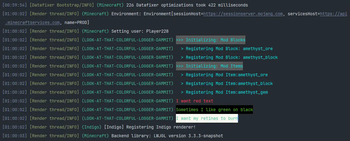
About this Mod



Ever wanted to add some color to your LOGGER during the development of your minecraft mods in a simple, yet functional manner?
Well look no further, Handsome Steve has you covered! This simple library allows you to do just that by utilizing a wide range of pre-defined ANSI codes.
EDIT: Please prioritize the Handsome Steve Maven as this also serves the Jar's Sources file. Alternatively, the installation code below has been updated to reflect Modrinth Maven incase the maven is ever offline, apologies in for any inconveniences.
FAQ
Q: Is this a mod?
Techinally, no. This is a library, so it's only really used when developing a mod, however, it may be required as a dependency when the dependent mod is being installed on a client/server depending on what platform the dependent mod is targeting and how the mod developer is utilising the library.
Q: Can I use this library as a dependency in my project?
Absolutely, go nuts!
Q: Does this library require a specific Fabric Version?
Nope, it's now standalone, so as long as your modding platform uses org.slf4j.Logger, it will work regardless of the version.
Current Version
Please note that the current version only has the Logger.info() method colorized, the rest will be added in future updates, such as Logger.error() etc.
Installation
Add the required Maven Repositories to your build.gradle in the repositories section:
    repositories {
        // Initial Maven Repository
        // Priority
        exclusiveContent {
            forRepository {
                maven {
                    name = "Handsome Steve's Maven"
                    url = "https://maven.handsomesteve.net/releases"
                }
            }
            filter {
                includeGroup "net.handsomesteve"
            }
        }

        // Modrinth Fallback Maven
        // Optional, but strongly recommended
        exclusiveContent {
            forRepository {
                maven {
                    name = "Modrinth"
                    url = "https://api.modrinth.com/maven"
                }
            }
            filter {
                includeGroup "maven.modrinth"
            }
        }
    }
Add an implementation to your build.gradle in the dependencies section:
    dependencies {
        //Handsome Steve's Colorful Logger // This automatically downloads the sources file as well.
        implementation include("net.handsomesteve:colorfulloggerlib:${project.hs_colorful_logger}")

        // Modrinth Fallback (De-comment if preferred maven is down).
        //implementation include ("maven.modrinth:colorfulloggerlib:${project.hs_colorful_logger}")
        // SOURCES FILE NEEDS MANUAL DOWNLOAD, SEE BOTTOM OF PAGE (if using fallback maven).
    }
Add the version variable to your gradle.properties and replace {version} by the desired available library version of your choice:
hs_colorful_logger={version}
Implementation
Create a public static final instance of the ColorfulLogger class. This instance will allow you to utilize the internal reference of org.slf4j.Logger from the ColorfulLogger class throughout your project.
    import net.handsomesteve.api.ColorfulLogger;
    import net.handsomesteve.api.ansi.AnsiColorBackground;
    import net.handsomesteve.api.ansi.AnsiColorText;

    public class FabricMod implements ModInitializer {
        public static final String MOD_ID = "your-mod-id";
        public static final ColorfulLogger LOGGER = ColorfulLogger.getInstance("your-mod-id", false);

       @Override
       public void onInitialize() {
           LOGGER.info(">>> This is a plain message without any colouring");
           LOGGER.info(">>> I want some green text", AnsiColorText.ANSI_BRIGHT_GREEN);
           LOGGER.info(">>> I want some red text with a black background", AnsiColorText.ANSI_BRIGHT_RED, AnsiColorBackground.ANSI_BLACK_BACK);
       }
    }
If required, the `Logger` can be interfaced with by calling it as follows:
LOGGER.getLogger(); // Returns the Logger to be interfaced with.
This will, however, not implement the ANSI color coding to your output if accessed this way.
NOTE: A
ColorfulLoggervariable can be declared anywhere in the project. It is recommended, however, to only ever declare this once as it is a singleton.
To import the declared variable as a static import when referencing the variable:import static com.packagename.FabricMod.LOGGER;
ALTERNATIVELY:
ColorfulLoggercan be instantiated anywhere in the project as follows if required after the singleton is declared:public class References { private static final ColorfulLogger LOGGER = ColorfulLogger.getInstance(); public static ColorfulLogger getLogger() { return LOGGER; } }Then accessed:
import static com.package.References.getLogger;

public class MyClass {
      References.getLogger();
}
Sources
[Only if using Modrinth Maven as a dependency]
There is a sources file available in the versions download.
This is a well define sources file where all variables, methods and constructors are well-defined as well as the class itself. You should download and add this file in the folder path:
.gradle/loom-cache/remapped_mods/net_fabricmc_yarn{version}/maven/colorfulloggerlib/{hs_colorful_logger_version}/
Note: Replace curly-braced text with current versions etc.
Available Versions
How to Install Colorful Logger Lib on Your Server
Order Server
Order a Minecraft Java server with at least 3 GB RAM (4 GB recommended).
Set fabric Loader
In the panel under "Egg", select the fabric loader and matching Minecraft version (1.21.6).
Install Mod
Open the mod browser in the dashboard and search for "Colorful Logger Lib". Click "Install" – done! Alternatively, upload the .jar via SFTP to the /mods folder.
Compatibility
Mod Loaders
Minecraft Versions
1.21.6, 1.21.5, 1.21.4 (+21 more)
Server-side
✗ UnsupportedRecommended RAM
4 GB(min. 3 GB)Frequently Asked Questions
Colorful Logger Lib server crashes on startup – what to do?
Most common cause: wrong fabric version or insufficient RAM. Check the server log (latest.log) for "OutOfMemoryError" or "Mixin" errors. With Mado Hosting: ensure at least 3 GB RAM is allocated and the loader matches the mod version (1.21.6). You can switch loaders with one click in the panel.
Is Colorful Logger Lib compatible with fabric?
Colorful Logger Lib officially supports fabric for Minecraft 1.21.6, 1.21.5, 1.21.4. The Mado dashboard automatically detects incompatible loader combinations.
Server lagging with Colorful Logger Lib – how to optimize performance?
Recommended RAM: 4 GB (per 8 players). Use /spark profiler to check if Colorful Logger Lib consumes the most tick time. Common fixes: reduce server view-distance to 8-10, install "performant" or "starlight" as supplementary mods on Forge. With Mado Hosting, your server runs on NVMe SSDs with dedicated CPU cores for minimal latency.
Similar Mods



Rent Modded Server
Install Colorful Logger Lib with just one click on your server.