
Combat-Hud Indicator
A lightweight multifunctional client-side mod that displays many HUDs necessary for both PVP and Survival gameplay.
About this Mod
Combat-Hud Indicator offers real-time tracking for cooldowns, health alerts, utility timers, and more, all in a sleek, customizable interface designed specifically for Minecraft 1.21.11.
How to Use:
Simply place the latest mod file, "combat-hud-indicator-1.21.11-1.2.0.jar", into your .minecraft\mods folder.
Key Features:
- Combat Trackers: Monitor your shield, ender pearl, and wind charge cooldowns with clear and precise icons.
- Vital Warnings: Visual alerts when player take damage and many sprite warnings for low item and armor durabilities.
- Tactical Timers: Stay ahead with built-in TNT primed timers and Totem counters.
- Resource Tracking: Keep an eye on your arrows, and XYZ coordinates.
- Survival Needs: Track health and hunger efficiently.
- Chat Privacy: Optional chat blocker to avoid distractions or toxicity while playing.
Fully Customizable:
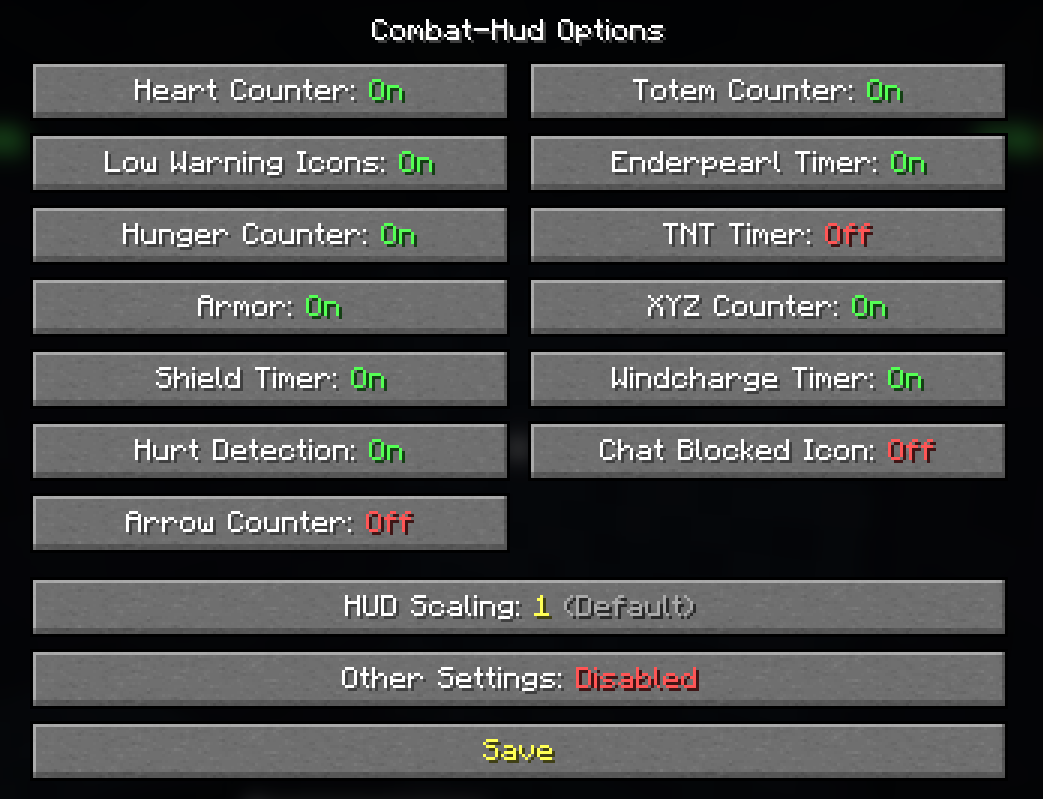
Access the configuration menu via the ESC menu to toggle any feature, specifically the button "Hud", including:
- Heart & Low Health Icons
- Hunger & Armor Display
- Shield & Hurt Detection
- Arrow Count & Totem Counter
- Ender Pearl & Wind Charge Cooldowns
- TNT Timer & XYZ Coordinates
- Chat Block
- Experimental features (NEW!)
- Hud Scaling (NEW!)
Need a smaller HUD? Cycle through three scales: 1 (default), 2 (small), and 3 (smaller) to fit your preference.
Technical Info
- Platform: Fabric (latest version)
- Fabric API needed: "fabric-api-0.141.3+1.21.11"
- Minecraft Version: 1.21.11 (older or newer versions are untested but should work.)
Note:
If configuration changes don’t apply on newer updates, delete the old combat-hud-indicator folder located at .minecraft/config for a fresh start.
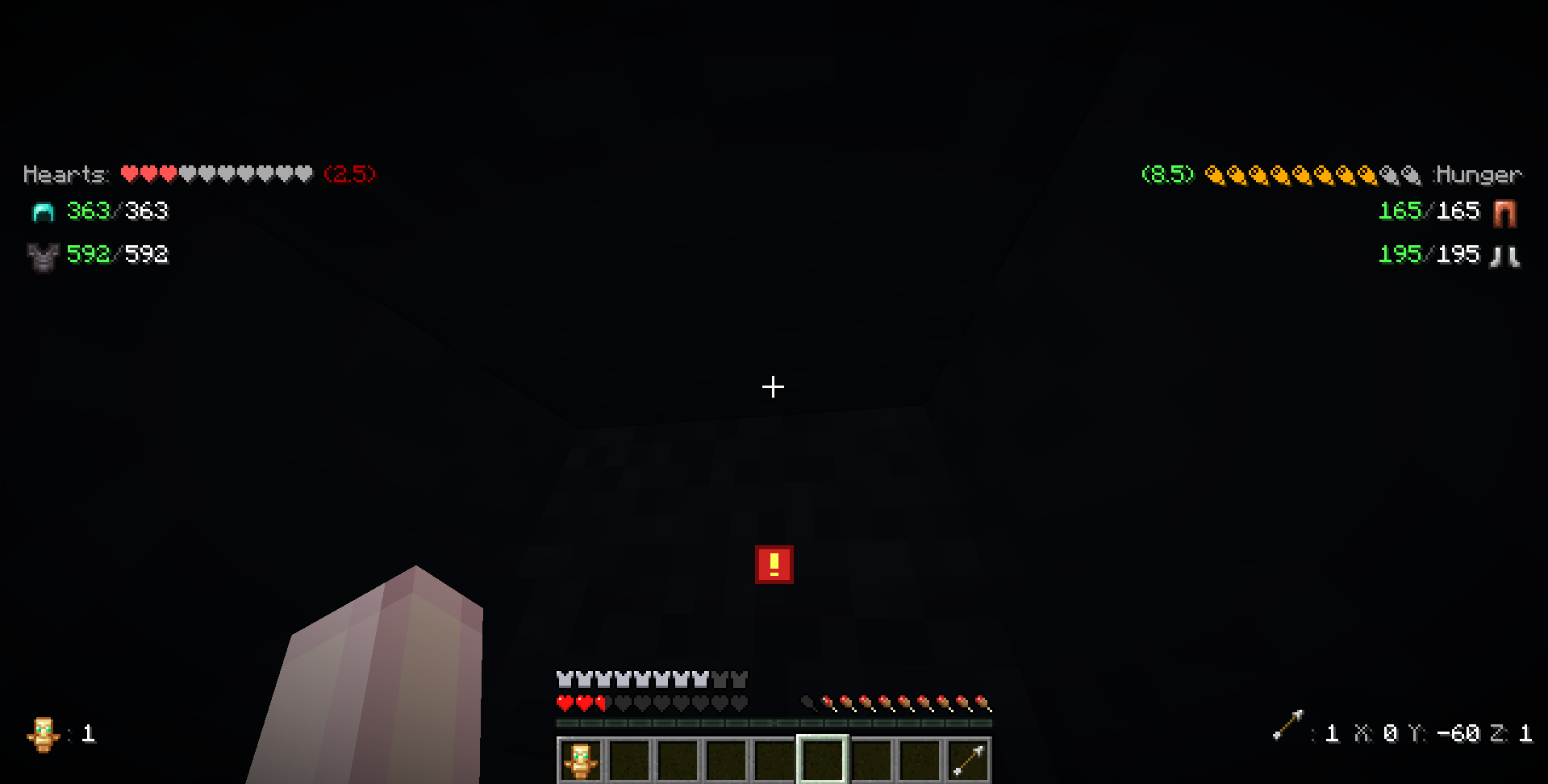
(HUD elements are spaced out for a clear overview, avoiding clutter or screen overcrowding)
(Screenshot of the stylish Options Menu for Combat-Hud Indicator)
© Jsll. Do not redistribute, sell, or claim as your own.
If you encounter any bugs or want to add more suggestions DM me in discord: @sirarmis
Got any mod ideas? I’m happy to code them for fun, completely free!

Slight issues to be fixed in the next update (hopefully xD):
- Heart Section (inconsistent)
- Hunger Section (inconsistent)

Possible future updates:
- Movable Hud-editor
- Speed/velocity meter
- Potion counters
- Reach indicator
- Bow Power indicator (icon)
- Ping display
Special thanks to Mushroomify for their contributions and support.
Available Versions
How to Install Combat-Hud Indicator on Your Server
Order Server
Order a Minecraft Java server with at least 3 GB RAM (4 GB recommended).
Set fabric Loader
In the panel under "Egg", select the fabric loader and matching Minecraft version (1.21.11).
Install Mod
Open the mod browser in the dashboard and search for "Combat-Hud Indicator". Click "Install" – done! Alternatively, upload the .jar via SFTP to the /mods folder.
Compatibility
Mod Loaders
Minecraft Versions
1.21.11
Server-side
✗ UnsupportedRecommended RAM
4 GB(min. 3 GB)Frequently Asked Questions
Combat-Hud Indicator server crashes on startup – what to do?
Most common cause: wrong fabric version or insufficient RAM. Check the server log (latest.log) for "OutOfMemoryError" or "Mixin" errors. With Mado Hosting: ensure at least 3 GB RAM is allocated and the loader matches the mod version (1.21.11). You can switch loaders with one click in the panel.
Is Combat-Hud Indicator compatible with fabric?
Combat-Hud Indicator officially supports fabric for Minecraft 1.21.11. The Mado dashboard automatically detects incompatible loader combinations.
Server lagging with Combat-Hud Indicator – how to optimize performance?
Recommended RAM: 4 GB (per 8 players). Use /spark profiler to check if Combat-Hud Indicator consumes the most tick time. Common fixes: reduce server view-distance to 8-10, install "performant" or "starlight" as supplementary mods on Forge. With Mado Hosting, your server runs on NVMe SSDs with dedicated CPU cores for minimal latency.
Similar Mods






Rent Modded Server
Install Combat-Hud Indicator with just one click on your server.