
CommandPad
A client-side command board for saving and running server commands from an in-game GUI.
Screenshots
About this Mod
CommandPad is a client-side command board for Minecraft.
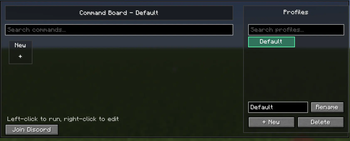
It lets you save commonly used server commands and run them from a clean in-game GUI. Commands are organized per server, so your profiles for one server do not mix with another server.
Supported Server Presets
- Hypixel
Hypixel includes built-in preset profiles for common game modes like SkyBlock, Bedwars, SkyWars, Duels, Murder Mystery, Build Battle, Arcade, Housing, TNT Games, UHC, and The Pit.
Other servers are still supported with custom profiles. If a server does not have built-in presets yet, CommandPad will create a clean Default profile for that server.
Singleplayer worlds share the same local CommandPad profiles.
Features
- Client-side only
- Per-server command profiles
- Search commands and profiles
- Create, rename, and delete profiles
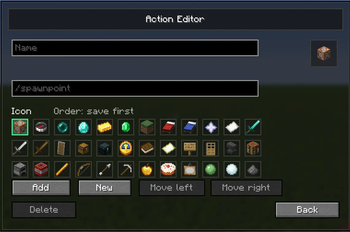
- Add custom command tiles with icons
- Reorder command tiles
- Left-click a command to run it
- Right-click a command to edit it
- Built-in Hypixel presets
- Join Discord button
Safety
CommandPad does not automate gameplay. Commands only run after you manually click a GUI button.
Available Versions
How to Install CommandPad on Your Server
Order Server
Order a Minecraft Java server with at least 3 GB RAM (4 GB recommended).
Set fabric Loader
In the panel under "Egg", select the fabric loader and matching Minecraft version (1.21.11).
Install Mod
Open the mod browser in the dashboard and search for "CommandPad". Click "Install" – done! Alternatively, upload the .jar via SFTP to the /mods folder.
Compatibility
Mod Loaders
Minecraft Versions
1.21.11
Server-side
✗ UnsupportedRecommended RAM
4 GB(min. 3 GB)Frequently Asked Questions
CommandPad server crashes on startup – what to do?
Most common cause: wrong fabric version or insufficient RAM. Check the server log (latest.log) for "OutOfMemoryError" or "Mixin" errors. With Mado Hosting: ensure at least 3 GB RAM is allocated and the loader matches the mod version (1.21.11). You can switch loaders with one click in the panel.
Is CommandPad compatible with fabric?
CommandPad officially supports fabric for Minecraft 1.21.11. The Mado dashboard automatically detects incompatible loader combinations.
Server lagging with CommandPad – how to optimize performance?
Recommended RAM: 4 GB (per 8 players). Use /spark profiler to check if CommandPad consumes the most tick time. Common fixes: reduce server view-distance to 8-10, install "performant" or "starlight" as supplementary mods on Forge. With Mado Hosting, your server runs on NVMe SSDs with dedicated CPU cores for minimal latency.
Similar Mods






Rent Modded Server
Install CommandPad with just one click on your server.