
CommandTokens
Configurable 'token' items that run commands when held and right clicked. Useful for servers.
About this Mod
NOTE: If you are looking for a server-side alternative to this mod (that clients dont also have to install to connect to your server) - CommandTokens has been included in my server-side essentials mod:
Henny Essentials
Overview
CommandTokens gives the user the ability to create custom items that execute commands when a player uses them.
This mod is aimed toward server owners, modpack creators and map makers but has a wide range of uses in many scenarios.
Commands
You can use the command /commandtokens give
Alternatively, you can use the Minecraft give command to give a player a token as follows:
/give
How to create a Token
To create a token, place this mod in your mods folder and load up a world in creative mode. If you navigate to the CommandTokens creative tab you will see 3 tokens that are created by default.
Now save and quit your world and navigate to the config directory, you will see a file called: CommandTokens.json
This is the file where you can create your custom tokens. Below is a breakdown of a "token" object: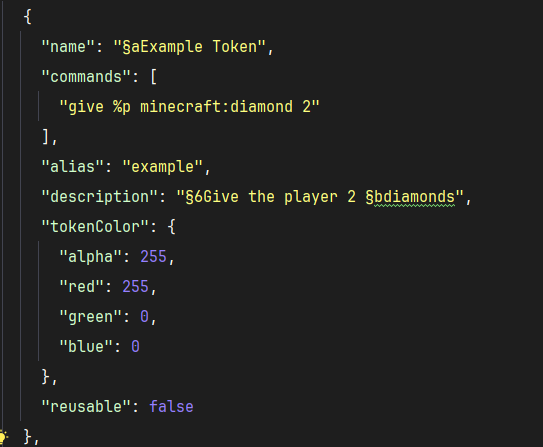
NOTE: as of V1.0.4 you can add a permission: "some.permission.node" option to tokens and it will use LuckPerms to check if player has permission to use the token. If LuckPerms is not installed, or the permission string is blank, the token will not check permissions.
Create as many of those objects as you want and place them within the "tokens": [] array in the config and the next time you load your world you will have access to these tokens.
For example, the config token defined above will create this token in game: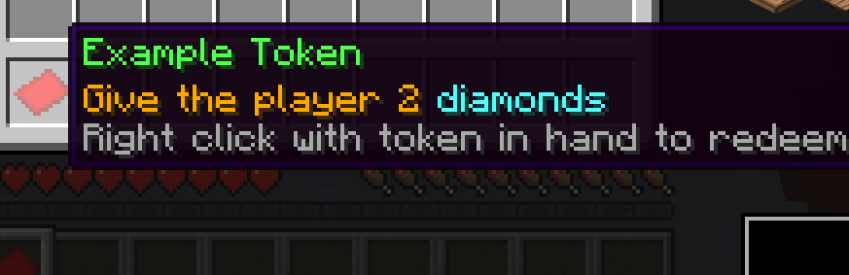
Available Versions
How to Install CommandTokens on Your Server
Order Server
Order a Minecraft Java server with at least 3 GB RAM (4 GB recommended).
Set neoforge Loader
In the panel under "Egg", select the neoforge loader and matching Minecraft version (1.21.1).
Install Mod
Open the mod browser in the dashboard and search for "CommandTokens". Click "Install" – done! Alternatively, upload the .jar via SFTP to the /mods folder.
Compatibility
Mod Loaders
Minecraft Versions
1.21.1
Server-side
✓ RequiredRecommended RAM
4 GB(min. 3 GB)Frequently Asked Questions
CommandTokens server crashes on startup – what to do?
Most common cause: wrong neoforge version or insufficient RAM. Check the server log (latest.log) for "OutOfMemoryError" or "Mixin" errors. With Mado Hosting: ensure at least 3 GB RAM is allocated and the loader matches the mod version (1.21.1). You can switch loaders with one click in the panel.
Is CommandTokens compatible with neoforge?
CommandTokens officially supports neoforge for Minecraft 1.21.1. The Mado dashboard automatically detects incompatible loader combinations.
Server lagging with CommandTokens – how to optimize performance?
Recommended RAM: 4 GB (per 8 players). Use /spark profiler to check if CommandTokens consumes the most tick time. Common fixes: reduce server view-distance to 8-10, install "performant" or "starlight" as supplementary mods on Forge. With Mado Hosting, your server runs on NVMe SSDs with dedicated CPU cores for minimal latency.
Similar Mods




![CobbleDollars [Cobblemon Addon]](https://cdn.modrinth.com/data/s7N7AsqL/684040a264fc1d7f9b856ec5d2da39767398c7ad.png)
Rent Modded Server
Install CommandTokens with just one click on your server.