
Companion-Friend
Your new companion is built to be reliable, customizable, and fun—enhancing exploration, combat, and survival with a genuinely useful in-game partner.
Screenshots

About this Mod
🏹 Companion Mod
Version: 1.0.0 | Minecraft: 1.21.1 | Loader: Fabric
A feature-rich companion mod that introduces a fully interactive, customizable archer ally designed to support you throughout your Minecraft adventures. Your companion provides reliable combat assistance, campfire cooking, dialogue-driven immersion, and practical utility—bringing personality and usefulness together in one cohesive system.
✨ Key Features
⚔️ Advanced Combat & AI
- Adaptive Weapon Handling: Automatically switches between Netherite Sword (melee) and Bow (ranged) depending on the threat.
- Intelligent Targeting: Responds to enemies that attack you or targets you engage.
- Companion Durability: Completely invulnerable and immune to all friendly fire.
- Battle Personality: Occasionally charges into combat with an iconic “Leroy Jenkins!” shout.
🍖 Campfire Cooking System
- Hands-Free Cooking: Provide raw food and place a Campfire—your companion will cook it automatically.
- Task Priority: Cooking temporarily overrides the follow behavior, allowing you to relax at camp.
- Smart Retrieval: Collects cooked items autonomously.
💬 Immersive Dialogue HUD
- Dedicated HUD Display: Companion speech appears in a clean, custom bottom-screen HUD box instead of the chat window.
- Unique Voice Lines: Includes over 15 contextual phrases for hunting, combat, and general interaction.
- Status Notifications: Clear on-screen updates when toggling between Follow and Sit states.
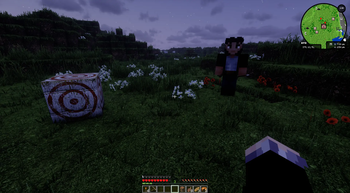
🎯 Target Practice Mode
- Idle Activity: In “Sit” mode, your companion places a Target Block and practices archery.~~~~
- Real Arrows: Watch them fire actual projectiles as they train.
🎒 Utility & Customization
- Inventory Support: Offers a full 27-slot (9×3) storage system for carrying your gear.
- Skin Variants: Select from multiple appearance options through the dedicated skin GUI.
- Reliable Teleportation: If separated by more than 25 blocks, your companion automatically warps to your location.
📥 Installation
Client Installation
- Install Fabric Loader
- (v0.16.14+).
- Download Fabric API
- for Minecraft 1.21.1.
- Download the Companion Mod JAR.
- Place all required JAR files into your .minecraft/mods directory.
- Launch Minecraft and enjoy.
Server Installation
For server-specific instructions, see SERVER_SETUP.md.
🎮 Usage & Controls
Action Control Description
- Sit / Follow Toggle
- Right-Click (with item)
- Switches between staying put and following the player.
- Open Inventory
- Shift + Right-Click
- Opens the 27-slot companion inventory.
- Open Skin Selector
- Right-Click (empty hand)
- Access the appearance customization menu.
Getting Started
- Summon: Use the Companion Summoner item or /summon companion:companion.
- Command: Right-click with a sword or tool to enable follow mode.
- Equip: Use Shift + Right-click to supply arrows, food, or items.
🛠️ Configuration
- The mod includes optimized default settings:
- HUD Message Duration: 10 seconds
- Follow Teleport Range: 25 blocks
❤️ Final Notes
Your new companion is built to be reliable, customizable, and fun—enhancing exploration, combat, and survival with a genuinely useful in-game partner.
Enjoy your journey with your loyal archer companion!
Available Versions
How to Install Companion-Friend on Your Server
Order Server
Order a Minecraft Java server with at least 3 GB RAM (4 GB recommended).
Set fabric Loader
In the panel under "Egg", select the fabric loader and matching Minecraft version (1.21.1).
Install Mod
Open the mod browser in the dashboard and search for "Companion-Friend". Click "Install" – done! Alternatively, upload the .jar via SFTP to the /mods folder.
Compatibility
Mod Loaders
Minecraft Versions
1.21.1
Server-side
✓ RequiredRecommended RAM
4 GB(min. 3 GB)Frequently Asked Questions
Companion-Friend server crashes on startup – what to do?
Most common cause: wrong fabric version or insufficient RAM. Check the server log (latest.log) for "OutOfMemoryError" or "Mixin" errors. With Mado Hosting: ensure at least 3 GB RAM is allocated and the loader matches the mod version (1.21.1). You can switch loaders with one click in the panel.
Is Companion-Friend compatible with fabric?
Companion-Friend officially supports fabric for Minecraft 1.21.1. The Mado dashboard automatically detects incompatible loader combinations.
Server lagging with Companion-Friend – how to optimize performance?
Recommended RAM: 4 GB (per 8 players). Use /spark profiler to check if Companion-Friend consumes the most tick time. Common fixes: reduce server view-distance to 8-10, install "performant" or "starlight" as supplementary mods on Forge. With Mado Hosting, your server runs on NVMe SSDs with dedicated CPU cores for minimal latency.
Similar Mods




Rent Modded Server
Install Companion-Friend with just one click on your server.