
Computerpc
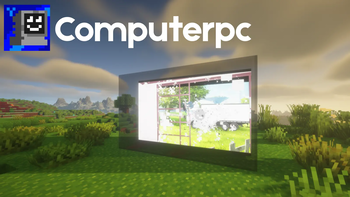
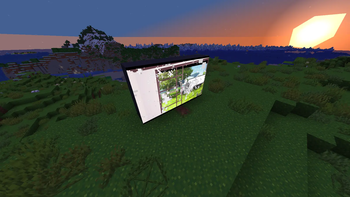
Computer PC adds placeable browser screens to Minecraft.
Screenshots
About this Mod
Computerpc
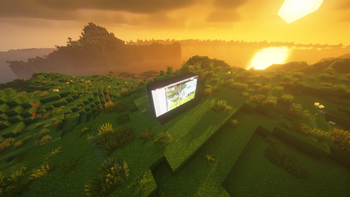
Computerpc adds placeable browser screens to Minecraft Fabric 1.21.11+.
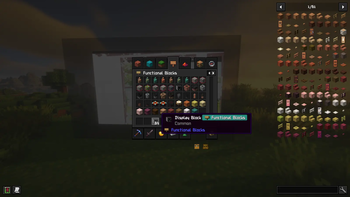
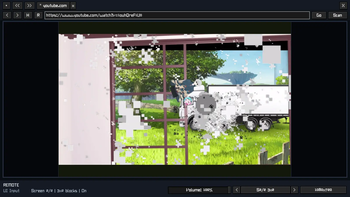
Build display walls from Display Blocks, power them on, and control them with the Browser Remote. Each screen uses an embedded Chromium runtime, letting you open real web pages in-game, switch tabs, change resolution, and control media volume from a clean remote interface.
It is designed for modern builds, control rooms, media setups, and multiplayer bases where you want functional browser displays instead of static decoration.
Features
- Placeable display blocks that connect into larger screen clusters
- Embedded Chromium-powered browser rendering
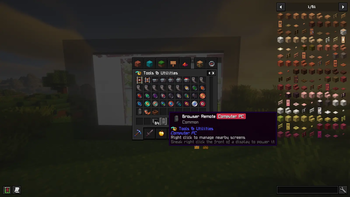
- Browser Remote for scanning and managing nearby screens
- Multiple tabs per display
- Back, forward, reload, home, and direct URL entry
- Resolution presets that adapt to the selected screen's aspect ratio
- Per-screen media volume control
- Cluster-wide power toggle
- Saved screen state, including tabs and settings
- Multiplayer-friendly syncing so other nearby players see the same display activity (url sync)
- Automatic browser runtime initialization on startup
Requirements
- Minecraft
1.21.11+ - Fabric Loader
0.18.5+ - Fabric API
Installation
- Install Fabric Loader for Minecraft
1.21.11+. - Download and install Fabric API.
- Download Computer PC.
- Install the files in the correct
modsfolder: - Launch the game.
Where To Install It
- Singleplayer: put Fabric API and Computer PC in your client
modsfolder only. - Dedicated server: put Fabric API and Computer PC in the server
modsfolder and in every player's clientmodsfolder. - The same Computer PC
.jaris used on both sides.
First Launch Note
Computer PC includes its browser integration, so you do not need to install a separate browser mod.
On first startup, the embedded Chromium runtime may need a moment to initialize or download its runtime files. If that happens, wait for it to finish before using the displays.
Quick Start
- Place one or more Display Blocks facing the same direction.
- Sneak + right-click the front of a display to power the screen on or off.
- Hold the Browser Remote and right-click to open the control screen.
- Use Scan to find nearby displays.
- Select a screen, enter a URL, and manage tabs, resolution, and volume from the remote UI.
Notes
- The remote scans for displays near the player.
- Display clusters share the same screen state, so larger setups behave like one screen wall.
- If Chromium is still starting, the display will begin rendering once the runtime is ready.
- In multiplayer the url gets synced with other players. Its not a screen share or streaming.
License & Attribution
ComputerPC is released into the Public Domain under the CC0 1.0 Universal License. You are absolutely free to view, use, modify, and distribute the code of this mod without needing permission.
MCEF (Third-Party Library)
To function, this mod dynamically downloads and links to MCEF [Keksuccino's Fork] at runtime. MCEF is an independent third-party library and is NOT under the CC0 license.
In compliance with its licensing, please note the following:
- License: MCEF is licensed under the GNU Lesser General Public License v2.1 (LGPL-2.1).
- Credits: MCEF [Keksuccino's Fork] is maintained by Keksuccino https://modrinth.com/mod/mcef-keksuccino . It is a fork of the original MCEF created by montoyo, ds58, and the CinemaMod Group. All rights and credits for MCEF belong to these respective developers.
- Source Code: You can find the open-source code for MCEF [Keksuccino's Fork] here: https://github.com/Keksuccino/mcef
Available Versions
How to Install Computerpc on Your Server
Order Server
Order a Minecraft Java server with at least 3 GB RAM (4 GB recommended).
Set fabric Loader
In the panel under "Egg", select the fabric loader and matching Minecraft version (26.1.2).
Install Mod
Open the mod browser in the dashboard and search for "Computerpc". Click "Install" – done! Alternatively, upload the .jar via SFTP to the /mods folder.
Compatibility
Mod Loaders
Minecraft Versions
26.1.2, 26.1.1, 1.21.11
Server-side
✓ RequiredRecommended RAM
4 GB(min. 3 GB)Frequently Asked Questions
Computerpc server crashes on startup – what to do?
Most common cause: wrong fabric version or insufficient RAM. Check the server log (latest.log) for "OutOfMemoryError" or "Mixin" errors. With Mado Hosting: ensure at least 3 GB RAM is allocated and the loader matches the mod version (26.1.2). You can switch loaders with one click in the panel.
Is Computerpc compatible with fabric?
Computerpc officially supports fabric for Minecraft 26.1.2, 26.1.1, 1.21.11. The Mado dashboard automatically detects incompatible loader combinations.
Server lagging with Computerpc – how to optimize performance?
Recommended RAM: 4 GB (per 8 players). Use /spark profiler to check if Computerpc consumes the most tick time. Common fixes: reduce server view-distance to 8-10, install "performant" or "starlight" as supplementary mods on Forge. With Mado Hosting, your server runs on NVMe SSDs with dedicated CPU cores for minimal latency.
Similar Mods






Rent Modded Server
Install Computerpc with just one click on your server.