
concrete-mixer
A single-block concrete factory. Drop in sand, gravel, and dye (or concrete powder) plus water — get colored concrete blocks. Furnace-style, no power required.
Screenshots
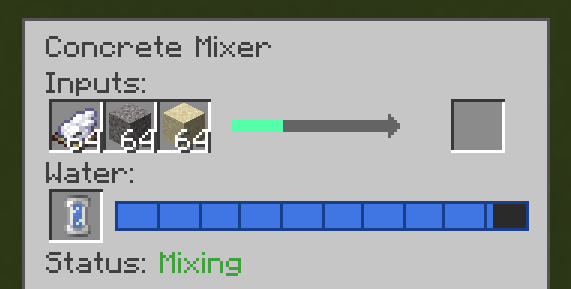
About this Mod

Tired of placing concrete powder next to water, scooping the result, and repeating?
The Concrete Mixer is a single-block solution that crafts colored concrete blocks furnace-style. No power required, no setup, just feed it materials and water.
Two crafting paths
Raw recipe — mimics vanilla concrete crafting in one machine:
- 4 sand + 4 gravel + 1 dye + 1000 mB water → 4 concrete blocks (12 seconds)
- Inputs go in any of the 3 input slots, any order
Powder shortcut — for when you already have concrete powder:
- 1 concrete powder + 250 mB water → 1 concrete block (3 seconds)
- Matches vanilla intuition — 1 powder + water = 1 concrete
Features
- 10-bucket water tank (10,000 mB) — fill via vanilla buckets OR any mod's fluid-storing item (Tech Reborn cells, Mekanism portable tanks, etc.)
- Fluid pipe compatibility — any pipe mod using standard fluid capabilities (Pipez, Create, Mekanism, EnderIO, etc.) can pump water into the tank
- Jade / WAILA compatibility — hover the block to see tank contents
- Status indicators — GUI shows Mixing / Idle / Needs water / Output full / Color mismatch / Disabled (redstone) so you always know what the mixer is doing
- Hopper compatibility — push inputs from the top/sides, pull output from the bottom, refill buckets from the sides
- Color-lock output — output slot accepts only one color at a time, so you can leave a mixer mid-batch without worrying about color mixing
- Redstone control — apply a signal to pause; remove to resume (progress preserved)
- Single tier, no-power design — craftable mid-game and immediately useful
- Contents preserved on break — break a loaded mixer with a pickaxe, re-place, all inventory intact
Recipe
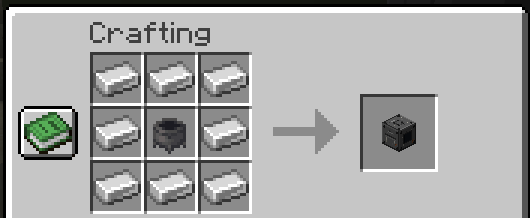
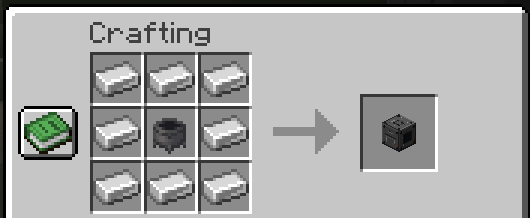
8 iron ingots ringing a cauldron in a crafting table → 1 Concrete Mixer.
Loader support
- Fabric (requires Fabric API)
- NeoForge
Supports Minecraft 26.1, 26.1.1, 26.1.2.
License
CC0-1.0 — public domain, do whatever you want.
Available Versions
How to Install concrete-mixer on Your Server
Order Server
Order a Minecraft Java server with at least 3 GB RAM (4 GB recommended).
Set fabric Loader
In the panel under "Egg", select the fabric loader and matching Minecraft version (26.1.2).
Install Mod
Open the mod browser in the dashboard and search for "concrete-mixer". Click "Install" – done! Alternatively, upload the .jar via SFTP to the /mods folder.
Compatibility
Mod Loaders
Minecraft Versions
26.1.2, 26.1.1, 26.1
Server-side
✓ RequiredRecommended RAM
4 GB(min. 3 GB)Frequently Asked Questions
concrete-mixer server crashes on startup – what to do?
Most common cause: wrong fabric version or insufficient RAM. Check the server log (latest.log) for "OutOfMemoryError" or "Mixin" errors. With Mado Hosting: ensure at least 3 GB RAM is allocated and the loader matches the mod version (26.1.2). You can switch loaders with one click in the panel.
Is concrete-mixer compatible with fabric and neoforge?
concrete-mixer officially supports fabric, neoforge for Minecraft 26.1.2, 26.1.1, 26.1. The Mado dashboard automatically detects incompatible loader combinations.
Server lagging with concrete-mixer – how to optimize performance?
Recommended RAM: 4 GB (per 8 players). Use /spark profiler to check if concrete-mixer consumes the most tick time. Common fixes: reduce server view-distance to 8-10, install "performant" or "starlight" as supplementary mods on Forge. With Mado Hosting, your server runs on NVMe SSDs with dedicated CPU cores for minimal latency.
Similar Mods





Rent Modded Server
Install concrete-mixer with just one click on your server.