
Container Data Dumper
Copy container and inventory data as Data Components directly to your clipboard - works with any container block or entity in Minecraft 1.20-1.21+
Screenshots
About this Mod
Container Data Dumper



Concept
This mod allows you to easily copy the contents of containers (like Chests, Barrels, Shulker Boxes, etc.) in the form of Data Components (SNBT) directly to your clipboard. It adds a convenient "Copy" button to the container UI, making it perfect for developers, technical players, or anyone who needs to extract inventory data.
The mod works with any block or entity that has a container inventory - including Chests, Barrels, Shulker Boxes, Hoppers, Furnaces, Brewing Stands, Chest Boats, Hopper Minecarts, and more.
Version Compatibility & Data Format
Supported Versions: Minecraft 1.20 - 1.21.11
⚠️ Important Note on Data Format
This mod always outputs item data using the Data Components format (introduced in Minecraft 1.20.5).
- If you are playing on Minecraft 1.21+, this is the standard format.
- If you are playing on Minecraft 1.20 - 1.20.4 (in which NBT is the standard format), the mod will still output Data Component format (it does NOT convert from the older NBT structure - it directly generates the modern format).
This ensures that the output is consistent and future-proof, regardless of which version you are currently using to capture the data.
Note on Slot Indices: This mod uses Storage/NBT indices (not GUI indices) for slot numbers. This is the correct format for use in commands, datapacks, and NBT data. For more information about the difference between GUI and Storage indices, see the Slot Index Documentation.
Output Example
Here is an example of what the copied data looks like (Data Components format):
[
  {
    "slot": 0,
    "item": {
      "id": "minecraft:netherite_sword",
      "count": 1,
      "components": {
        "minecraft:enchantments": {
          "minecraft:unbreaking": 3
        }
      }
    }
  },
  {
    "slot": 1,
    "item": {
      "id": "minecraft:netherite_chestplate",
      "count": 1,
      "components": {
        "minecraft:enchantments": {
          "minecraft:unbreaking": 3
        }
      }
    }
  },
  {
    "slot": 26,
    "item": {
      "id": "minecraft:jungle_log",
      "count": 1
    }
  }
]
Usage Tip for 1.20.5+
IMPORTANT: Due to chat character limitations, the data copied by this mod is often too long to be pasted directly into the chat window when used in commands.
You typically MUST use a Command Block to execute commands with this data.
Usage Example
To give yourself a chest containing the dumped data, use the following syntax in a command block:
/give @a chest[container=<PASTE_YOUR_COPIED_DATA_HERE>]
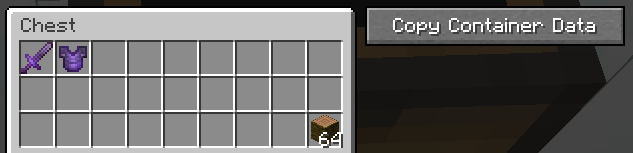
This images may also help:
This converts to:
[
  {
    "slot": 0,
    "item": {
      "id": "minecraft:netherite_sword",
      "count": 1,
      "components": {
        "minecraft:enchantments": {
          "minecraft:unbreaking": 3
        }
      }
    }
  },
  {
    "slot": 1,
    "item": {
      "id": "minecraft:netherite_chestplate",
      "count": 1,
      "components": {
        "minecraft:enchantments": {
          "minecraft:unbreaking": 3
        }
      }
    }
  },
  {
    "slot": 26,
    "item": {
      "id": "minecraft:jungle_log",
      "count": 64
    }
  }
]
Available Versions
How to Install Container Data Dumper on Your Server
Order Server
Order a Minecraft Java server with at least 3 GB RAM (4 GB recommended).
Set fabric Loader
In the panel under "Egg", select the fabric loader and matching Minecraft version (1.21.11).
Install Mod
Open the mod browser in the dashboard and search for "Container Data Dumper". Click "Install" – done! Alternatively, upload the .jar via SFTP to the /mods folder.
Compatibility
Mod Loaders
Minecraft Versions
1.21.11, 1.21.10, 1.21.9 (+16 more)
Server-side
✗ UnsupportedRecommended RAM
4 GB(min. 3 GB)Frequently Asked Questions
Container Data Dumper server crashes on startup – what to do?
Most common cause: wrong fabric version or insufficient RAM. Check the server log (latest.log) for "OutOfMemoryError" or "Mixin" errors. With Mado Hosting: ensure at least 3 GB RAM is allocated and the loader matches the mod version (1.21.11). You can switch loaders with one click in the panel.
Is Container Data Dumper compatible with fabric?
Container Data Dumper officially supports fabric for Minecraft 1.21.11, 1.21.10, 1.21.9. The Mado dashboard automatically detects incompatible loader combinations.
Server lagging with Container Data Dumper – how to optimize performance?
Recommended RAM: 4 GB (per 8 players). Use /spark profiler to check if Container Data Dumper consumes the most tick time. Common fixes: reduce server view-distance to 8-10, install "performant" or "starlight" as supplementary mods on Forge. With Mado Hosting, your server runs on NVMe SSDs with dedicated CPU cores for minimal latency.
Rent Modded Server
Install Container Data Dumper with just one click on your server.