
Control Blocks
Control Blocks are command blocks, but even better. Do more with less by coding with ControlScript, the mod exclusive Text-Based Coding Language
Screenshots
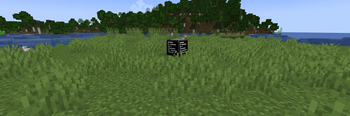
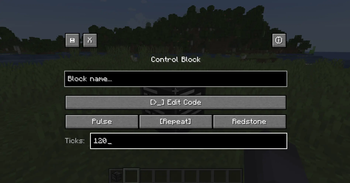
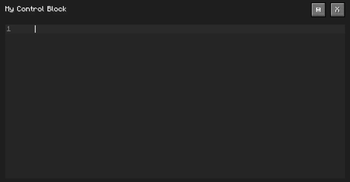
About this Mod
Control Blocks Command Blocks You Script
Command blocks are great, and it unlocks so many options, and allows you to make incredible creations, but sometimes, for big projects it either gets much more complicated or too long! That is where this mod comes in, it allows you to code scripts in game that can be triggered in multiple ways such as:
- Power with redstone;
- Powers each said tick;
- Power each said tick on powered with redstone;
You can make minigames, tools, and way more with only one block! With an easy language made just for this mod, with full documentation called Control Script.
Check out our GitBook documentation to learn more in detail about ControlScript at this link.
What version is the mod compatible with?
I'm working to bring this mod to more and more versions/modloaders.
**Modloader:** Forge **Minecraft Version:** 1.20.1 to 1.20.6 **Platforms:** Curseforge & Modrinth
How to get one?
Control Blocks are like Command Blocks, you can only get them via commands.
/give @p controlblocks:control_block
Check the documentation for full info!
How to support this mod?
DOCUMENTATION
This is not the full documentation, check the GitBook for the complete docs at this link.
Execution Modes
| Mode | Description |
|---|---|
| Pulse | Runs once when it gets a redstone pulse |
| Repeat | Runs every X ticks on its own |
| Redstone | Runs every X ticks, but only while powered |
ControlScript
ControlScript is a small scripting language written from scratch for this mod — no external libraries, no Lua runtime. Just a clean language that talks directly to Minecraft.
What the language supports
- Variables (
var x = 10) - Math (
+,-,*,/) - String concatenation (
..) - Conditionals (
if / elseif / else / end) - Comments (
--and--[[ ]])
Built-in Functions
| Function | Description |
|---|---|
log(message) |
Sends a message to all players in chat |
run(command) |
Runs a Minecraft command (op level 4) |
randint(min, max) |
Random integer between min and max |
round(number) |
Rounds to nearest integer |
abs(number) |
Absolute value |
outpower(level) |
Sets redstone output of the block (0–15) |
outpower(level, ticks) |
Pulses redstone output for X ticks then drops to 0 |
inpower() |
Reads the incoming redstone signal level (0–15) |
Quick Example
var player = "@p"
var roll = randint(1, 6)

log("You rolled a " .. roll)
run(give player minecraft:diamond roll)
run() works with any mod's items and commands — not just vanilla.
See more like Custom Function, get() and more in our documentation at this link.
Made by Web Demon
Available Versions
How to Install Control Blocks on Your Server
Order Server
Order a Minecraft Java server with at least 3 GB RAM (4 GB recommended).
Set forge Loader
In the panel under "Egg", select the forge loader and matching Minecraft version (1.20.6).
Install Mod
Open the mod browser in the dashboard and search for "Control Blocks". Click "Install" – done! Alternatively, upload the .jar via SFTP to the /mods folder.
Compatibility
Mod Loaders
Minecraft Versions
1.20.6, 1.20.5, 1.20.4 (+4 more)
Server-side
✓ RequiredRecommended RAM
4 GB(min. 3 GB)Frequently Asked Questions
Control Blocks server crashes on startup – what to do?
Most common cause: wrong forge version or insufficient RAM. Check the server log (latest.log) for "OutOfMemoryError" or "Mixin" errors. With Mado Hosting: ensure at least 3 GB RAM is allocated and the loader matches the mod version (1.20.6). You can switch loaders with one click in the panel.
Is Control Blocks compatible with forge?
Control Blocks officially supports forge for Minecraft 1.20.6, 1.20.5, 1.20.4. The Mado dashboard automatically detects incompatible loader combinations.
Server lagging with Control Blocks – how to optimize performance?
Recommended RAM: 4 GB (per 8 players). Use /spark profiler to check if Control Blocks consumes the most tick time. Common fixes: reduce server view-distance to 8-10, install "performant" or "starlight" as supplementary mods on Forge. With Mado Hosting, your server runs on NVMe SSDs with dedicated CPU cores for minimal latency.
Similar Mods





Rent Modded Server
Install Control Blocks with just one click on your server.
Details
- License
- Creative Commons Attribution No Derivatives 4.0 International
- Server-side
- Required