
ConvenientCrafting
This mod adds ways to un- craft things, oasis, greenhouses, and more to come! Surviving in desert biomes becomes much easier with this mod, adding ways to craft essential resources like wood with sticks.
Screenshots
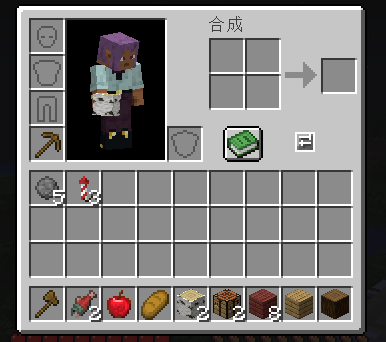
About this Mod
Convenient Crafting
Convenient Crafting is a lightweight quality-of-life mod for Minecraft 1.21.1, focused on making everyday crafting faster without changing the vanilla survival feel.
Press G to open a compact crafting assistant anywhere, then craft directly from the materials you already have in your inventory or in the container you are currently using.
Portable Crafting Assistant
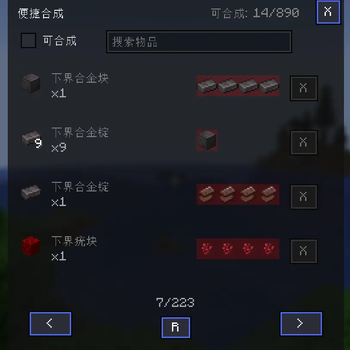
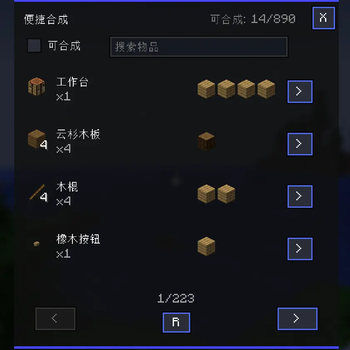
The main feature of this mod is the convenient crafting panel.
Instead of placing a crafting table, searching through your inventory, counting materials, and manually moving items around, you can open the panel and craft what you need immediately.
The panel supports:
- Vanilla crafting table recipes
- Smithing table recipes
- Brewing stand recipes
- Recipes from datapacks and compatible mods
- Materials from your player inventory
- Materials from opened containers, such as chests
This is especially useful while mining, building, exploring, sorting storage rooms, or working with large modpacks.
Smart Recipe List
The convenient crafting panel is designed to stay small and quick to use.
It includes:
- Recipe search by item name or id
- Craftable-only filtering
- Available craft count display
- Mouse wheel page navigation
- Ingredient and result item tooltips
- Compact adaptive layout for different window sizes
The recipe list automatically groups similar recipes and cycles through valid variants, so alternative ingredients and multiple recipe outputs stay readable without making the UI huge.
Batch and Nested Crafting
Convenient Crafting supports faster crafting when you need more than one item:
- Click
>to craft once - Shift-click
>to craft in batches - Alt-click
→to try nested crafting
Nested crafting can automatically work through intermediate materials before crafting the final item. For example, if a recipe needs sticks and you only have logs, the mod can pre-check whether the required intermediate materials can be crafted first.
Before nested crafting starts, the mod simulates the full crafting chain. If the target item cannot be crafted, it shows a scrollable tree-style missing-material popup so you can quickly see which raw materials are still missing.
Brewing Support
Brewing stand recipes are handled with vanilla brewing behavior in mind.
One brewing ingredient can process up to three matching input potions at the same time, producing up to three result potions from one convenient crafting action.
Modpack-Friendly Config
Modpack users can configure which built-in vanilla workstation recipe types are enabled in the convenient crafting panel.
By default, vanilla crafting, smithing, and brewing recipe types are enabled.
The config also supports additional recipe type ids for pack authors who want to expose compatible custom recipe types through the convenient crafting panel.
Extra Quality-of-Life Feature
Convenient Crafting also includes a simple one-click inventory sorting button for inventory and container screens.
It can merge stackable items and group similar items together, but the mod's main focus is the portable convenient crafting experience.
Controls
| Key / Action | Function |
|---|---|
G |
Open the convenient crafting panel |
Click > |
Craft once |
Shift-click > |
Batch craft |
Alt-click → |
Try nested crafting |
Compatibility
- Minecraft 1.21.1
- NeoForge 21.1.220+
- Multiplayer friendly
- Datapack compatible
- Designed to stay lightweight and vanilla-friendly
Convenient Crafting helps reduce repetitive crafting steps so you can spend more time building, exploring, and actually playing.
Available Versions
How to Install ConvenientCrafting on Your Server
Order Server
Order a Minecraft Java server with at least 3 GB RAM (4 GB recommended).
Set neoforge Loader
In the panel under "Egg", select the neoforge loader and matching Minecraft version (1.21.1).
Install Mod
Open the mod browser in the dashboard and search for "ConvenientCrafting". Click "Install" – done! Alternatively, upload the .jar via SFTP to the /mods folder.
Compatibility
Mod Loaders
Minecraft Versions
1.21.1
Server-side
✓ RequiredRecommended RAM
4 GB(min. 3 GB)Frequently Asked Questions
ConvenientCrafting server crashes on startup – what to do?
Most common cause: wrong neoforge version or insufficient RAM. Check the server log (latest.log) for "OutOfMemoryError" or "Mixin" errors. With Mado Hosting: ensure at least 3 GB RAM is allocated and the loader matches the mod version (1.21.1). You can switch loaders with one click in the panel.
Is ConvenientCrafting compatible with neoforge?
ConvenientCrafting officially supports neoforge for Minecraft 1.21.1. The Mado dashboard automatically detects incompatible loader combinations.
Server lagging with ConvenientCrafting – how to optimize performance?
Recommended RAM: 4 GB (per 8 players). Use /spark profiler to check if ConvenientCrafting consumes the most tick time. Common fixes: reduce server view-distance to 8-10, install "performant" or "starlight" as supplementary mods on Forge. With Mado Hosting, your server runs on NVMe SSDs with dedicated CPU cores for minimal latency.
Similar Mods






Rent Modded Server
Install ConvenientCrafting with just one click on your server.