Cool Resource Finder
Add a "Resource Scanner" item that allows user to easily locate ores and other resources.
Screenshots
About this Mod
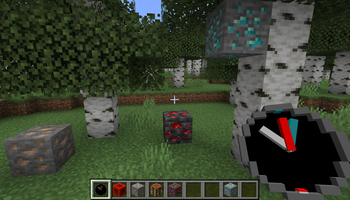
Adds "Resource Scanner" item, that allows to locate resources. This will help players to find rare resources more easily, allowing take a short play sessions, still craft everything that this wonderful game proposes.
WARNING - mod is beta quality, not tested with large number of mods, performance impact not known. Please, follow bug tracker to ask questions and report issues.
Features
- scans resources in range of 16 blocks(spherical scan mode)
- use while in hand, to switch to circular scan mode(doubles scan range, but scans only one block above\below player position
- shows horizontal direction to nearest block, as well as indicates if block is higher or lower relative to player
- same scanner can scan multiple resources simultaneously(max 5 resources)
- limited scan time, scanner need to be charged with respective resource
- one single item charges scanner for 1 minute(diamond, coal, redstone dust, etc.)
- resource block(Block of Iron, Block of Diamond, etc.) charges scanner for 9 minutes
- smaller items(Iron Nugget, etc.) charges scanner for 1/9 minutes
- once charge for specific resource is gone, you can charge scanner with same or another resource
- configurable - default config file will be generated on game start
- does not allow cheating, requires mod to be installed on server side
Crafting
Charging
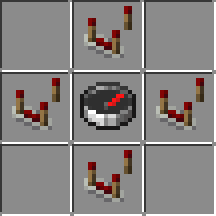
Recipe is shapeless. Charging will eat whole stack of items, so stack of diamonds will charge scanner for 64 minutes of diamond scanning.
Scanner can be charged by ingots, diamonds, emeralds, coal, and respective blocks. See generated configuration file for full list of items to charge.
Available Versions
How to Install Cool Resource Finder on Your Server
Order Server
Order a Minecraft Java server with at least 3 GB RAM (4 GB recommended).
Set fabric Loader
In the panel under "Egg", select the fabric loader and matching Minecraft version (1.21.1).
Install Mod
Open the mod browser in the dashboard and search for "Cool Resource Finder". Click "Install" – done! Alternatively, upload the .jar via SFTP to the /mods folder.
Compatibility
Mod Loaders
Minecraft Versions
1.21.1, 1.21, 1.20.1 (+1 more)
Server-side
✓ RequiredRecommended RAM
4 GB(min. 3 GB)Frequently Asked Questions
Cool Resource Finder server crashes on startup – what to do?
Most common cause: wrong fabric version or insufficient RAM. Check the server log (latest.log) for "OutOfMemoryError" or "Mixin" errors. With Mado Hosting: ensure at least 3 GB RAM is allocated and the loader matches the mod version (1.21.1). You can switch loaders with one click in the panel.
Is Cool Resource Finder compatible with fabric?
Cool Resource Finder officially supports fabric for Minecraft 1.21.1, 1.21, 1.20.1. The Mado dashboard automatically detects incompatible loader combinations.
Server lagging with Cool Resource Finder – how to optimize performance?
Recommended RAM: 4 GB (per 8 players). Use /spark profiler to check if Cool Resource Finder consumes the most tick time. Common fixes: reduce server view-distance to 8-10, install "performant" or "starlight" as supplementary mods on Forge. With Mado Hosting, your server runs on NVMe SSDs with dedicated CPU cores for minimal latency.
Similar Mods




![[TaCZ] Timeless and Classics Zero](https://cdn.modrinth.com/data/SzzJttH8/fd27766d2bb8390d284696b1dbd358f87e081439_96.webp)

Rent Modded Server
Install Cool Resource Finder with just one click on your server.