CoopTweaks
Sync advancements completion, chat relay for Discord and more.
Screenshots
About this Mod
CoopTweaks
Sync advancements, chat relay for Discord and more. Check here for the latest builds.
About
This project is inspired by the CooperativeAdvancements mod, my
goal with this is to add on the coop experience I really enjoyed from CooperativeAdvancements by giving more features in just one package.
Some features in this mod come from my other mod, Fred.
Features
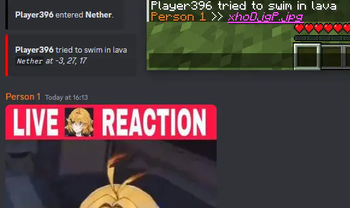
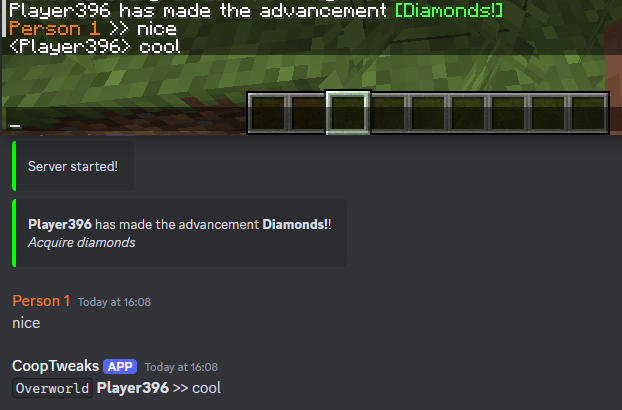
- Bridges a Discord channel to the Minecraft server chat, allowing for chat between the two.
- Send events like advancements, join/leave, death, from the server to Discord.
- Sync advancements completion, all players share the same advancement progress.
- Discord commands to retrieve information about the server.
- Link items in the chat.
TODO
- More options to enable/disable certain parts of the mod.
- Add Discord commands to retrieve general information about the server, TPS, etc.
- Maybe use a small database library for storage as it might be useful for other ideas.
Configuration
Configuration is located in a folder called cooptweaks, contains the following:
saves/: Folder containing the advancements reached by the players, files are named by the world seed.advancements.toml: Configuration for the advancement module.discord.toml: Configuration for Discord related features.
The Discord bot requires the permission to create slash commands and MESSAGE_CONTENT and GUILD_MEMBERS intents.
Client
Keybinds
Left Shift + Left Alt: Links the item being hovered by the player.
Commands
shrug: Shrugs.flip: Flips the table.unflip: Unflips said table.coords: Sends the player's coordinates in a dimension in chat.
Server
Commands
All commands are prefixed with /cooptweaks.
advancements <subcommand>
progress: Shows the advancement progress of the world.
link
Links the item being held by the player in the chat.
Discord Commands
/status: Shows information about the server like motd, uptime, address, etc.
Available Versions
How to Install CoopTweaks on Your Server
Order Server
Order a Minecraft Java server with at least 3 GB RAM (4 GB recommended).
Set fabric Loader
In the panel under "Egg", select the fabric loader and matching Minecraft version (1.21.1).
Install Mod
Open the mod browser in the dashboard and search for "CoopTweaks". Click "Install" – done! Alternatively, upload the .jar via SFTP to the /mods folder.
Compatibility
Mod Loaders
Minecraft Versions
1.21.1
Server-side
✓ RequiredRecommended RAM
4 GB(min. 3 GB)Frequently Asked Questions
CoopTweaks server crashes on startup – what to do?
Most common cause: wrong fabric version or insufficient RAM. Check the server log (latest.log) for "OutOfMemoryError" or "Mixin" errors. With Mado Hosting: ensure at least 3 GB RAM is allocated and the loader matches the mod version (1.21.1). You can switch loaders with one click in the panel.
Is CoopTweaks compatible with fabric and neoforge?
CoopTweaks officially supports fabric, neoforge for Minecraft 1.21.1. The Mado dashboard automatically detects incompatible loader combinations.
Server lagging with CoopTweaks – how to optimize performance?
Recommended RAM: 4 GB (per 8 players). Use /spark profiler to check if CoopTweaks consumes the most tick time. Common fixes: reduce server view-distance to 8-10, install "performant" or "starlight" as supplementary mods on Forge. With Mado Hosting, your server runs on NVMe SSDs with dedicated CPU cores for minimal latency.
Similar Mods






Rent Modded Server
Install CoopTweaks with just one click on your server.