
CoordBook
In-game coordinate notebook, sorted by world.
Screenshots
About this Mod
📖 CoordBook
Advanced, highly-optimized in-game coordinate manager and waypoint tracker.
Developed by Markesr
🔍 What is CoordBook?
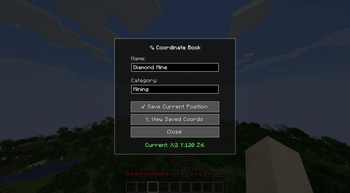
CoordBook is a sleek, modern, and high-performance client-side mod that completely eliminates the need for physical notepads or alt-tabbing to save your Minecraft coordinates. Simply press B to open a beautifully designed, dark-themed UI where you can record, categorize, and manage your important locations. From diamond mines to your secret base, your coordinates are always just a keystroke away.
⚡ Technical Excellence & Performance
- Modern Translucent UI: Goodbye, clunky vanilla book textures! CoordBook features a premium, semi-transparent dark mode interface with clean borders and modern typography.
- Zero-Lag Architecture: Carefully engineered with strict memory management. Pinned coordinates are cached efficiently, completely avoiding Java Garbage Collector stuttering (micro-lags) during rendering.
- Smart World Detection: The mod intelligently groups your coordinates. It natively detects whether you are in a single-player world or a multiplayer server, ensuring your lists are always perfectly organized and separated based on your current location.
🛠️ Advanced Features
- 📌 Dynamic HUD Tracking: Pin any coordinate from your book to have it appear directly on your screen (top right). The HUD dynamically calculates the real-time distance and displays an intelligent compass arrow pointing exactly to your saved location.
- 📋 One-Click Actions:
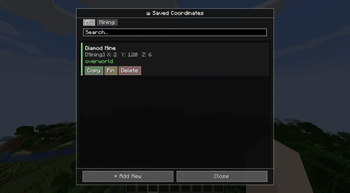
- Copy: Instantly copy formatted coordinates to your clipboard to share in chat.
- TP (Teleport): If you have operator/admin permissions, a single click will instantly teleport you to the saved location.
- Categories: Sort your coordinates by custom tags (e.g., "Mining", "Base", "Spawners") with easy-to-use filter tabs.
- 🌍 Dimension Awareness: Automatically detects and saves the dimension (Overworld, Nether, End) and color-codes them within the UI for quick visual recognition.
📥 Dependencies
To use this mod, please make sure you have the following installed in your mods folder:
- Fabric API
- (Works entirely client-side! You do not need to install this on the server.)
Available Versions
How to Install CoordBook on Your Server
Order Server
Order a Minecraft Java server with at least 3 GB RAM (4 GB recommended).
Set fabric Loader
In the panel under "Egg", select the fabric loader and matching Minecraft version (1.21.11).
Install Mod
Open the mod browser in the dashboard and search for "CoordBook". Click "Install" – done! Alternatively, upload the .jar via SFTP to the /mods folder.
Compatibility
Mod Loaders
Minecraft Versions
1.21.11, 1.21.10, 1.21.9 (+9 more)
Server-side
✗ UnsupportedRecommended RAM
4 GB(min. 3 GB)Frequently Asked Questions
CoordBook server crashes on startup – what to do?
Most common cause: wrong fabric version or insufficient RAM. Check the server log (latest.log) for "OutOfMemoryError" or "Mixin" errors. With Mado Hosting: ensure at least 3 GB RAM is allocated and the loader matches the mod version (1.21.11). You can switch loaders with one click in the panel.
Is CoordBook compatible with fabric?
CoordBook officially supports fabric for Minecraft 1.21.11, 1.21.10, 1.21.9. The Mado dashboard automatically detects incompatible loader combinations.
Server lagging with CoordBook – how to optimize performance?
Recommended RAM: 4 GB (per 8 players). Use /spark profiler to check if CoordBook consumes the most tick time. Common fixes: reduce server view-distance to 8-10, install "performant" or "starlight" as supplementary mods on Forge. With Mado Hosting, your server runs on NVMe SSDs with dedicated CPU cores for minimal latency.
Similar Mods




Rent Modded Server
Install CoordBook with just one click on your server.