
Coords Action Bar
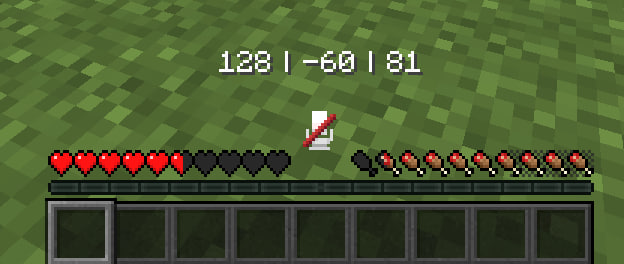
Adds simple coords displayer on your action bar space
Screenshots
About this Mod
📍 Coords Action Bar
Minimalistic player coordinates displayed directly in the Action Bar.
✨ Clean • Simple • No HUD clutter ✨
Requires Fabric API
🧭 What this mod does
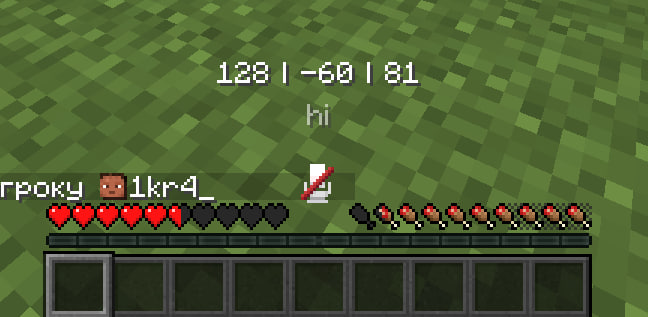
This mod shows your player coordinates at the bottom of the screen in the Action Bar like this:
X | Y | Z
- Coordinates only
- White text
- Updates in real time
- No extra HUD elements
- Perfect for survival, building, and navigation
🔄 Smart Action Bar behavior
If another message appears in the Action Bar (for example from the game or another mod), Coords Action Bar automatically moves its coordinates slightly above so nothing overlaps.
As soon as the other message disappears, the coordinates return to their normal position.
⚙️ In-game settings & localization
The mod includes a settings screen:
- You have to use Mod Menu to open mod settings by pressing Coords Action Bar icon in the mod list
- Most settings are translated into many languages
- Simple and clean configuration
💡 Why use this?
- No need to open F3
- Keeps your screen clean
- Easy to read and note coordinates
- Fits perfectly into a vanilla-style experience
🔁 Feedback
If you found bugs or crashes you always can DM me on my
discord
Available Versions
How to Install Coords Action Bar on Your Server
Order Server
Order a Minecraft Java server with at least 3 GB RAM (4 GB recommended).
Set fabric Loader
In the panel under "Egg", select the fabric loader and matching Minecraft version (26.1.2).
Install Mod
Open the mod browser in the dashboard and search for "Coords Action Bar". Click "Install" – done! Alternatively, upload the .jar via SFTP to the /mods folder.
Compatibility
Mod Loaders
Minecraft Versions
26.1.2, 26.1.1, 26.1 (+24 more)
Server-side
✗ UnsupportedRecommended RAM
4 GB(min. 3 GB)Frequently Asked Questions
Coords Action Bar server crashes on startup – what to do?
Most common cause: wrong fabric version or insufficient RAM. Check the server log (latest.log) for "OutOfMemoryError" or "Mixin" errors. With Mado Hosting: ensure at least 3 GB RAM is allocated and the loader matches the mod version (26.1.2). You can switch loaders with one click in the panel.
Is Coords Action Bar compatible with fabric?
Coords Action Bar officially supports fabric for Minecraft 26.1.2, 26.1.1, 26.1. The Mado dashboard automatically detects incompatible loader combinations.
Server lagging with Coords Action Bar – how to optimize performance?
Recommended RAM: 4 GB (per 8 players). Use /spark profiler to check if Coords Action Bar consumes the most tick time. Common fixes: reduce server view-distance to 8-10, install "performant" or "starlight" as supplementary mods on Forge. With Mado Hosting, your server runs on NVMe SSDs with dedicated CPU cores for minimal latency.
Similar Mods




Rent Modded Server
Install Coords Action Bar with just one click on your server.