Coords HUD
An efficient and customizable action bar HUD for servers!
Screenshots
About this Mod
Coords HUD



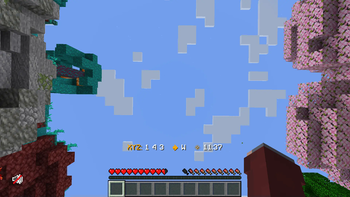
This is a small server-side mod to provide fast and configurable HUD text to players. It's very similar to the "Coordinates HUD" datapack from Vanilla Tweaks!

It aims to provide some small improvements over the datapack:
- Allows custom server or player-specific HUD messages, using the Placeholder API
- Stores data in a config/db file, rather than including it in the world save
- More efficient for large servers, avoiding expensive processing and reducing sent packets
This was primarily built so that Minecraft BINGO players don't need to re-run the /trigger ch_toggle command every time the server restarts with a new world. The customization with placeholders is a nice advantage.
While the performance improvements are good for large servers, the difference should not be noticeable for most players. If you aren't using the extra functionality in this mod, I'd recommend sticking with the datapack for better compatibility.
⌨️ Commands
/coordshudtoggles whether the HUD is enabled/coordshud format <text>changes the text format used for the HUD
📖 Configuration
On the first startup, the mod will create its config files in ./config/coords-hud/... No initial setup is needed to use the mod; it should run out of the box.
"isEnabledByDefault"(default: true) - Whether the HUD is enabled by default for new players."formatDefault"- The default HUD text format, in Raw JSON text format syntax.
Available Versions
How to Install Coords HUD on Your Server
Order Server
Order a Minecraft Java server with at least 3 GB RAM (4 GB recommended).
Set fabric Loader
In the panel under "Egg", select the fabric loader and matching Minecraft version (26.1.2).
Install Mod
Open the mod browser in the dashboard and search for "Coords HUD". Click "Install" – done! Alternatively, upload the .jar via SFTP to the /mods folder.
Compatibility
Mod Loaders
Minecraft Versions
26.1.2, 26.1.1, 26.1 (+15 more)
Server-side
✓ RequiredRecommended RAM
4 GB(min. 3 GB)Frequently Asked Questions
Coords HUD server crashes on startup – what to do?
Most common cause: wrong fabric version or insufficient RAM. Check the server log (latest.log) for "OutOfMemoryError" or "Mixin" errors. With Mado Hosting: ensure at least 3 GB RAM is allocated and the loader matches the mod version (26.1.2). You can switch loaders with one click in the panel.
Is Coords HUD compatible with fabric and quilt?
Coords HUD officially supports fabric, quilt for Minecraft 26.1.2, 26.1.1, 26.1. The Mado dashboard automatically detects incompatible loader combinations.
Server lagging with Coords HUD – how to optimize performance?
Recommended RAM: 4 GB (per 8 players). Use /spark profiler to check if Coords HUD consumes the most tick time. Common fixes: reduce server view-distance to 8-10, install "performant" or "starlight" as supplementary mods on Forge. With Mado Hosting, your server runs on NVMe SSDs with dedicated CPU cores for minimal latency.
Similar Mods




Rent Modded Server
Install Coords HUD with just one click on your server.