
Copper Expansion
This is my Debut mod, it Adds a Little stuff like Copper Tools and Armor and a new Weapon called the ThunderBlade!
Screenshots
About this Mod
Embark on an enriched early-game journey and late game combat in Minecraft with the Copper Expansion mod! This mod introduces essential new features centered around copper, enhancing your gameplay with practical improvements and exciting new items.
Features:
- Copper Tools and Armor: Equip yourself with essential copper tools and armor, ideal for early-game survival and exploration.
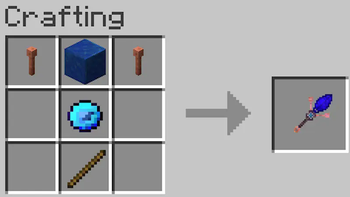
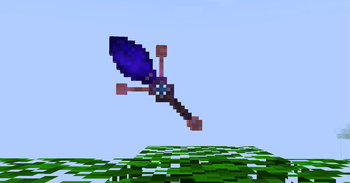
- The ThunderBlade: Unleash the power of storms with the ThunderBlade! This unique weapon summons lightning to strike enemies during thunderstorms, adding a thrilling combat dynamic.
- Enhanced Early-Game Utility: Improve your gameplay experience with accessible copper gear that balances effectiveness and ease of use.
Why Choose Copper Expansion?
- Early-Game Advantages: Equip yourself with reliable copper gear to streamline your early-game progression and survival.
- Unique Gameplay Mechanics: Master the ThunderBlade's ability to harness natural lightning, turning the tide of battle in your favor.
Discover the potential of copper and transform your early-game and late combat experience in Minecraft with the Copper Expansion mod today!
Available Versions
How to Install Copper Expansion on Your Server
Order Server
Order a Minecraft Java server with at least 3 GB RAM (4 GB recommended).
Set forge Loader
In the panel under "Egg", select the forge loader and matching Minecraft version (1.20.1).
Install Mod
Open the mod browser in the dashboard and search for "Copper Expansion". Click "Install" – done! Alternatively, upload the .jar via SFTP to the /mods folder.
Compatibility
Mod Loaders
Minecraft Versions
1.20.1
Server-side
✓ RequiredRecommended RAM
4 GB(min. 3 GB)Frequently Asked Questions
Copper Expansion server crashes on startup – what to do?
Most common cause: wrong forge version or insufficient RAM. Check the server log (latest.log) for "OutOfMemoryError" or "Mixin" errors. With Mado Hosting: ensure at least 3 GB RAM is allocated and the loader matches the mod version (1.20.1). You can switch loaders with one click in the panel.
Is Copper Expansion compatible with forge?
Copper Expansion officially supports forge for Minecraft 1.20.1. The Mado dashboard automatically detects incompatible loader combinations.
Server lagging with Copper Expansion – how to optimize performance?
Recommended RAM: 4 GB (per 8 players). Use /spark profiler to check if Copper Expansion consumes the most tick time. Common fixes: reduce server view-distance to 8-10, install "performant" or "starlight" as supplementary mods on Forge. With Mado Hosting, your server runs on NVMe SSDs with dedicated CPU cores for minimal latency.
Similar Mods



![[TaCZ] Timeless and Classics Zero](https://cdn.modrinth.com/data/SzzJttH8/fd27766d2bb8390d284696b1dbd358f87e081439_96.webp)


Rent Modded Server
Install Copper Expansion with just one click on your server.