
Copper Grate Forge
A small mod that adds a new block called "copper grate forge" that acts as a decoration block! But I also aim to add a functionality, So if someone wants to suggest me how to add functionality and solve bugs, Contact me
Screenshots
About this Mod
Copper Grate Forge
By Codex
Add a touch of rustic glow to your Minecraft world with the Copper Grate Forge!
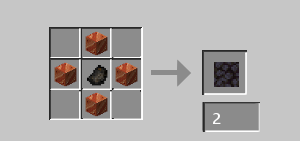
The Copper Grate Forge is your brand new decorative block, perfect for adding an industrial-chic aesthetic to your builds. Crafted with intricate copper details, this block brings a unique visual element to any workshop, mine, or cozy corner you can imagine.
Currently, the Copper Grate Forge serves as a beautiful and functional light source, emitting a warm and inviting glow at light level 10. Illuminate your darkest caverns or simply enhance the ambiance of your favorite builds with its radiant presence.
What's Next? (Future Plans!)
While the Copper Grate Forge is currently a decorative and light-emitting block, it's designed with future expansions in mind! We have exciting plans to introduce new functionalities that will transform this humble block into a valuable tool for your in-game adventures. Stay tuned for updates that will unlock its full potential!
Support & Connect
If you love the Copper Grate Forge, consider leaving a heart or star on Modrinth! Your support helps us immensely.
Available Versions
How to Install Copper Grate Forge on Your Server
Order Server
Order a Minecraft Java server with at least 3 GB RAM (4 GB recommended).
Set neoforge Loader
In the panel under "Egg", select the neoforge loader and matching Minecraft version (1.21.4).
Install Mod
Open the mod browser in the dashboard and search for "Copper Grate Forge". Click "Install" – done! Alternatively, upload the .jar via SFTP to the /mods folder.
Compatibility
Mod Loaders
Minecraft Versions
1.21.4
Server-side
✓ RequiredRecommended RAM
4 GB(min. 3 GB)Frequently Asked Questions
Copper Grate Forge server crashes on startup – what to do?
Most common cause: wrong neoforge version or insufficient RAM. Check the server log (latest.log) for "OutOfMemoryError" or "Mixin" errors. With Mado Hosting: ensure at least 3 GB RAM is allocated and the loader matches the mod version (1.21.4). You can switch loaders with one click in the panel.
Is Copper Grate Forge compatible with neoforge?
Copper Grate Forge officially supports neoforge for Minecraft 1.21.4. The Mado dashboard automatically detects incompatible loader combinations.
Server lagging with Copper Grate Forge – how to optimize performance?
Recommended RAM: 4 GB (per 8 players). Use /spark profiler to check if Copper Grate Forge consumes the most tick time. Common fixes: reduce server view-distance to 8-10, install "performant" or "starlight" as supplementary mods on Forge. With Mado Hosting, your server runs on NVMe SSDs with dedicated CPU cores for minimal latency.
Similar Mods




Rent Modded Server
Install Copper Grate Forge with just one click on your server.